New to Telerik UI for WinForms? Start a free 30-day trial
How to Add Background Image to the Plot Area in ChartView
Updated on Aug 27, 2026
Environment
| Product Version | Product | Author |
|---|---|---|
| 2021.1.122 | RadChartView for WinForms | Desislava Yordanova |
Description
A common requirement is to apply an image as a background for the plot area in RadChartView.
Solution
To render an image at a particular place, e.g. on the plot area, it is possible to override the default drawing of the CartesiaGrid and draw the necessary image instead by utilizing the CartesianRenderer.
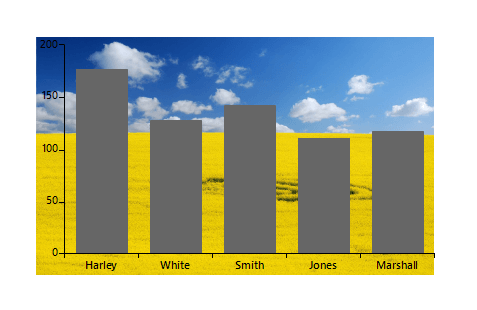
C#
public RadForm1()
{
    InitializeComponent();

    this.radChartView1.CreateRenderer += RadChartView_CreateRenderer;
    Telerik.WinControls.UI.BarSeries barSeries = new Telerik.WinControls.UI.BarSeries("Performance", "RepresentativeName");
    barSeries.DataPoints.Add(new CategoricalDataPoint(177, "Harley"));
    barSeries.DataPoints.Add(new CategoricalDataPoint(128, "White"));
    barSeries.DataPoints.Add(new CategoricalDataPoint(143, "Smith"));
    barSeries.DataPoints.Add(new CategoricalDataPoint(111, "Jones"));
    barSeries.DataPoints.Add(new CategoricalDataPoint(118, "Marshall"));
    this.radChartView1.Series.Add(barSeries);


    var area = this.radChartView1.GetArea<CartesianArea>();
    CartesianGrid grid = area.GetGrid<CartesianGrid>();
    this.radChartView1.ShowGrid = true;
    grid.DrawVerticalFills = true;
    grid.DrawVerticalStripes = true;
    this.radChartView1.Tag = Properties.Resources.nature;
}
private void RadChartView_CreateRenderer(object sender, ChartViewCreateRendererEventArgs e)
{
    e.Renderer = new CustomRenderer(e.Area as CartesianArea);
}

public class CustomCartesianGridDrawPart : CartesianGridDrawPart
{
    public CustomCartesianGridDrawPart(CartesianGrid grid, IChartRenderer renderer) : base(grid, renderer)
    {
    }
    public override void Draw()
    {
        CartesianRenderer renderer = (CartesianRenderer)this.Renderer;
        Graphics graphics = renderer.Graphics;
        RectangleF plotArea = RectangleF.Empty;
        CartesianGrid grid = renderer.Area.Grid as CartesianGrid;

        RadRect rect = grid.Area.AreaModel.LayoutSlot;
        ChartWrapper wrapper = renderer.Area.Owner.Owner as ChartWrapper;
        RadChartView myChart = wrapper.ElementTree.Control as RadChartView;
        Image img = myChart.Tag as Image;
        graphics.DrawImage(img, new Rectangle((int)rect.X, (int)rect.Y, (int)rect.Width, (int)rect.Height));
    }
}

public class CustomRenderer : CartesianRenderer
{
    public CustomRenderer(CartesianArea area) : base(area)
    {
    }

    protected override void InitializeGrid()
    {
        if (this.Area.Grid is CartesianGrid)
            this.DrawParts.Add(new CustomCartesianGridDrawPart(this.Area.Grid as CartesianGrid, this));
    }
}