Custom Nodes
With RadTreeView you can create custom nodes and display them instead of the default ones. This can be done by creating a custom TreeNodeElement, which will replace the default one in the CreateNodeElement event handler. This article demonstrates how this approach can be implemented.
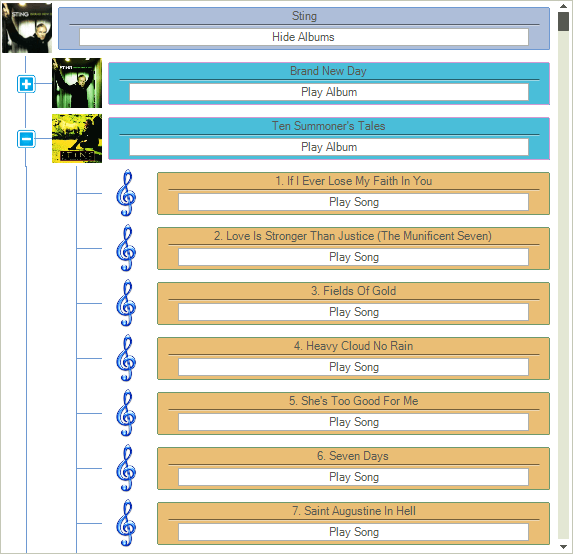
To create this example you can first prepare a project by following the steps in this article
1. First we can create a custom TreeNodeContentElement class which contains the main elements for the custom node. These elements are created and initialized in the CreateChildElements method. Also the Synchronize method is overridden for setting the elements properties in accordance with the corresponding data:
class CustomContentElement : TreeNodeContentElement
{
    StackLayoutElement nodeContentContainer;
    LinePrimitive lineElement;
    LightVisualElement textElement;
    RadButtonElement buttonElement;

    protected override Type ThemeEffectiveType
    {
        get
        {
            return typeof(TreeNodeContentElement);
        }
    }
    protected override void InitializeFields()
    {
        base.InitializeFields();
        this.DrawBorder = true;
        this.NumberOfColors = 2;
        this.GradientStyle = GradientStyles.Linear;
        this.Margin = new Padding(5, 5, 5, 5);
        this.Shape = new RoundRectShape(2);
        this.StretchHorizontally = true;
    }

    public override void Synchronize()
    {
        this.DrawFill = true;

        TreeNodeElement treeNodeElement = this.NodeElement;
        RadTreeNode node = treeNodeElement.Data;
        DataRowView rowView = (DataRowView)node.DataBoundItem;

        if (node.Level == 0)
        {
            this.textElement.Text = "" + rowView["ArtistName"];
            if (node.Expanded == false)
            {
                buttonElement.Text = "Show Albums";
            }
            else
            {
                buttonElement.Text = "Hide Albums";
            }

            this.BorderColor = Color.FromArgb(110, 153, 210);
            this.BackColor = Color.FromArgb(174, 190, 217);
            this.BackColor2 = Color.FromArgb(168, 183, 210);
        }
        else if (node.Level == 1)
        {
            this.textElement.Text = "" + rowView["AlbumName"];
            this.buttonElement.Text = "Play Album";

            this.BorderColor = Color.FromArgb(210, 153, 210);
            this.BackColor = Color.FromArgb(74, 190, 217);
            this.BackColor2 = Color.FromArgb(50, 150, 190);
        }
        else
        {
            this.textElement.Text = "" + rowView["SongName"];
            this.buttonElement.Text = "Play Song";

            this.BorderColor = Color.FromArgb(110, 153, 110);
            this.BackColor = Color.FromArgb(234, 190, 117);
            this.BackColor2 = Color.FromArgb(208, 183, 110);
        }
    }

    protected override void CreateChildElements()
    {
        nodeContentContainer = new StackLayoutElement();
        nodeContentContainer.Orientation = Orientation.Vertical;
        nodeContentContainer.StretchHorizontally = true;
        nodeContentContainer.StretchVertically = false;

        textElement = new LightVisualElement();
        textElement.ShouldHandleMouseInput = false;
        textElement.NotifyParentOnMouseInput = true;
        textElement.StretchVertically = false;
        this.nodeContentContainer.Children.Add(textElement);

        lineElement = new LinePrimitive();
        lineElement.BackColor = Color.Black;
        lineElement.Margin = new Padding(10, 0, 10, 0);
        lineElement.StretchVertically = false;
        this.nodeContentContainer.Children.Add(lineElement);

        buttonElement = new RadButtonElement();
        buttonElement.Margin = new Padding(20, 3, 20, 3);
        buttonElement.Click += buttonElement_Click;
        buttonElement.StretchVertically = false;
        this.nodeContentContainer.Children.Add(buttonElement);

        this.Children.Add(nodeContentContainer);

    }

    void buttonElement_Click(object sender, EventArgs e)
    {
        TreeNodeElement treeNodeElement = this.NodeElement;
        RadTreeNode node = treeNodeElement.Data;
        if (node.Level == 0)
        {
            if (node.Expanded == true)
            {
                node.Collapse();
                buttonElement.Text = "Show Albums";
            }
            else
            {
                node.Expand();
                buttonElement.Text = "Hide Albums";
            }
        }
    }
}
2. Now we can use the already created CustomContentElement and create a custom TreeNodeElement class. Also here the Synchronize method is overridden in order to set the picture of the node:
public class CustomTreeNodeElement : TreeNodeElement
{

    protected override TreeNodeContentElement CreateContentElement()
    {
        return new CustomContentElement();
    }

    public override void Synchronize()
    {
        base.Synchronize();

        RadTreeNode node = this.Data;
        DataRowView rowView = (DataRowView)node.DataBoundItem;
        if (node.Level != 2)
        {
            this.ImageElement.Image = ImageHelper.GetImageFromBytes((byte[])rowView["Image"]).GetThumbnailImage(50, 50, null, IntPtr.Zero);
        }
        else
        {
            this.ImageElement.Image = Resources.the_music_icon.GetThumbnailImage(50, 50, null, IntPtr.Zero);
        }
    }

    protected override Type ThemeEffectiveType
    {
        get
        {
            return typeof(TreeNodeElement);
        }
    }
}
3. Finally, we can add a little bit more customization by setting some of the RadTreeView properties in the form's Load event handler. And also we need to subscribe to the CreateNodeElement event in order to use the newly created custom nodes:
private void CustomNodes_Load(object sender, EventArgs e)
{
    // TODO: This line of code loads data into the 'musicCollectionDataSet.Artists' table. You can move, or remove it, as needed.
    this.artistsTableAdapter.Fill(this.musicCollectionDataSet.Artists);
    // TODO: This line of code loads data into the 'musicCollectionDataSet.Albums' table. You can move, or remove it, as needed.
    this.albumsTableAdapter.Fill(this.musicCollectionDataSet.Albums);
    // TODO: This line of code loads data into the 'musicCollectionDataSet.Songs' table. You can move, or remove it, as needed.
    this.songsTableAdapter.Fill(this.musicCollectionDataSet.Songs);

    this.radTreeView1.DataSource = this.artistsBindingSource;
    this.radTreeView1.DisplayMember = "ArtistName";
    this.radTreeView1.ValueMember = "ArtistID";
    this.radTreeView1.RelationBindings.Add(new RelationBinding(this.albumsBindingSource, "AlbumName", "ArtistID", "ArtistID", "AlbumID"));
    this.radTreeView1.RelationBindings.Add(new RelationBinding(this.songsBindingSource, "SongName", "AlbumID", "AlbumID", "SongID"));

    this.radTreeView1.TreeViewElement.CreateNodeElement += TreeViewElement_CreateNodeElement;
    this.radTreeView1.TreeViewElement.AutoSizeItems = true;
    this.radTreeView1.ShowRootLines = false;
    this.radTreeView1.FullRowSelect = false;
    this.radTreeView1.ShowLines = true;
    this.radTreeView1.LineStyle = TreeLineStyle.Solid;
    this.radTreeView1.LineColor = Color.FromArgb(110, 153, 210);
    this.radTreeView1.TreeIndent = 50;
    radTreeView1.TreeViewElement.CollapseImage = Resources.toggle_expand_basic_blue.GetThumbnailImage(20, 20, null, IntPtr.Zero);
    radTreeView1.TreeViewElement.ExpandImage = Resources.toggle_collapse_basic_blue.GetThumbnailImage(20, 20, null, IntPtr.Zero);
    this.radTreeView1.ExpandAll();
}

void TreeViewElement_CreateNodeElement(object sender, Telerik.WinControls.UI.CreateTreeNodeElementEventArgs e)
{
    e.NodeElement = new CustomTreeNodeElement();
}