Combining RadDragDropService and OLE Drag and Drop
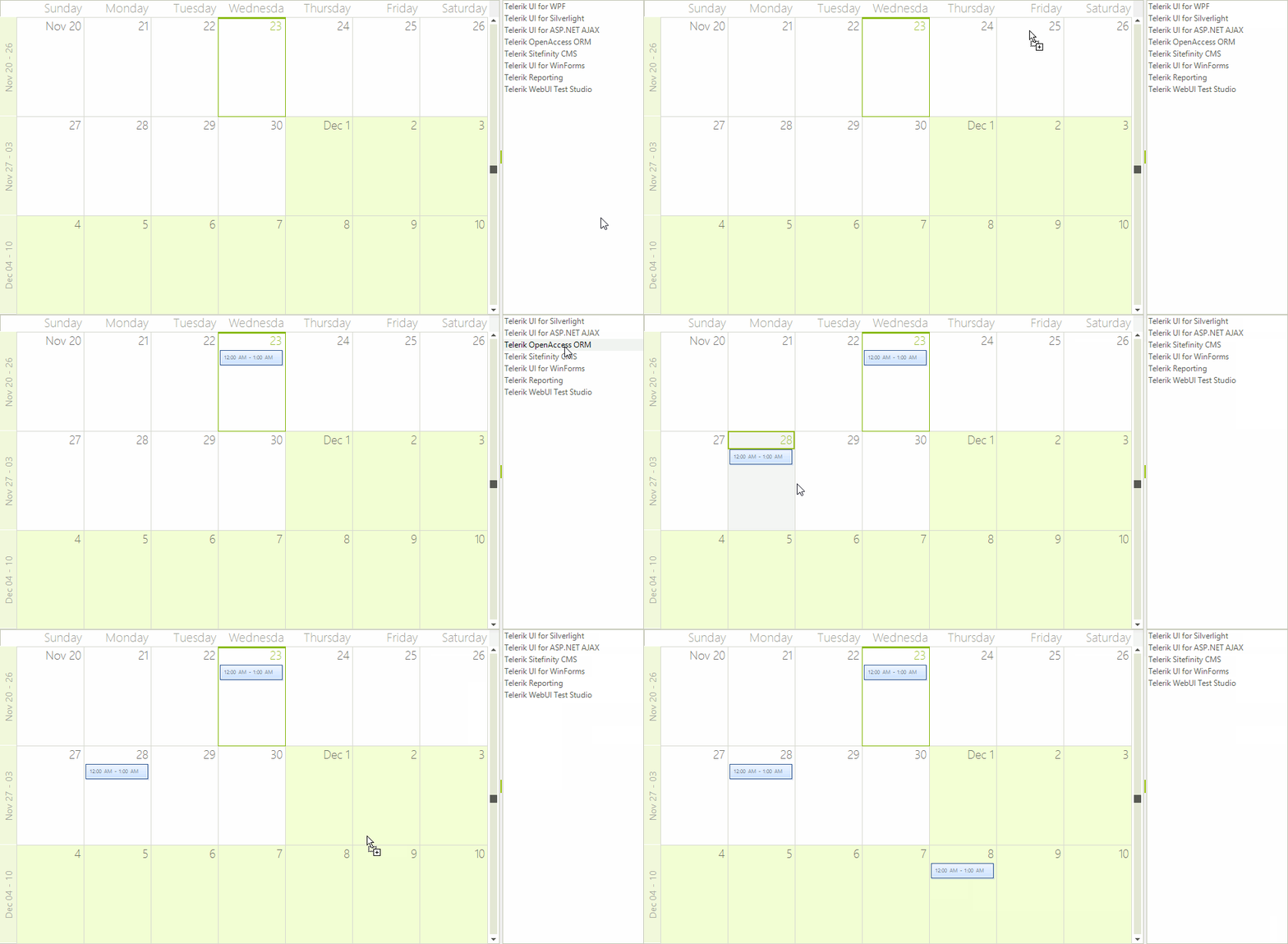
This article demonstrates a sample approach how to achieve drag and drop functionality between RadScheduler and RadListControl. For this purpose, we will use a combination between the RadDragDropService, supported by the RadScheduler control, and the OLE drag-and-drop, which is supported by all controls from the Telerik UI for WinForms suite.
Let’s assume that our RadScheduler is in bound mode and the RadListControl is populated manually with items. Set the AllowDrop property to true for both of the controls.
Drag and Drop from RadScheduler to RadListControl Using RadDragDropService
To implement drag and drop functionality for this scenario, we will use the SchedulerElement.DragDropBehavior, which is a derivative of the RadDragDropService. Subscribe to its PreviewDragOver and PreviewDragDrop events. In the PreviewDragOver event allow dropping over a RadListElement. The PreviewDragDrop event performs the actual inserting of the dragged appointment into the RadListControl.Items collection:
Behavior PreviewDragOver
private void DragDropBehavior_PreviewDragOver(object sender, Telerik.WinControls.RadDragOverEventArgs e)
{
    e.CanDrop = e.HitTarget is RadListElement;
}

private void DragDropBehavior_PreviewDragDrop(object sender, Telerik.WinControls.RadDropEventArgs e)
{
    DragFeedbackElement draggedInstance = e.DragInstance as DragFeedbackElement;
    if (draggedInstance == null)
    {
        return;
    }

    RadListElement listElement = e.HitTarget as RadListElement;
    if (listElement == null)
    {
        return;
    }
    e.Handled = true;
    RadListControl listControl = listElement.ElementTree.Control as RadListControl;
    RadListVisualItem targetItem = listControl.ElementTree.GetElementAtPoint(e.DropLocation) as RadListVisualItem;
    int indexToInsert;
    if (targetItem != null)
    {
        indexToInsert = targetItem.Data.RowIndex;
    }
    else
    {
        indexToInsert = listControl.Items.Count;
    }
    Appointment draggedAppointment = draggedInstance.AssociatedAppointment as Appointment;
    SchedulerUIHelper.DeleteAppointment(draggedAppointment, this.radScheduler1);
    RadListDataItem newItem = new RadListDataItem(draggedAppointment.Summary);
    listControl.Items.Insert(indexToInsert, newItem);

    //save changes to data base
    SaveChanges();
}

public void SaveChanges()
{
    appointmentsResourcesTableAdapter.Adapter.AcceptChangesDuringUpdate = false;
    SchedulerDataDataSet.AppointmentsResourcesDataTable deletedChildRecords =
        this.schedulerDataDataSet.AppointmentsResources.GetChanges(DataRowState.Deleted)
        as SchedulerDataDataSet.AppointmentsResourcesDataTable;
    SchedulerDataDataSet.AppointmentsResourcesDataTable newChildRecords =
        this.schedulerDataDataSet.AppointmentsResources.GetChanges(DataRowState.Added)
        as SchedulerDataDataSet.AppointmentsResourcesDataTable;
    SchedulerDataDataSet.AppointmentsResourcesDataTable modifiedChildRecords =
        this.schedulerDataDataSet.AppointmentsResources.GetChanges(DataRowState.Modified)
        as SchedulerDataDataSet.AppointmentsResourcesDataTable;
    try
    {
        if (deletedChildRecords != null)
        {
            appointmentsResourcesTableAdapter.Update(deletedChildRecords);
        }
        appointmentsTableAdapter.Update(this.schedulerDataDataSet.Appointments);
        if (newChildRecords != null)
        {
            appointmentsResourcesTableAdapter.Update(newChildRecords);
        }
        if (modifiedChildRecords != null)
        {
            appointmentsResourcesTableAdapter.Update(modifiedChildRecords);
        }
        this.schedulerDataDataSet.AcceptChanges();
    }
    catch (Exception ex)
    {
        MessageBox.Show(string.Format("An error occurred during the update process:\n{0}", ex.Message));
    }
    finally
    {
        if (deletedChildRecords != null)
        {
            deletedChildRecords.Dispose();
        }
        if (newChildRecords != null)
        {
            newChildRecords.Dispose();
        }
        if (modifiedChildRecords != null)
        {
            modifiedChildRecords.Dispose();
        }
    }
}
Figure 1: Using RadDragDropService

As we remove the dragged appointment,it is necessary to save the performed changes in the data source.Please refer to Data Binding Walkthrough article.
Drag and Drop from RadListControl to RadScheduler Using the OLE Drag and Drop
- Firstly, we should start the drag and drop operation using the RadListControl.MouseMove event when the left mouse button is pressed. Afterwards, allow dragging over the RadScheduler via the Effect argument of the DragEventArgs in the RadScheduler.DragEnter event handler:
private Point mouseDownPosition;
private bool isDragging;

private void radListControl1_MouseMove(object sender, MouseEventArgs e)
{
    if (e.Button != MouseButtons.Left)
    {
        this.isDragging = false;
        return;
    }

    if (this.isDragging)
        return;

    Point currentPosition = e.Location;
    if ((Math.Abs((currentPosition.X - this.mouseDownPosition.X)) >= SystemInformation.DragSize.Width) ||
        (Math.Abs((currentPosition.Y - this.mouseDownPosition.Y)) >= SystemInformation.DragSize.Height))
    {
        this.isDragging = true;
        DragObject dragObject = new DragObject();
        RadListVisualItem draggedItem = this.radListControl1.ElementTree.GetElementAtPoint(currentPosition) as RadListVisualItem;
        if (draggedItem != null)
        {
            string itemText = draggedItem.Text;

            if (itemText != string.Empty)
            {
                dragObject.Values.Add(AppointmentFields.Summary, itemText);
                dragObject.Status = AppointmentFields.Summary;
                //start the drag and drop operation
                (sender as RadListControl).DoDragDrop(dragObject, DragDropEffects.Copy);
            }
        }
    }
}

private void radScheduler1_DragEnter(object sender, DragEventArgs e)
{
    DragObject dragObject = e.Data.GetData(typeof(DragObject)) as DragObject;
    //allow dragging over the RadScheduler
    e.Effect = dragObject == null ? DragDropEffects.None : DragDropEffects.Copy;
}
2. In the RadScheduler.DragDrop event you need to get the location of the mouse and convert it to a point that the scheduler can use to get the cell element underneath the mouse. This MonthCellElement is passed to a private method GetCellAppointment that we will write next:
private void radScheduler1_DragDrop(object sender, DragEventArgs e)
{
    Point point = this.radScheduler1.PointToClient(new Point(e.X, e.Y));
    SchedulerCellElement schedulerCell = SchedulerUIHelper.GetCellAtPoint(point, this.radScheduler1);

    if (schedulerCell != null)
    {
        DragObject dragObject = e.Data.GetData(typeof(DragObject)) as DragObject;
        if (dragObject != null)
        {
            Appointment appointment = CreateAppointment(schedulerCell.Date, dragObject);
            this.radScheduler1.Appointments.Add(appointment);

            int indexToRemove = this.radListControl1.Items.IndexOf(appointment.Summary);
            if (indexToRemove > -1)
            {
                this.radListControl1.Items.RemoveAt(indexToRemove);
            }
        }
    }

    this.mouseDownPosition = Point.Empty;
    this.isDragging = false;
    //save changes to database
    SaveChanges();
}
3. The helper method CreateAppointment() creates an appointment, starting at the cell where the RadListControl item is dropped. This appointment gets its data from the dragged item.
private Appointment CreateAppointment(DateTime currentDate, DragObject dragObject)
{
    Appointment appointment = new Appointment();
    DateTime startDate = currentDate;
    DateTime endDate = currentDate.AddHours(1);
    switch (dragObject.Status)
    {
        case AppointmentFields.Summary:
            appointment.Summary = dragObject.Values[dragObject.Status] as string;
            break;
        case AppointmentFields.Row:
            appointment.Summary = dragObject.Values[AppointmentFields.Summary] as string;
            appointment.Description = dragObject.Values[AppointmentFields.Description] as string;
            appointment.BackgroundId = (int)dragObject.Values[AppointmentFields.Background];
            appointment.StatusId = (int)dragObject.Values[AppointmentFields.Status];
            appointment.Location = dragObject.Values[AppointmentFields.Location] as string;

            startDate = (DateTime)dragObject.Values[AppointmentFields.Start];
            endDate = (DateTime)dragObject.Values[AppointmentFields.End];

            TimeSpan range = endDate - startDate;
            endDate = currentDate + range;
            startDate = currentDate;

            break;
    }
    appointment.Start = startDate;
    appointment.End = endDate;
    return appointment;
}

private enum AppointmentFields
{
    Row,
    Summary,
    Location,
    Description,
    Start,
    End,
    Background,
    Status
}

private class DragObject
{
    private AppointmentFields status;
    private Dictionary<AppointmentFields, object> values = new Dictionary<AppointmentFields, object>();

    public AppointmentFields Status
    {
        get
        {
            return this.status;
        }
        set
        {
            this.status = value;
        }
    }

    public Dictionary<AppointmentFields, object> Values
    {
        get
        {
            return this.values;
        }
    }
}
Figure 2: OLE Drag and Drop