Type Converters
RadPropertyGrid is commonly used to visualize custom object’s properties and values. A common case is when a certain property is of custom type, or there is no predefined editor for the specific type. In this situation the control will only display the type as a string. This article demonstrates how you can modify the way a property is being displayed and edited by using custom TypeConverters. A Type Converter is used to convert values between data types. Here are the four main methods that are usually used when implementing a custom Type Converter.
-
Override the CanConvertFrom method that specifies which type the converter can convert from.
-
Override the ConvertFrom method that implements the conversion.
-
Override the CanConvertTo method that specifies which type the converter can convert to.
-
Override the ConvertTo method that implements the conversion.
Consider the RadPropertyGrid is populated with a Patient object contacting the following properties:
Bind RadPropertyGrid
public PropertyGridTypeConverters()
{
    InitializeComponent();

    Patient patient = new Patient();
    patient.BloodType = "O-";
    patient.BodyTemperature = new Temperature() { Value = 309.25, Unit = TemperatureUnit.Kelvin };
    patient.FirstName = "First";
    patient.LastName = "Last";
    patient.TotalLungCapacity = 5800d;

    this.radPropertyGrid1.SelectedObject = patient;
}

public class Patient
{
    [Description("This property is here just to make the example more real-life like.")]
    public string FirstName { get; set; }

    [Description("This property is here just to make the example more real-life like.")]
    public string LastName { get; set; }

    public double TotalLungCapacity { get; set; }

    public string BloodType { get; set; }

    public Temperature BodyTemperature { get; set; }
}

public class Temperature
{
    public double Value { get; set; }

    public TemperatureUnit Unit { get; set; }
}

public enum TemperatureUnit
{
    Kelvin,
    Celsius,
    Fahrenheit
}
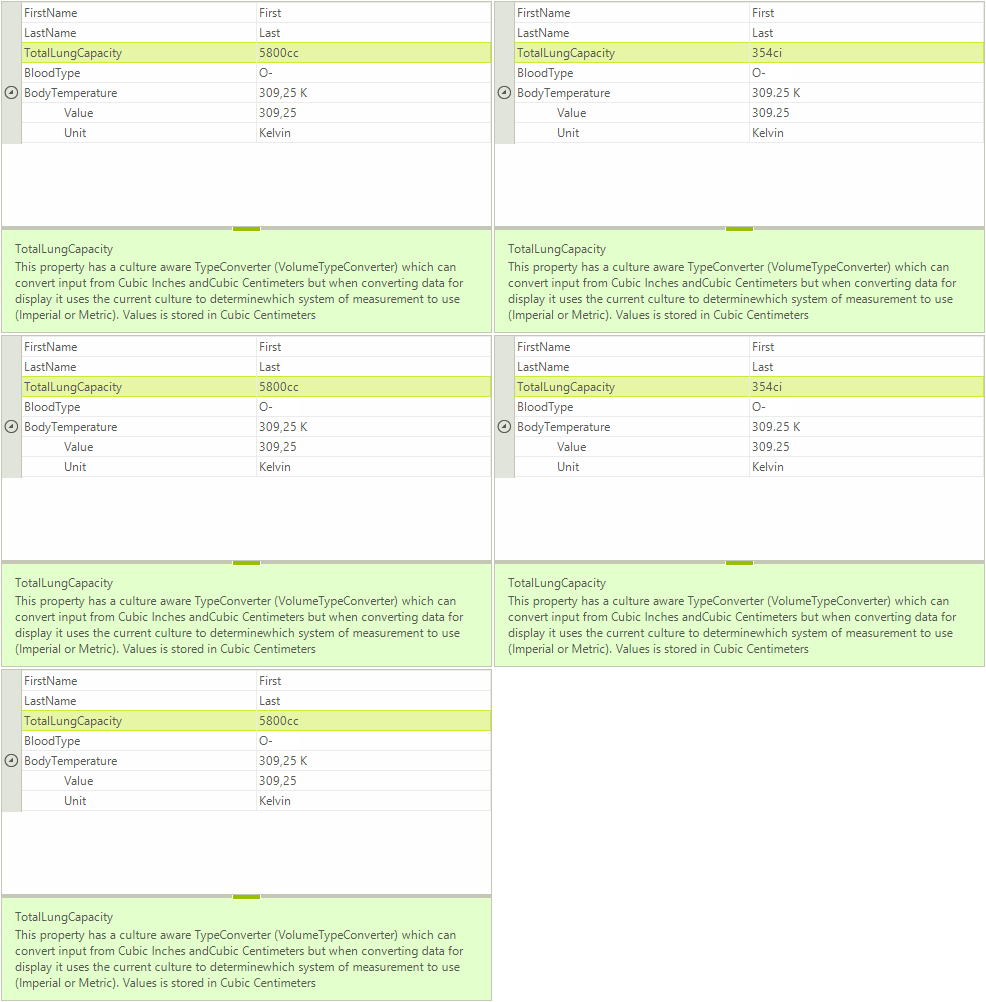
You will notice that the BodyTemperature property displays the property type:
Figure 1: BodyTemperature Property
In order to visualize the BodyTemperature value with a custom formatted string you need to implement a TypeConverter which should convert the Temperature value to the desired string.
Display nested properties with ExpandableObjectConverter
As the BodyTemperature property is of complex type composed of two properties, we will use a custom type converter derived from the ExpandableObjectConverter:
TemperatureTypeConverter
public class TemperatureTypeConverter : ExpandableObjectConverter
{
    public override bool CanConvertFrom(ITypeDescriptorContext context, Type sourceType)
    {
        if (sourceType == typeof(string))
        {
            return true;
        }

        return base.CanConvertFrom(context, sourceType);
    }

    public override bool CanConvertTo(ITypeDescriptorContext context, Type destinationType)
    {
        if (destinationType == typeof(string))
        {
            return true;
        }

        return base.CanConvertTo(context, destinationType);
    }

    public override object ConvertTo(ITypeDescriptorContext context,
        System.Globalization.CultureInfo culture, object value, Type destinationType)
    {
        if (destinationType != typeof(string))
        {
            return base.ConvertTo(context, culture, value, destinationType);
        }

        Temperature temp = value as Temperature;

        if (temp == null)
        {
            return string.Empty;
        }

        return string.Format("{0} {1}", temp.Value, temp.Unit.ToString().Substring(0, 1));
    }

    public override object ConvertFrom(ITypeDescriptorContext context,
        System.Globalization.CultureInfo culture, object value)
    {
        string stringValue = value as string;

        if (stringValue == null)
        {
            return base.ConvertFrom(context, culture, value);
        }

        string number = "";

        for (int i = 0; i < stringValue.Length; i++)
        {
            char c = stringValue[i];

            if (char.IsNumber(c))
            {
                number += stringValue[i];
            }

            if (c == ',' || c == '.')
            {
                number += culture.NumberFormat.NumberDecimalSeparator;
            }
        }

        TemperatureUnit unit = TemperatureUnit.Kelvin;

        if (stringValue.ToUpper().Contains("K"))
        {
            unit = TemperatureUnit.Kelvin;
        }
        else if (stringValue.ToUpper().Contains("F"))
        {
            unit = TemperatureUnit.Fahrenheit;
        }
        else if (stringValue.ToUpper().Contains("C"))
        {
            unit = TemperatureUnit.Celsius;
        }
        else
        {
            PropertyGridItem item = context as PropertyGridItem;

            if (item != null)
            {
                Temperature oldTemp = item.Value as Temperature;

                if (oldTemp != null)
                {
                    unit = oldTemp.Unit;
                }
            }
        }

        return new Temperature() { Value = double.Parse(number), Unit = unit };
    }
}
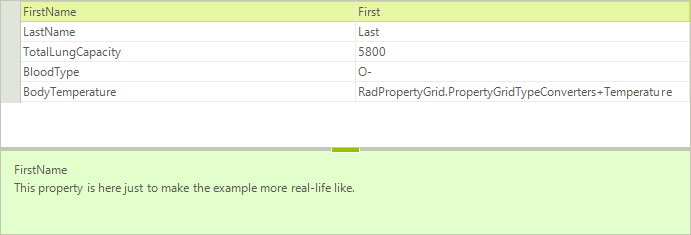
Apply a TypeConverterAttribute that indicates the type of your type converter. The result is illustrated on the screenshot below:
BodyTemperature Property
[Description("This is a property with a TypeConverter (TemperatureTypeConverter) set to the class defining the type of the property." +
             "The converter allows the property to be expanded and individual properties of the class to be edited. " +
             "Additionally the convert allows users to input temperature as string in Kelvin, Celsius and Fahrenheit.")]
[TypeConverter(typeof(TemperatureTypeConverter))]
public Temperature BodyTemperature { get; set; }
Figure 2: RadPropertyGrid TypeConverterAttribute
Display a predefined list of values for a property with TypeConverter
The BloodType property is a string property which allows entering any string, even if it is not a valid blood type. To handle this case we can create a TypeConverter. In it we will override the GetStandardValuesSupported method, which indicates whether the object supports a standard set of values that can be picked from a predefined list. Then we will override the GetStandardValuesExclusive method which indicates whether the collection of standard values is exclusive or the user is allowed to add custom values. Lastly, in the GetStandardValues method we should specify the predefined list. The property grid uses this collection to build a list and provide it to the user for selection.
BloodTypeConverter
public class BloodTypeConverter : TypeConverter
{
    public override bool GetStandardValuesSupported(ITypeDescriptorContext context)
    {
        return true;
    }

    public override bool GetStandardValuesExclusive(ITypeDescriptorContext context)
    {
        return true;
    }

    public override StandardValuesCollection GetStandardValues(ITypeDescriptorContext context)
    {
        return new StandardValuesCollection(new string[] { "O-", "O+", "A-", "A+", "B-", "B+", "AB-", "AB+" });
    }
}
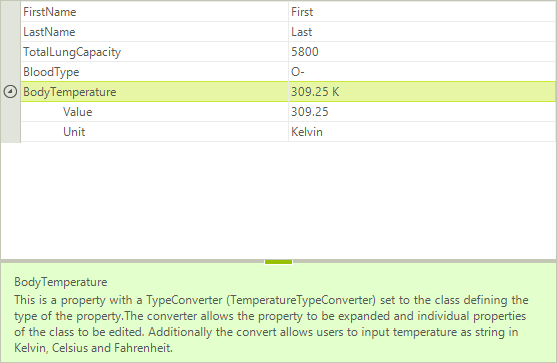
After applying the TypeConverterAttribute, when you try to modify the BloodType property RadPropertyGrid will display a drop down list editor with the predefined set of values:
BloodType Property
[TypeConverter(typeof(BloodTypeConverter)),
Description("This is a string property which has a standard values collection defined in its TypeConverter (BloodTypeConverter)." +
            " The property grid uses this collection to build a list and provide it to the user for selection.")]
public string BloodType { get; set; }
Figure 3: BloodTypeConverter
Culture Aware TypeConverter
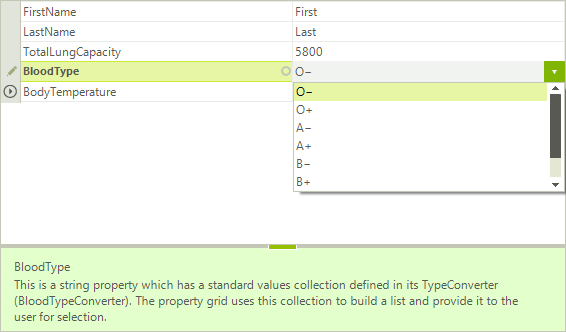
This example demonstrates how to apply a culture aware TypeConverter to the TotalLungCapacity property which can convert input from Cubic Inches and Cubic Centimeters but when converting data for display it uses the current culture to determine which system of measurement to use (Imperial or Metric). The value is stored in Cubic Centimeters.
VolumeTypeConverter
public class VolumeTypeConverter : TypeConverter
{
    private const double CubicInchesToCubicCentimeters = 16.387064d;
    private const double CubicCentimetersToCubicInches = 0.0610237441d;

    public override bool CanConvertFrom(ITypeDescriptorContext context, Type sourceType)
    {
        if (sourceType == typeof(string))
        {
            return true;
        }

        return base.CanConvertFrom(context, sourceType);
    }

    public override bool CanConvertTo(ITypeDescriptorContext context, Type destinationType)
    {
        if (destinationType == typeof(string))
        {
            return true;
        }

        return base.CanConvertTo(context, destinationType);
    }

    public override object ConvertFrom(ITypeDescriptorContext context, CultureInfo culture, object value)
    {
        if (!(value is string))
        {
            return base.ConvertFrom(context, culture, value);
        }

        string val = (string)value;

        string measure = val.Substring(val.Length - 2, 2).ToLower();
        string dispValue = val.Substring(0, val.Length - 2);
        double disp = double.Parse(dispValue);

        if (measure.ToLower() == "cc")
        {
            return disp;
        }
        else
        {
            return disp * CubicInchesToCubicCentimeters;
        }
    }

    public override object ConvertTo(ITypeDescriptorContext context, CultureInfo culture, object value, Type destinationType)
    {
        if (!(destinationType == typeof(string)))
        {
            return base.ConvertTo(context, culture, value, destinationType);
        }

        RegionInfo regionInfo = new RegionInfo(culture.LCID);
        bool metric = regionInfo.IsMetric;

        if (metric)
        {
            return string.Format("{0:F0}cc", value);
        }
        else
        {
            double cubicInches = (double)value * CubicCentimetersToCubicInches;

            return string.Format("{0:F0}ci", cubicInches);
        }
    }
}
Do not forget to apply the TypeConverterAttribute. Additionally, we will specify the editor to be PropertyGridTextBoxEditor.
ApplyVolumeTypeAttribute
[TypeConverter(typeof(VolumeTypeConverter)),
Editor(typeof(PropertyGridTextBoxEditor), typeof(BaseInputEditor)),
Description("This property has a culture aware TypeConverter (VolumeTypeConverter) which can convert input from Cubic Inches and" +
            "Cubic Centimeters but when converting data for display it uses the current culture to determine" +
            "which system of measurement to use (Imperial or Metric). Values is stored in Cubic Centimeters")]
public double TotalLungCapacity { get; set; }
Figure 4: TotalLungCapacity Property