AI Summarization for RadPdfViewer
RadPdfViewer provides a smart summarization feature that allows you to use Large Language Models (LLMs) services to analyze the content of the PDF document. This functionality allows you to summarize document content and ask questions about the document, with the AI providing relevant answers based on the document's content.
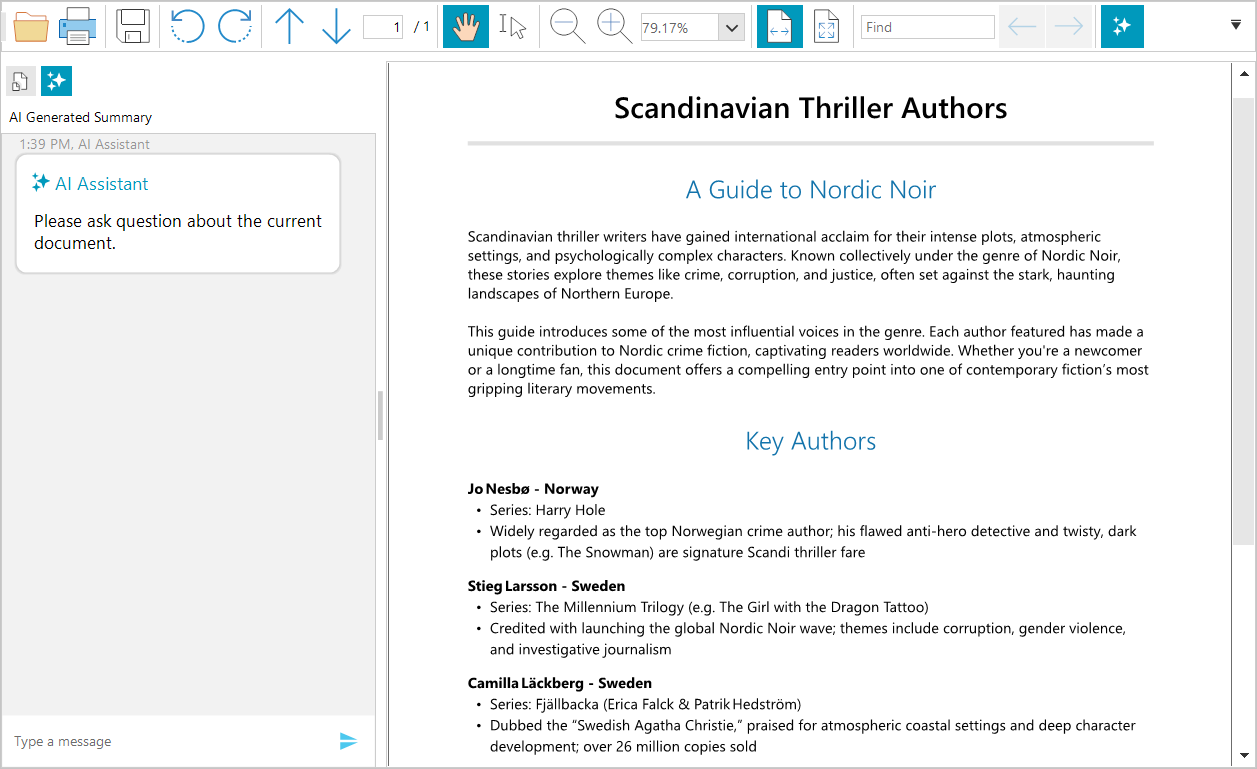
The AI summarization feature is accessible through an integrated chat interface within the RadPdfViewer component. You can connect the RadPdfViewer to supported AI services to enable document analysis and summarization capabilities. The integrated chat interface allows users to enter custom prompts and receive AI-generated responses based on the PDF document content.
Required NuGet Packages
The summarization feature requires the installation of several additional packages beyond those needed for the RadPdfViewer control.
Required Packages
<ItemGroup>
 <PackageReference Include="Azure.AI.OpenAI" Version="2.2.0-beta.2" />
 <PackageReference Include="Microsoft.Extensions.AI.OpenAI" Version="9.3.0-preview.1.25161.3" />
 <PackageReference Include="OllamaSharp" Version="5.4.8" />
 <PackageReference Include="Telerik.UI.for.WinForms.AllControls" Version="2025.4.1111" />
 <PackageReference Include="Telerik.Licensing" Version="1.6.31" />
 <PackageReference Include="Telerik.Windows.Documents.Fixed" Version="2025.4.1104*" />
 <PackageReference Include="Telerik.Windows.Documents.Core" Version="2025.4.1104*" />
 <PackageReference Include="Telerik.Windows.Documents.AIConnector" Version="*2025.4.1104" />
</ItemGroup>
Using Assembly References
The recommended installation approach is to use the Telerik NuGet packages, but in case you cannot do this, the following list shows the required .dll files.
Telerik.Documents.AI.Core.dllTelerik.Documents.AI.RAG.dllTelerik.Windows.Documents.AIConnector.dllTelerik.Windows.Documents.Core.dllTelerik.Windows.Documents.Fixed.dllTelerik.Licensing.Runtime.dllTelerik.WinControls.dllTelerik.WinControlsUI.dllTelerik.Common.dllTelerikData.dll
Showing the AI Summarization UI
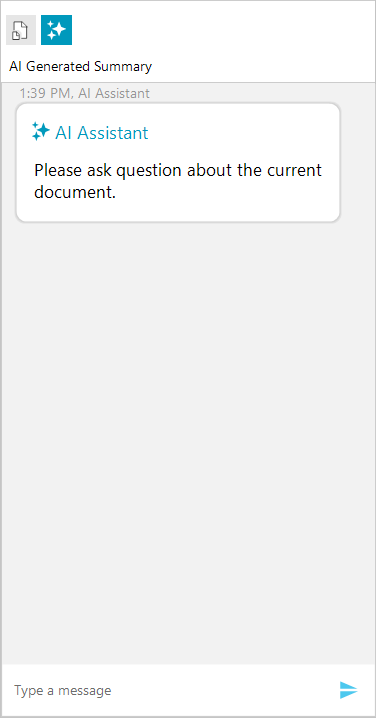
The AI summarization is represented by a RadChat component that allows you to craft prompts and recieve reponses from the corresponding AI service. To enable it, set the EnableAISummary property to true. This will include an extra tab on the left part in the navigation pane in RadPdfViewer. Additionally, the RadPdfViewerNavigator shows a button that can be used to quickly show/hide the AI summarization feature directly from the UI.
this.radPdfViewer1.EnableAISummary = true;
Setting up the AI Provider
To connect the chat to an AI service, one of the built-in providers can be used. This setting is configured through the PdfViewerElement property. All available AI providers implement the ISummaryProvider interface.
The following AI providers are available for integration with RadPdfViewer:
- Azure OpenAI Provider — Integrates with Microsoft Azure's OpenAI services with powerful AI capabilities.
- OpenAI Provider — Connects directly to OpenAI's API services for AI-powered document analysis.
- Ollama AI Provider—Enables the use of local AI models through Ollama.
- Custom Summary Provider — Allows you to implement custom summarization behavior by creating your own provider.
this.radPdfViewer1.PdfViewerElement.SummaryProvider = aiSummaryProvider;
Using Azure OpenAI Provider
To enable the Azure OpenAI services, use the AzureOpenAISummaryProvider class.
// Azure OpenAI Summary Provider example
string key = "your-azure-openai-key";
SecureString secureKey = new SecureString();
foreach (char c in key)
{
    secureKey.AppendChar(c);
}

string endpoint = "https://your-resource-name.openai.azure.com/";
string model = "model-name"; //ex: "gpt-4o-mini"
var azureOpenAIprovider = new Telerik.WinControls.UI.AIProviders.AzureOpenAISummaryProvider(secureKey, endpoint, model);
this.radPdfViewer1.PdfViewerElement.SummaryProvider = azureOpenAIprovider;
Using OpenAI Provider
To enable the OpenAI services, use the OpenAISummaryProvider class.
// Using OpenAI Provider
string key = "your-openai-key";
SecureString secureKey = new SecureString();
foreach (char c in key)
{
    secureKey.AppendChar(c);
}

string model = "model-name"; //ex: "gpt-4o-mini"

var openAIprovider = new Telerik.WinControls.UI.AIProviders.OpenAISummaryProvider(secureKey, model);
this.radPdfViewer1.PdfViewerElement.SummaryProvider = openAIprovider;
Using Ollama AI Provider (Local AI)
To use a local Ollama AI model, utilize the LlamaSummaryProvider class.
//Use Ollama Provider
string endpoint = "localhost server"; //ex: "http://localhost:11434/"
string model = "model-name"; //ex: "llama3"

var ollamaProvider = new Telerik.WinControls.UI.AIProviders.LlamaSummaryProvider(endpoint, model);
this.radPdfViewer1.PdfViewerElement.SummaryProvider = ollamaProvider;
Implementing Custom Summary Provider
In addition to the built-in providers, you can implement custom summarization provider by implementing the ISummaryProvider interface.
Basic example of custom summary provider implementation
public class CustomSummaryProvider : ISummaryProvider
{
    private string promptAddition = string.Empty;
    public string PromptAddition { get => promptAddition; set => promptAddition = value; }

    public string AskQuestion(string question, SimpleTextDocument simpleDocument)
    {
        string documentText = simpleDocument.Text;
        // implement custom logic here
        return "An answer based on the question and the documentText";
    }

    public string GetSummary(SimpleTextDocument simpleDocument)
    {
        string documentText = simpleDocument.Text;
        // implement custom summarizaiton logic here
        return "An answer based on the documentText";
    }
}
Get Summary Programmatically
To retrieve a document summarization programmatically, use the GetSummary method of the corresponding AI provider.
var textDoc = this.radPdfViewer1.Document.ToSimpleTextDocument(null);
var summaryProvider = this.radPdfViewer1.PdfViewerElement.SummaryProvider;
Task.Run(() =>
{
    string summary = summaryProvider.GetSummary(textDoc);

    // this is required only if you want to update the WinForms UI with the result
    Application.Current.Dispatcher.Invoke(() =>
    {
        // update the UI if needed
    });
});
Append Additional Instructions
You can customize the AI behavior by setting the PromptAddition property of the provider. This property allows you to append additional instructions to the prompt, which will be applied during both summarization and question-answering operations. The following example demonstrates how to configure the AI provider to deliver a concise summary translated into Bulgarian.
var summaryProvider = this.radPdfViewer1.PdfViewerElement.SummaryProvider;
summaryProvider.PromptAddition = "Be concise and translate the summary to Bulgarian.";
SummaryResourcesCalculated Event
The summary providers also expose an event called SummaryResourcesCalculated, which is invoked before the actual summarization process begins (after the GetSummary method is called). This event provides information about the estimated resource usage. The SummaryResourcesCalculatedEventArgs exposes the following properties:
EstimatedCallsRequired—Gets the number of API calls required.EstimatedTokensRequired—Gets the number of tokens to be processed.ShouldContinueExecution—A boolean flag indicating whether to proceed with summarization. The default value istrue.
var summaryProvider = this.radPdfViewer1.PdfViewerElement.SummaryProvider;
var baseProvider = summaryProvider as BaseSummaryProvider;
baseProvider.SummaryResourcesCalculated += this.BaseProvider_SummaryResourcesCalculated;

private void BaseProvider_SummaryResourcesCalculated(object sender, Windows.Documents.AIConnector.SummaryResourcesCalculatedEventArgs e)
{
    //cancel the summarization process, if needed
    e.ShouldContinueExecution = false;

}
Adjusting the Max Number of Tokens
The maximum number of tokens allowed can be set using the MaxTokenCount property of the summary provider. The default value is 128000.
var azureOpenAIprovider = new Telerik.WinControls.UI.AIProviders.AzureOpenAISummaryProvider(secureKey, endpoint, model);
azureOpenAIprovider.MaxTokenCount = 1000;