New to Telerik UI for WinForms? Start a free 30-day trial
KML Reader
Updated on Aug 27, 2026
RadMap provides support for stunning map overlays through its KML-import feature. Once you have the desired set of features (place marks, images, polygons, textual descriptions, etc.) encoded in KML, you can easily import the data and visualize it through the RadMap control. In this way you can easily visualize complex shapes like country's borders on the map and fill the separate shapes with different colors in order to achieve a sort of grouping.
Figure 1: KML Reader
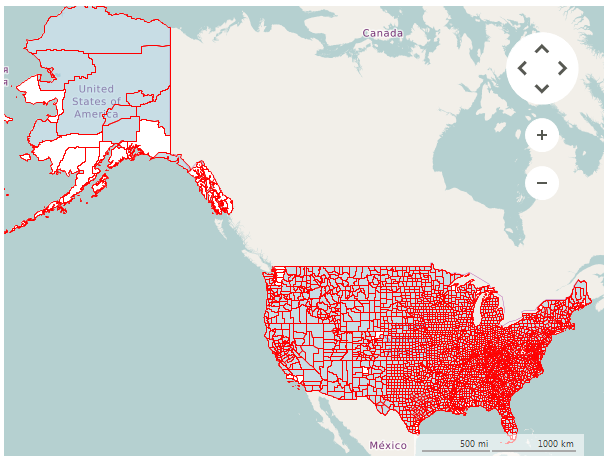
To read your data you have to use a KmlReader.
Using KmlReader
C#
OpenStreetMapProvider osmProvider = new OpenStreetMapProvider();
this.radMap1.MapElement.Providers.Add(osmProvider);
this.radMap1.Layers.Clear();
this.radMap1.Layers.Add(new MapLayer("Capitals"));
using (FileStream seatsStream = new FileStream(@"..\..\Resources\cb_2015_us_county_5m.kml", FileMode.Open, FileAccess.Read))
{
List<MapVisualElement> elements = KmlReader.Read(seatsStream);
foreach (MapVisualElement item in elements)
{
item.BorderWidth = 1;
item.BorderColor = Color.Red;
}
        this.radMap1.Layers["Capitals"].AddRange(elements);
}
Using local images
The KmlReader supports loading images from a local folder. The KmlReader class has two static properties that controls this functionality:
- UseLocalImages: A boolean property which enables the local image loading.
- LocalImagesFolder: The folder that contains all images.