New to Telerik UI for WinForms? Start a free 30-day trial
Properties
Updated over 6 months ago
| Property | Description | Image |
|---|---|---|
| ColorDialogForm | Gets the instance of RadColorDialogForm, which incorporates various settings of the underlaying color selection Form and ColorSelector user control. | |
| Icon | Gets or sets the icon displayed for this dialog. | |
| RadColorDialogForm.ActiveMode | Determines the currently selected tab. Valid enumeration values from Telerik.WinControls.ColorPickerActiveMode are Basic, System, Web,Professional. | |
| RadColorDialogForm.AllowColorPickFromScreen | When true (the default) the "eye dropper" tool is displayed. |  |
| RadColorDialogForm.AllowColorSaving | Toggles the "Add a custom color" button visibility. |  |
| BackColor | The background color of the color selector as a whole. You can also set this color to be Transparent to have it blend in with your other UI elements. | |
| ForeColor | The color for labels and text entry. | |
| SelectedColor | In the figure below the SelectedColor is labeled as "New". | |
| RadColorDialogForm.OldColor | In the figure below the OldColor is labeled as "Current". | 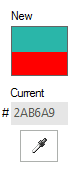 |
| RadColorDialogForm.ShowBasicColors | If true (the default) the corresponding Basic tab is displayed. | |
| RadColorDialogForm.ShowSystemColors | If true (the default) the corresponding System tab is displayed. | |
| RadColorDialogForm.ShowWebColors | If true (the default) the corresponding Web tab is displayed. | |
| RadColorDialogForm.ShowProfessionalColors | If true (the default) the corresponding Professional tab is displayed. | |
| RadColorDialogForm.AllowEditHEXValue | If true (the default) enables hexadecimal entry of color values. | |
| RadColorDialogForm.ShowHEXColorValue | If true (the default) displays the hexadecimal entry of color values. | 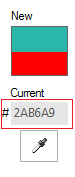 |
| RadColorDialogForm.CustomColors[] | This is a read-only array of Color objects. You can query the contents of the custom colors displayed along the bottom of the selector. |  |
| RadColorDialogForm.RadColorSelector | Gets the color selector | |
| RadColorDialogForm.AddNewColorButtonText | Gets or sets the text of the add new color button. | |
| RadColorDialogForm.BasicTabHeading | Gets or sets the heading of the basic colors tab. | |
| RadColorDialogForm.SystemTabHeading | Gets or sets the heading of the system colors tab. | |
| RadColorDialogForm.WebTabHeading | Gets or sets the heading of the web colors tab. | |
| RadColorDialogForm.ProfessionalTabHeading | Gets or sets the heading of the professional colors tab. | |
| RadColorDialogForm.SelectedColorLabelHeading | Gets or sets the heading of the selected color label. | |
| RadColorDialogForm.OldColorLabelHeading | Gets or sets the heading of the old color label. | |
| RadColorDialogForm.SelectedColor | Gets or sets the new color. | |
| RadColorDialogForm.SelectedHslColor | Gets or sets selected HSL color. | |
| RadColorSelector.SaveCustomColors | Gets or sets a value indicatign whether custom colors should be save upon exiting the color picker. |
You can find below how to enlist all custom colors in RadColorDialog:
Enlist the current custom colors in RadColorDialog
C#
private void radButton1_Click(object sender, EventArgs e)
{
    StringBuilder sb = new StringBuilder();
    foreach (Color color in radColorDialog1.CustomColors)
    {
        sb.Append(color.ToString());
        sb.Append(System.Environment.NewLine);
    }
    MessageBox.Show(sb.ToString());
}
Methods
| Method | Description |
|---|---|
| Reset | Resets the properties of a color dialog box to their default values. Replaces the underlaying ColorDialogForm with new instance. |
Events
| Event | Description |
|---|---|
| RadColorDialogForm.ColorChanged | Fires when the selected color has changed. |
| RadColorSelector.OkButtonClicked | Fires when the OK button is clicked |
| RadColorSelector.CancelButtonClicked | Fires when the Cancel button is clicked |
| RadColorSelector.CustomColorsConfigLocationNeeded | Fires when custom colors configuration is about to be saved or loaded.Can be used to change the default location of the configuration file. |