Using the ContextMenuService
Overview
All context menu related operations are handled by a stand alone service, registered with RadDock - ContextMenuService. Each context menu request is passed to the service, which on its hand creates the appropriate menu items and raises several events, which allows users to modify existing items, add their own or even cancel the request.
Modifying the existing context menus
The following example demonstrates how you can hide the Close options from the DocumentWindow context menu. By default, the menu looks like this:
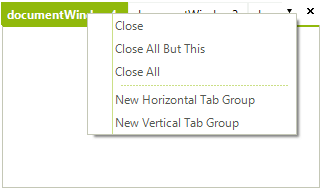
Let's get the ContextMenuService and subscribe to its ContextMenuDisplaying event:
Getting the ContextMenuService
ContextMenuService menuService = this.radDock1.GetService<ContextMenuService>();
menuService.ContextMenuDisplaying += menuService_ContextMenuDisplaying;Then, hide the 'Close' options in the ContextMenuDisplaying event handler:
Hiding the 'close' menu items
private void menuService_ContextMenuDisplaying(object sender, ContextMenuDisplayingEventArgs e)
{
    //the menu request is associated with a valid DockWindow instance, which resides within a DocumentTabStrip
    if (e.MenuType == ContextMenuType.DockWindow &&
        e.DockWindow.DockTabStrip is DocumentTabStrip)
    {
        //remove the "Close" menu items
        for (int i = 0; i < e.MenuItems.Count; i++)
        {
            RadMenuItemBase menuItem = e.MenuItems[i];
            if (menuItem.Name == "CloseWindow" ||
                menuItem.Name == "CloseAllButThis" ||
                menuItem.Name == "CloseAll" ||
                menuItem is RadMenuSeparatorItem)
            {
                // In case you just want to disable to option you can set Enabled false
                //menuItem.Enabled = false;
                menuItem.Visibility = Telerik.WinControls.ElementVisibility.Collapsed;
            }
        }
    }
}The result is shown on the screenshot below:
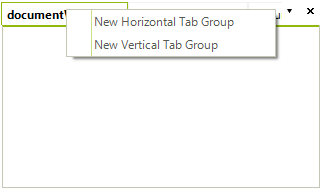
Menu items' names
You can notice in the code snippet above that we are using the Name property of the items instead of the Text property. This allows you to handle the case even when a custom RadDockLocalization provider is applied. The names for the menu items in RadDock are:
| Text | Name |
|---|---|
| Close | CloseWindow |
| Close All But This | CloseAllButThis |
| Close All | CloseAll |
| New Horizontal Tab Group | NewHTabGroup |
| New Vertical Tab Group | NewVTabGroup |
| Floating | Floating |
| Dockable | Docked |
| Tabbed Document | TabbedDocument |
| Auto Hide | AutoHide |
| Hide | Hidden |
| Document Name | ActivateWindow |
See Also
Getting Started Using the CommandManager Understanding RadDock Using the DragDropService Document Manager