Custom labels text
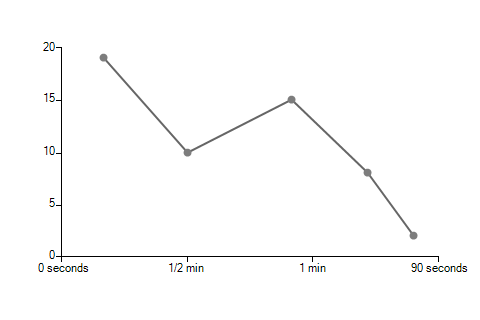
RadChartView allows you to easily change the axes labels text by using a custom format provider class. This class must implement the IFormatProvider and ICustomFormatter interfaces. The key point in this class is that the Format method is called for each label and its "arg" parameter contains the current label text. The returned value will represent the new label.
Example 1: Changing the labels' texts to more human readable ones
Label Format
public class MyFormatProvider : IFormatProvider, ICustomFormatter
{
    public object GetFormat(Type formatType)
    {
        return this;
    }

    public string Format(string format, object arg, IFormatProvider formatProvider)
    {
        string s = arg.ToString();
        switch (s)
        {
            case "0":
                return "0 seconds";
            case "30":
                return "1/2 min";
            case "60":
                return "1 min";
            case "90":
                return "90 seconds";
        }
        return null;
    }
}
Then you can just change the horizontal axis LabelFormatProvider by using the corresponding property.
Assign Format Provider
LinearAxis horizontalAxis = radChartView1.Axes.Get<LinearAxis>(0);
horizontalAxis.LabelFormatProvider = new MyFormatProvider();Figure 1: Format Provider
Example 2: Showing the date part of a label only on day changes
DateTime Format Provider
public class DateTimeFormatProvider : IFormatProvider, ICustomFormatter
{
    public object GetFormat(Type formatType)
    {
        return this;
    }

    public string Format(string format, object arg, IFormatProvider formatProvider)
    {
        DateTime val = (DateTime)arg;

        if (val.Hour == 0)
        {
            return val.ToShortDateString();
        }
        else
        {
            return val.ToString("H\\h");
        }
    }
}
Again you can just change the horizontal axis LabelFormatProvider by using the corresponding property.
Assign DateTime Format Provider
DateTimeContinuousAxis dateTimeAxis = new DateTimeContinuousAxis();
dateTimeAxis.LabelFormatProvider = new DateTimeFormatProvider();Figure 2: DateTime Format Provider
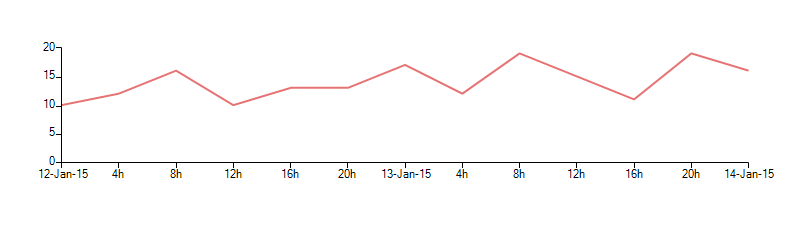
The above provider implementation is applicable only to axes working with DateTime objects ( DateTimeContinuousAxis and DateTimeCategoricalAxis ).