New to Telerik UI for WinForms? Start a free 30-day trial
Modifying the Default Context Menu
Updated on May 7, 2026
The default RadChartView context menu can be customized in the ContextMenuOpening event handler.
New Menu Item
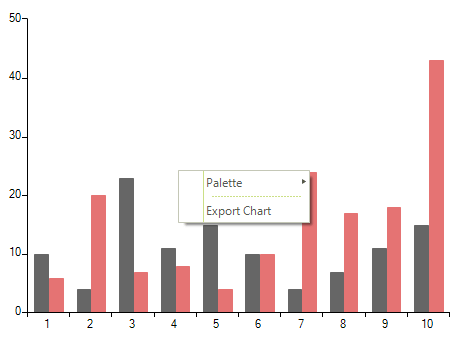
In order to add custom menu items to the default context menu, you should create menu item instances in the ContextMenuOpening event handler and add them to the e.ContextMenu.Items collection. The following example adds an item responsible for exporting the chart to an image.
Figure 1: Modified Context Menu
Subscribe to Event
C#
this.radChartView1.ContextMenuOpening += radChartView1_ContextMenuOpening;Handle Event
C#
private void radChartView1_ContextMenuOpening(object sender, ChartViewContextMenuOpeningEventArgs e)
{
    RadMenuItem customMenuItem = new RadMenuItem();
    customMenuItem.Text = "Export Chart";
    customMenuItem.Click += customMenuItem_Click;

    RadMenuSeparatorItem separator = new RadMenuSeparatorItem();
    e.ContextMenu.Items.Add(separator);
    e.ContextMenu.Items.Add(customMenuItem);
}

private void customMenuItem_Click(object sender, EventArgs e)
{
   string filePath = @"..\..\..\exportedChart.png";
   this.radChartView1.ExportToImage(filePath, this.radChartView1.Size, System.Drawing.Imaging.ImageFormat.Png);
}