or
2 answers
159 views
Hi,
I've got a tabstrip, but when the user is tabbing through their UI elements, there's no visual change on the current tabstrip element that is focused. Is there an API that I haven't flicked the switch for, or just an oversight?
Thanks.
I've got a tabstrip, but when the user is tabbing through their UI elements, there's no visual change on the current tabstrip element that is focused. Is there an API that I haven't flicked the switch for, or just an oversight?
Thanks.
0 answers
106 views
I noticed something that was not documented in the dropdown lists, where they can have local datasources that are JSON and not JavaScript objects/arrays (e.g. I can output from my page a JSON formatted object like [ "key" : "value", "key": "value" ] instead of [ key: "value", key: "value" ]). I wanted to find out if this is the case the grids and other controls and find out the answer to this question:
Is this a feature or a bug, because I've come to rely on it (e.g. I would hate for this not to be supported)? I think of it as a feature, but don't want to count on it if all controls do not work the same as the dropdowns in allowing this in the datasource's data property.
Is this a feature or a bug, because I've come to rely on it (e.g. I would hate for this not to be supported)? I think of it as a feature, but don't want to count on it if all controls do not work the same as the dropdowns in allowing this in the datasource's data property.

jgill
Top achievements
 Rank 1
Rank 1
asked
on
29 Oct 2012
0 answers
190 views
I'm not sure if this is a problem, or a misunderstanding on my part, but there's an unexpected behavior with the aggregate function count on kendo charts while using dates. The issue is notable in this site's demo at :
http://demos.kendoui.com/dataviz/bar-charts/date-axis.html
The problem is that if you choose the base unit as days, the count aggregate function will instead show minimum value instead of counting how many registers for that day are there.
However, if you have at least 2 registers in any given day, the function will count correctly for that particular date.
To further demonstrate this behavior, modify this part of the demo's code:
There are now at least 2 registers for every day except December 30. The count is done correctly for every day except December 30, which shows the value.
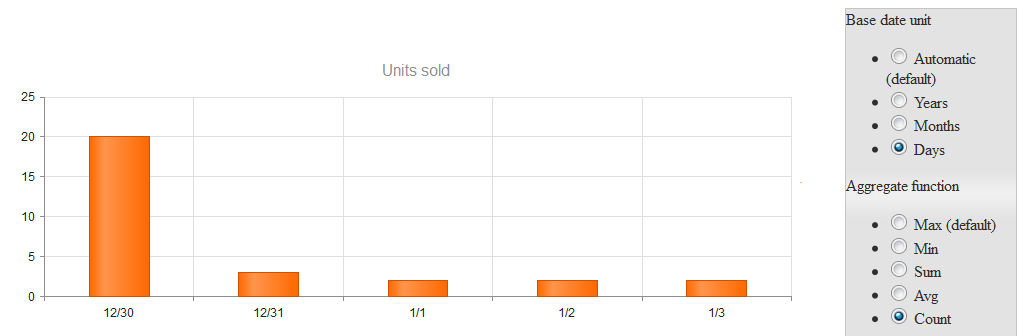
http://demos.kendoui.com/dataviz/bar-charts/date-axis.html
The problem is that if you choose the base unit as days, the count aggregate function will instead show minimum value instead of counting how many registers for that day are there.
However, if you have at least 2 registers in any given day, the function will count correctly for that particular date.
To further demonstrate this behavior, modify this part of the demo's code:
function createChart() { $("#chart").kendoChart({ theme: $(document).data("kendoSkin") || "default", title: { text: "Units sold" }, series: [{ type: "column", data: [20, 40, 45, 30, 50, 10, 20, 30 ,40 , 50], aggregate: "sum" }], categoryAxis: { baseUnit: "months", categories: [ new Date("2011/12/30"), new Date("2011/12/31"), new Date("2012/01/01"), new Date("2012/01/02"), new Date("2012/01/03"), new Date("2011/12/31"), new Date("2011/12/31"), new Date("2012/01/01"), new Date("2012/01/02"), new Date("2012/01/03") ] } }); }There are now at least 2 registers for every day except December 30. The count is done correctly for every day except December 30, which shows the value.
1 answer
186 views
hi,
how can I integrate Google map with multiple locations in my MVC 4 Razor engin project
My requirement is bellow.
if anyone knows please help me..
its urgent ....
thanks in advance.
how can I integrate Google map with multiple locations in my MVC 4 Razor engin project
My requirement is bellow.
- Need to printout multiple location with Icon
- When I click the Icon it open small popup and populate the address
- The address should come from database with json formet
if anyone knows please help me..
its urgent ....
thanks in advance.
Jonathan
Top achievements
Rank 1
Rank 1
answered
on
29 Oct 2012
1 answer
153 views
I am having an issue with a chart in which I am specifying the categories explicitly in a list of DateTimes (using Razor). The script appears to be looping and timing out (in FF and Chrome). Here is a copy of the output script:
Is there something I am doing incorrectly there that I am not seeing?
jQuery("#ComparisonChart").kendoChart({"chartArea":{"background":"transparent"},"theme":"BlueOpal","title":{"visible":false},"legend":{"position":"bottom","visible":true},"series":[{"name":"Series 1","type":"line","data":[363.02948999999984,386.43137096774205,394.77789677419366,391.96260344827596,397.30644838709674,380.5523633333334,401.997464516129,412.83990968253971,387.34019825268825]},{"name":"Series 2","type":"line","data":[123.63480299999999,173.04288387096773,171.53627741935486,159.57903965517241,154.44881935483869,149.10146999999995,157.6923290322581,170.64611530555553,167.9252829301075]},{"name":"Series 3","type":"line","data":[84.8014192,63.289669032258054,81.889754870967735,73.58135620689653,55.59777903225806,122.64908719999997,129.71715732258062,152.43915316269846,74.84976545698926]},{"name":"Series 4","type":"line","data":[139.20569980000002,190.72106548387103,175.20732,154.13307862068965,130.75742225806451,148.7146827666667,156.06423645161286,97.983419814285739,63.053801075268822]}],"seriesDefaults":{"line":{"width":3,"markers":{"visible":false}}},"categoryAxis":{"labels":{"font":"10px arial,serif","visible":true,"step":0},"majorGridLines":{"visible":false},"minorGridLines":{"visible":false},"title":{"text":"Date (11/01/2011 - 07/01/2012)"},"type":"Date","categories":["2011/11/01 00:00:00","2011/12/01 00:00:00","2012/01/01 00:00:00","2012/02/01 00:00:00","2012/03/01 00:00:00","2012/04/01 00:00:00","2012/05/01 00:00:00","2012/06/01 00:00:00","2012/07/01 00:00:00"]},"tooltip":{"visible":true}});Is there something I am doing incorrectly there that I am not seeing?
1 answer
202 views
I've found an issue using the upload control inside IE 10. This is running under full IE10 standards mode, not in compatibility mode.
We're using the unload control to send a CSV file along with a few extra parameters to the server. Chrome and IE9 both have no problem with this but under IE10 we get a 500 back from the server.
The specific difference between the request from Chrome and the request from IE10 is:
Chrome:
POST /api/csv?username=Administrator HTTP/1.1
Accept: */*
Content-Type: multipart/form-data; boundary=----WebKitFormBoundaryQurgi2tW6JVeKs0Q
------WebKitFormBoundaryQurgi2tW6JVeKs0Q
Content-Disposition: form-data; name="csv[]"; filename="Outlook Contacts.CSV"
Content-Type: application/octet-stream
"Title","First Name","Middle Name" ...
IE10:
POST /api/csv?username=Administrator HTTP/1.1
Accept: */*
Content-Type: multipart/form-data; boundary=---------------------------7dc3b02050500
-----------------------------7dc3b02050500
Content-Disposition: form-data; name="csv[]"; filename="C:\Users\User\Desktop\Outlook Contacts.CSV"
Content-Type:
"Title","First Name","Middle Name" ...
Note that the content type is missing from the IE version. Using fiddler I can edit and resend the request with the content type filled in and it works fine. I don't know how this gets set, whether the upload control builds this request or it happens in the depths of IE. Either way it's coming out the other end incorrectly.
We're using the unload control to send a CSV file along with a few extra parameters to the server. Chrome and IE9 both have no problem with this but under IE10 we get a 500 back from the server.
The specific difference between the request from Chrome and the request from IE10 is:
Chrome:
POST /api/csv?username=Administrator HTTP/1.1
Accept: */*
Content-Type: multipart/form-data; boundary=----WebKitFormBoundaryQurgi2tW6JVeKs0Q
------WebKitFormBoundaryQurgi2tW6JVeKs0Q
Content-Disposition: form-data; name="csv[]"; filename="Outlook Contacts.CSV"
Content-Type: application/octet-stream
"Title","First Name","Middle Name" ...
IE10:
POST /api/csv?username=Administrator HTTP/1.1
Accept: */*
Content-Type: multipart/form-data; boundary=---------------------------7dc3b02050500
-----------------------------7dc3b02050500
Content-Disposition: form-data; name="csv[]"; filename="C:\Users\User\Desktop\Outlook Contacts.CSV"
Content-Type:
"Title","First Name","Middle Name" ...
Note that the content type is missing from the IE version. Using fiddler I can edit and resend the request with the content type filled in and it works fine. I don't know how this gets set, whether the upload control builds this request or it happens in the depths of IE. Either way it's coming out the other end incorrectly.
1 answer
160 views
Hi All,
Sorry if the topic is little bit confuse, I am new comer in MVC, and Kendo UI of course, I have some question about Grid of kendo UI which related some part of functional in grid.
the first, How to give functionality about check all with checkbox control in header template and Item template in grid? I already read on example project of Kendo UI but still got confuse about that :), is there any different way get that result?
the second, in web form we can modify in item template of grid which can add / insert some control and manipulate the value on server side code, how to do that functionality in kendo grid? based on example I just get how to modify in row template, is it possible?
the third and the last, Is there possible to give functionality on event double click in row of grid to edit the record? cause I want the grid have ability to selection row with highlight on one click and ability to edit the record inline the row on double click also. is it possible?
thanks, hope my questions not too much and make confusing :)
I am newbie and getting stuck on some code of MVC :)
Rory,
Sorry if the topic is little bit confuse, I am new comer in MVC, and Kendo UI of course, I have some question about Grid of kendo UI which related some part of functional in grid.
the first, How to give functionality about check all with checkbox control in header template and Item template in grid? I already read on example project of Kendo UI but still got confuse about that :), is there any different way get that result?
the second, in web form we can modify in item template of grid which can add / insert some control and manipulate the value on server side code, how to do that functionality in kendo grid? based on example I just get how to modify in row template, is it possible?
the third and the last, Is there possible to give functionality on event double click in row of grid to edit the record? cause I want the grid have ability to selection row with highlight on one click and ability to edit the record inline the row on double click also. is it possible?
thanks, hope my questions not too much and make confusing :)
I am newbie and getting stuck on some code of MVC :)
Rory,
Petur Subev
Telerik team

answered
on
29 Oct 2012
0 answers
224 views
Hi, I'm workinkg on Kendo grid and I'd like to dynamically change grid page size.
There is a problem when I change pageSize property by the function from
There is a problem when I change pageSize property by the function from
There are some options in my grid pager dropdown like: 5, 10, 15, 20, but when i use this function, selected value in that dropdown doesn't change. How can I change it's selected value? I'm always setting value that exists in that dropdown.$("#somegrid").data('kendoGrid').dataSource.pageSize(10);

0 answers
144 views
I have a issue with the kendo datepicker, that is caused by the jquery.validate.*.js. I get a validation error when using DatePicker because it validates that date as if it was en-US (MM/dd/yyyy) and not nb-NO (dd.MM.yyyy) which it should be. So when I write the date of the day above 12 do I get a error that says ".. must be a date". When I remove the included library from Jquery does the datepicker work just fine, but then there's other functionality that doesn't work. Any suggestions on how I can solve this issue would be greatly appriciated.
I'm using .NET 3.5, MVC 4 and the DatePickerFor.
I'm using .NET 3.5, MVC 4 and the DatePickerFor.
Arne
Top achievements
Rank 1
Rank 1
asked
on
29 Oct 2012
3 answers
147 views
Hello,
When browser maximised, and parent-splitter-holder width is set to 100%, on loading the code recalculates it to 1901px when my screen is 1920px - leaving a large white gap on the right-edge of my screen.
If I manually resize the browser window it correctly recalculates and fills the entire width of the browser.
http://i41.tinypic.com/5lz6sz.png
Thanks,
Jared
Chrome 15 and FF + Win 7
When browser maximised, and parent-splitter-holder width is set to 100%, on loading the code recalculates it to 1901px when my screen is 1920px - leaving a large white gap on the right-edge of my screen.
If I manually resize the browser window it correctly recalculates and fills the entire width of the browser.
http://i41.tinypic.com/5lz6sz.png
Thanks,
Jared
Chrome 15 and FF + Win 7
Vitantonio
Top achievements
Rank 1
Rank 1
answered
on
29 Oct 2012





