This question is locked. New answers and comments are not allowed.
Hello out there!
Maybe sbdy can help me. I am stuck. I want to display the cell value in a client edit template for the cell. And, additionally I want
a combobox to select the cell value. Is there any way to achieve this?
I've got a editortemplate for a string cell in a telerik grid. And I want to do s.th. like this in editor template:
<span>
@(Display the current value of CoPref)
<span>
<div>
@(Html.Telerik().ComboBox()
.Name("CoPref")
.BindTo(new SelectList((IEnumerable)ViewData["Countries"], "Code", "DisplayName"))
)
</div>
I tried every Idea I had. But the '@Model' is allways null, so I can't just display it.
Please, Please, Please help!
I am using Ajax Binding.
brgds
Sven Weiberg
Maybe sbdy can help me. I am stuck. I want to display the cell value in a client edit template for the cell. And, additionally I want
a combobox to select the cell value. Is there any way to achieve this?
I've got a editortemplate for a string cell in a telerik grid. And I want to do s.th. like this in editor template:
<span>
@(Display the current value of CoPref)
<span>
<div>
@(Html.Telerik().ComboBox()
.Name("CoPref")
.BindTo(new SelectList((IEnumerable)ViewData["Countries"], "Code", "DisplayName"))
)
</div>
I tried every Idea I had. But the '@Model' is allways null, so I can't just display it.
Please, Please, Please help!
I am using Ajax Binding.
brgds
Sven Weiberg
4 Answers, 1 is accepted
0
Accepted

Hello Sven,
In order for the ComboBox to select the cell value automatically you should name it the same as the model property.
Displaying cell value not in an input field isn't supported out of the box and will require some additional code. Basically, you should add a handler to the Grid's OnEdit client-side event and use the event argument's dataItem property to populate the value in the cell which is available trough the cell property. For example:
All the best,
Daniel
the Telerik team
In order for the ComboBox to select the cell value automatically you should name it the same as the model property.
Displaying cell value not in an input field isn't supported out of the box and will require some additional code. Basically, you should add a handler to the Grid's OnEdit client-side event and use the event argument's dataItem property to populate the value in the cell which is available trough the cell property. For example:
<span id="valuePlaceHolder"><span><div>@(Html.Telerik().ComboBox() .Name("Code") .BindTo(new SelectList((IEnumerable)ViewData["Countries"], "Code", "DisplayName")))</div>function onEdit(e) { if (e.mode == 'edit') { var placeHolder = $(e.cell).find('#valuePlaceHolder'); if (placeHolder.length > 0) { placeHolder.text(e.dataItem.Code); } }}All the best,
Daniel
the Telerik team
If you want to get updates on new releases, tips and tricks and sneak peeks at our product labs directly from the developers working on the Telerik Extensions for ASP.MET MVC, subscribe to their blog feed now.
0

Raed
Top achievements
 Rank 1
Rank 1
answered on 08 Aug 2012, 11:24 AM
i face a problem .., plz help
my model
[NopResourceDisplayName("Plugins.Product.PinCodesManagement.Fields.StatusName")]
[UIHint("PinCodeStatus")]
public string StatusName { get; set; }
my view
<table class="adminContent">
<tr>
<td>
@(Html.Telerik().Grid<ProductPinCodesManagementModel>(Model.PinCodesList.Data)
.Name("settings-grid")
.DataKeys(x =>
{
x.Add(y => y.Id).RouteKey("Id");
})
.Columns(columns =>
{
columns.Bound(x => x.CategoryName).EditorTemplateName("String").Width(300);
//.ClientTemplate(
// Html.DropDownListFor(m => m.CategoryName, Model.AvailableCategories).ToHtmlString()
// );
columns.Bound(x => x.ProductName).EditorTemplateName("String");
columns.Bound(x => x.VariantName).EditorTemplateName("String");
columns.Bound(x => x.PinCode).EditorTemplateName("String");
columns.Bound(x => x.StatusName).EditorTemplateName("String");
//.ClientTemplate(
// Html.DropDownListFor(m => m.StatusName, Model.SearchStatusName).ToHtmlString()
//);
columns.Command(commands =>
{
commands.Edit();
commands.Delete();
}).Width(180);
})
.ToolBar(x => x.Insert())
.Editable(x =>
{
x.Mode(GridEditMode.InLine);
})
.Filterable()
.Pageable(settings => settings.PageSize(gridPageSize).Total(Model.PinCodesList.Total).Position(GridPagerPosition.Both))
.DataBinding(dataBinding =>
{
dataBinding.Ajax().Select("Index", "ProductPinCodesManagement")
.Update("SettingUpdate", "Nop.Plugin.Product.PinCodesManagement.Controllers.ProductPinCodesManagement")
.Delete("SettingDelete", "Nop.Plugin.Product.PinCodesManagement.Controllers.ProductPinCodesManagement")
.Insert("SettingAdd", "Nop.Plugin.Product.PinCodesManagement.Controllers.ProductPinCodesManagement");
})
.ClientEvents(x => x.OnError("grid_onError"))
.ClientEvents(events => events.OnEdit("onEdit"))
.EnableCustomBinding(true))
</td>
</tr>
</table>
<script type="text/javascript">
function onEdit(e) {
$(e.form).find('#PinCodeStatus').data('tDropDownList').select(function (dataItem) {
return dataItem.text == e.dataItem['PinCodeStatus'];
});
}
</script>
and this is the editor
@(Html.Telerik().DropDownList()
.Name("PinCodeStatus")
.BindTo(new SelectList((IEnumerable)ViewData["CustomerNames"], "raed", "1"))
)
can't display the dropdowan list in the grid ??????????????
my model
[NopResourceDisplayName("Plugins.Product.PinCodesManagement.Fields.StatusName")]
[UIHint("PinCodeStatus")]
public string StatusName { get; set; }
my view
<table class="adminContent">
<tr>
<td>
@(Html.Telerik().Grid<ProductPinCodesManagementModel>(Model.PinCodesList.Data)
.Name("settings-grid")
.DataKeys(x =>
{
x.Add(y => y.Id).RouteKey("Id");
})
.Columns(columns =>
{
columns.Bound(x => x.CategoryName).EditorTemplateName("String").Width(300);
//.ClientTemplate(
// Html.DropDownListFor(m => m.CategoryName, Model.AvailableCategories).ToHtmlString()
// );
columns.Bound(x => x.ProductName).EditorTemplateName("String");
columns.Bound(x => x.VariantName).EditorTemplateName("String");
columns.Bound(x => x.PinCode).EditorTemplateName("String");
columns.Bound(x => x.StatusName).EditorTemplateName("String");
//.ClientTemplate(
// Html.DropDownListFor(m => m.StatusName, Model.SearchStatusName).ToHtmlString()
//);
columns.Command(commands =>
{
commands.Edit();
commands.Delete();
}).Width(180);
})
.ToolBar(x => x.Insert())
.Editable(x =>
{
x.Mode(GridEditMode.InLine);
})
.Filterable()
.Pageable(settings => settings.PageSize(gridPageSize).Total(Model.PinCodesList.Total).Position(GridPagerPosition.Both))
.DataBinding(dataBinding =>
{
dataBinding.Ajax().Select("Index", "ProductPinCodesManagement")
.Update("SettingUpdate", "Nop.Plugin.Product.PinCodesManagement.Controllers.ProductPinCodesManagement")
.Delete("SettingDelete", "Nop.Plugin.Product.PinCodesManagement.Controllers.ProductPinCodesManagement")
.Insert("SettingAdd", "Nop.Plugin.Product.PinCodesManagement.Controllers.ProductPinCodesManagement");
})
.ClientEvents(x => x.OnError("grid_onError"))
.ClientEvents(events => events.OnEdit("onEdit"))
.EnableCustomBinding(true))
</td>
</tr>
</table>
<script type="text/javascript">
function onEdit(e) {
$(e.form).find('#PinCodeStatus').data('tDropDownList').select(function (dataItem) {
return dataItem.text == e.dataItem['PinCodeStatus'];
});
}
</script>
and this is the editor
@(Html.Telerik().DropDownList()
.Name("PinCodeStatus")
.BindTo(new SelectList((IEnumerable)ViewData["CustomerNames"], "raed", "1"))
)
can't display the dropdowan list in the grid ??????????????
0
Hello Raed,
Daniel
the Telerik team
I am not sure if I understand correctly the issue but from the code it seems that you have specified the EditorTemplateName for each column to "String". This way, the value from the UIHint attribute will be overriden and the PinCodeStatus template will not be used.
Regards,Daniel
the Telerik team
Check out the successor of Telerik MVC Extensions - Kendo UI for ASP.NET MVC - and deem it for new ASP.NET MVC development.
0
Raed
Top achievements
Rank 1
Rank 1
answered on 15 Aug 2012, 08:30 AM
hello Daniel ,
i need your help plz
the case :
i create a new plugin and i will call this plugin by adding new link called (custom plugin >> pincodes management) as shown in pic

ti add it on the sitemap.config file as shown

it's work , but the problem when i click my plugin link , the other pages not working , for example country page not work i got this error
i think when i click my plugin it's route me using url , then i;m not admin now so i think it's a privilege issue
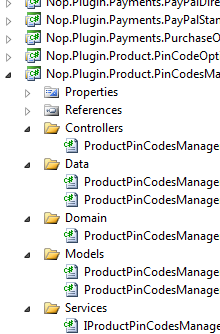
this is my plugin location :
????//
i need your help plz
the case :
i create a new plugin and i will call this plugin by adding new link called (custom plugin >> pincodes management) as shown in pic
ti add it on the sitemap.config file as shown
it's work , but the problem when i click my plugin link , the other pages not working , for example country page not work i got this error
i think when i click my plugin it's route me using url , then i;m not admin now so i think it's a privilege issue
this is my plugin location :
????//