This question is locked. New answers and comments are not allowed.


Greetings,
I have recently run across an issue with the telerik MVC grid using AJAX binding. Essentially, when the grid first populates on the HTTP GET, it renders correctly. See below (please excuse the squished look of the images):
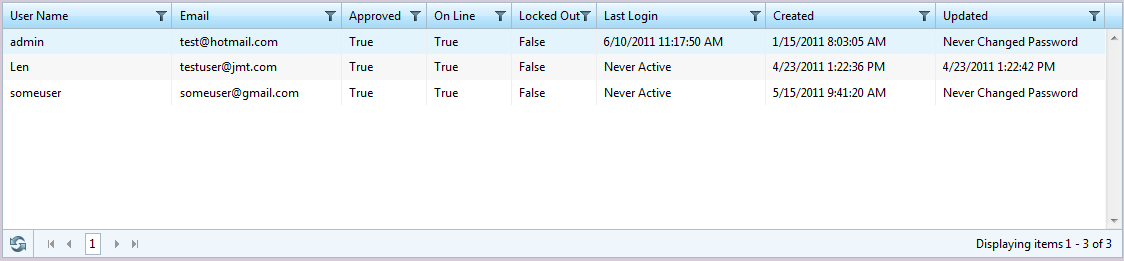
If I then press the refresh button (bound to an AJAX Select function) I get the following results (note the funky date values and lowered case booleans):
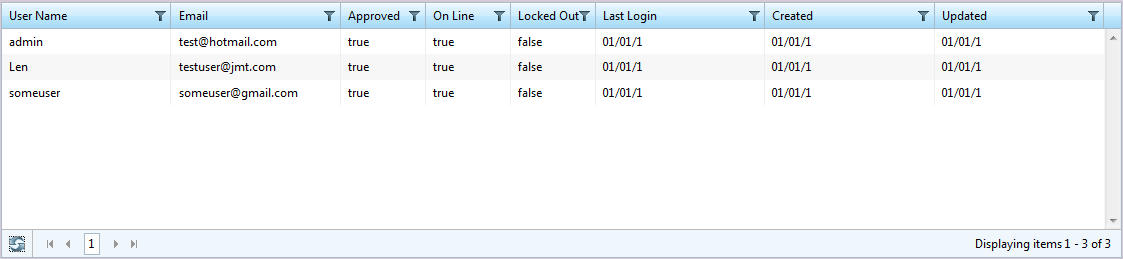
I am using build 2011.1.324 of the telerik controls. I have included the code for the grid as well as my controller actions which are basically identical with the exception of the return values and a few parameters.
Here are my controller actions:
I have recently run across an issue with the telerik MVC grid using AJAX binding. Essentially, when the grid first populates on the HTTP GET, it renders correctly. See below (please excuse the squished look of the images):
If I then press the refresh button (bound to an AJAX Select function) I get the following results (note the funky date values and lowered case booleans):
I am using build 2011.1.324 of the telerik controls. I have included the code for the grid as well as my controller actions which are basically identical with the exception of the return values and a few parameters.
Here are my controller actions:
// GET: /Administration/User/public virtual ActionResult Index(){ var memberSvc = new MembershipService(); var members = from user in memberSvc.GetAllUsers(0, 50) select new MembershipUserModel(user); return View(members);}/// <summary>
/// action method used by Telerik control for paging
/// </summary>/// <param name= "pageIndex">The page you are on</param>/// <param name= "pageSize">The number of records to return</param>/// <returns>the action result</returns>[GridAction]public virtual ActionResult Paging(int? pageIndex, int? pageSize){ var memberSvc = new MembershipService(); var members = from user in memberSvc.GetAllUsers(pageIndex ?? 0, pageSize ?? 50); select new MembershipUserModel(user); return View(new GridModel<MembershipUserModel> { Data = members });}
And my Grid:


@model IEnumerable<MDGov.Dnr.Portal.Models.MembershipUserModel>
@(Html.Telerik().Grid<MDGov.Dnr.Portal.Models.MembershipUserModel>(Model)
    .Name("Grid")
    .Columns(columns =>
    {
        columns.Bound(u => u.UserName);
        columns.Bound(u => u.Email);
        columns.Bound(u => u.IsApproved).Title("Approved").Format("{0}").Width(85);
        columns.Bound(u => u.IsOnline).Title("On Line").Format("{0}").Width(85);
        columns.Bound(u => u.IsLockedOut).Title("Locked Out").Format("{0}").Width(85);
        columns.Bound(u => u.LastLoginDate).Format("{0:MM/dd/yyyy}").Title("Last Login");
        columns.Bound(u => u.CreationDate).Format("{0:MM/dd/yyyy}").Title("Created");
        columns.Bound(u => u.LastPasswordChangedDate).Format("{0:MM/dd/yyyy}").Title("Updated");
    })
    .DataBinding(dataBinding => dataBinding.Ajax()
        .Select("Paging", "Users")
        )
        .Pageable(paging => paging.PageSize(10)
            .Style(GridPagerStyles.NextPreviousAndNumeric)
            .Position(GridPagerPosition.Bottom))
        .Sortable(sorting => sorting.Enabled(true))
        .Scrollable(scrolling => scrolling.Enabled(true))
        .Filterable(filtering => filtering.Enabled(true))
        .Selectable()
        .ClientEvents(events => events.OnRowSelected("onRowSelected"))
        .RowAction(row => { row.Selected = row.DataItem.ProviderUserKey.Equals(ViewData["ProviderUserKey"]); })
)
<script type="text/javascript"><!--
    function onRowSelected(e) {
        var url = "Users/Edit?userName=" + e.row.cells[0].innerHTML;
        window.location.href = url;
    }
--></script>


Any ideas/suggestions?


Thanks,

Jon L