Correctly Rendering Non-Breaking Spaces in PDF from HTML with RadWordsProcessing
Environment
| Version | Product | Author |
|---|---|---|
| 2025.1.205 | RadWordsProcessing | Desislava Yordanova |
Description
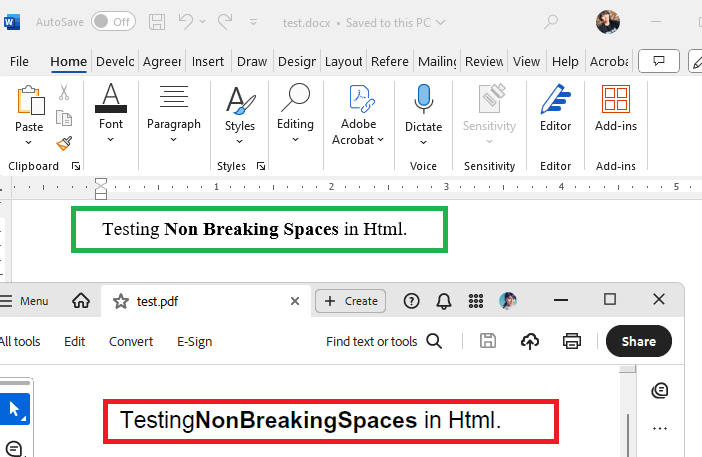
When converting HTML content to PDF format using RadWordsProcessing, non-breaking spaces ( ) within and surrounding HTML tags do not render correctly in the generated PDF document. They appear as expected in the DOCX output. This issue occurs only when exporting to PDF format because the .NET Standard version of RadPdfProcessing lacks a default mechanism for reading font data. Font data is required for accurate space rendering in PDFs.
This article shows how to ensure that non-breaking spaces in HTML render correctly in the exported PDF documents using RadWordsProcessing.
Solution
To resolve the issue of non-breaking spaces not rendering correctly in PDF documents generated from HTML content, implement a custom FontsProvider. This ensures RadPdfProcessing has access to font data for accurately rendering spaces and other font-related features in the PDF output.
-
Implement a Custom FontsProvider
Create a class that extends
FontsProviderBaseand override theGetFontDatamethod to provide the necessary font data. This method returns the font data as a byte array for the specified font properties.csharppublic class FontsProvider : Telerik.Windows.Documents.Extensibility.FontsProviderBase { public override byte[] GetFontData(Telerik.Windows.Documents.Core.Fonts.FontProperties fontProperties) { string fontFileName = fontProperties.FontFamilyName + ".ttf"; string fontFolder = Environment.GetFolderPath(Environment.SpecialFolder.Fonts); //The fonts can differ depending on the file if (fontProperties.FontFamilyName == "Segoe UI") { if (fontProperties.FontStyle == FontStyles.Italic && fontProperties.FontWeight == FontWeights.Bold) { fontFileName = $"segoeuiz.ttf"; } else if (fontProperties.FontStyle == FontStyles.Italic) { fontFileName = $"segoeuii.ttf"; } else if (fontProperties.FontWeight == FontWeights.Normal) { fontFileName = "segoeui.ttf"; } else if (fontProperties.FontWeight == FontWeights.Bold) { fontFileName = $"segoeuib.ttf"; } } else if (fontProperties.FontFamilyName == "Times New Roman") { if (fontProperties.FontStyle == FontStyles.Italic && fontProperties.FontWeight == FontWeights.Bold) { fontFileName = $"timesbi.ttf"; } else if (fontProperties.FontStyle == FontStyles.Italic) { fontFileName = $"timesi.ttf"; } else if (fontProperties.FontWeight == FontWeights.Normal) { fontFileName = "times.ttf"; } else if (fontProperties.FontWeight == FontWeights.Bold) { fontFileName = $"timesbd.ttf"; } } //...add more fonts if needed... DirectoryInfo directory = new DirectoryInfo(fontFolder); FileInfo[] fontFiles = directory.GetFiles(); var fontFile = fontFiles.FirstOrDefault(f => f.Name.Equals(fontFileName, StringComparison.InvariantCultureIgnoreCase)); if (fontFile != null) { var targetPath = fontFile.FullName; using (FileStream fileStream = File.OpenRead(targetPath)) { using (MemoryStream memoryStream = new MemoryStream()) { fileStream.CopyTo(memoryStream); Debug.WriteLine("Found "+ fontFileName); return memoryStream.ToArray(); } } } Debug.WriteLine("NOT Found " + fontFileName); return null; } } -
Set the Custom FontsProvider to the FixedExtensibilityManager
Before generating the PDF document, assign an instance of the custom
FontsProviderto theFontsProviderproperty ofFixedExtensibilityManager.csharpTelerik.Windows.Documents.Extensibility.FontsProviderBase fontsProvider = new FontsProvider(); Telerik.Windows.Documents.Extensibility.FixedExtensibilityManager.FontsProvider = fontsProvider; -
Generate the PDF Document from HTML Content
Use the HtmlFormatProvider to import HTML content and convert it to a RadFlowDocument. Then, use the PdfFormatProvider to export the document to PDF. This ensures non-breaking spaces and other font-related elements render correctly.
csharp// Example method implementation for converting HTML to PDF public static byte[] CreateDocumentFromHtml(string html, bool pdf = false) { // Conversion logic... }
For a detailed guide on implementing a FontsProvider, refer to the How to Implement a FontsProvider article. This implementation ensures that non-breaking spaces and other font-related elements render accurately in PDF documents generated from HTML content using RadWordsProcessing.
You can also manually register the fonts as an alternative option.