New to Telerik Document Processing? Start a free 30-day trial
How to Quote Worksheet Values during CSV Export
Updated on Jun 9, 2026
Environment
| Product Version | Product | Author |
|---|---|---|
| 2024.1.124 | RadSpreadProcessing | Yoan Karamanov |
Description
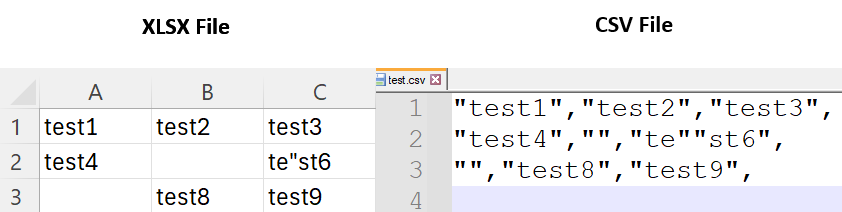
This article shows how to export the values of a worksheet to a CSV file using RadSpreadProcessing. The example specifies the delimiter and surrounds the cell values with quotes.
This approach is slower than using the integrated SpreadProcessing API.
Solution
- Define the delimiter character and quote character for the CSV file.
- Open a stream and create a
StreamWriterto write the CSV file. - Get the range of used cells in the worksheet.
- Iterate over each row and column in the used cell range and export the cell values to the CSV file.
csharp
Workbook workbook;
IWorkbookFormatProvider xlsxFormatProvider = new XlsxFormatProvider();

using (Stream input = new FileStream("input.xlsx", FileMode.Open))
{
    workbook = xlsxFormatProvider.Import(input);
}

Worksheet worksheet = workbook.ActiveWorksheet;

//Manually export to CSV
char delimiter = ',';
string quote = "\"";
string doubleQuotes = $"{quote}{quote}";

using (Stream stream = File.OpenWrite("test.csv"))
using (StreamWriter writer = new StreamWriter(stream))
{
    var usedCellRange = worksheet.GetUsedCellRange(CellPropertyDefinitions.ValueProperty);
    for (int row = usedCellRange.FromIndex.RowIndex; row <= usedCellRange.ToIndex.RowIndex; row++)
    {
        for (int column = usedCellRange.FromIndex.ColumnIndex; column <= usedCellRange.ToIndex.ColumnIndex; column++)
        {
            var cellSelection = worksheet.Cells[row, column];
            var format = cellSelection.GetFormat().Value;
            var value = cellSelection.GetValue().Value.GetResultValueAsString(format);

            var handledQUotes = value.Replace(quote, doubleQuotes);

            writer.Write(quote);
            writer.Write(handledQUotes);
            writer.Write(quote);
            writer.Write(delimiter);
        }

        writer.WriteLine();
    }
}