New to Telerik Document Processing? Start a free 30-day trial
Generating PDF with Headers and Footers from Separate HTML Files
Updated on Jun 5, 2026
Environment
| Version | Product | Author |
|---|---|---|
| 2025.3.806 | RadWordsProcessing | Desislava Yordanova |
Description
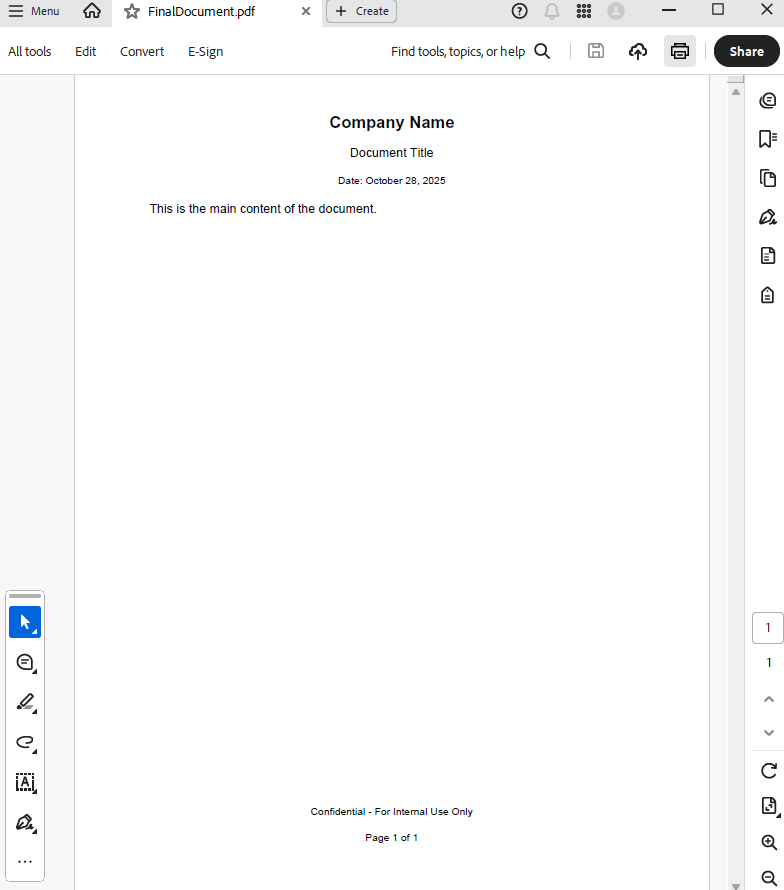
This article shows how to combine separate HTML files for header, footer, and content into one document and produce a PDF with the result.
Solution
To generate a PDF with separate headers and footers, process the HTML files with RadWordsProcessing. Follow these steps:
- Import the HTML content: Use the
HtmlFormatProviderto import the HTML content intoRadFlowDocumentobjects. - Add headers and footers: Use the
DocumentElementImporterto insert header and footer content into the main document. - Export the document to PDF: Use the
PdfFormatProviderto export the final document to PDF format.
Code Example
csharp
        static void Main(string[] args)
        {

            string headerHtml = "\r\n<p style=\"text-align: center; font-size: 16pt; font-weight: bold;\">\r\n    Company Name\r\n</p>\r\n<p style=\"text-align: center; font-size: 12pt;\">\r\n    Document Title\r\n</p>\r\n<p style=\"text-align: center; font-size: 10pt;\">\r\n    Date: October 28, 2025\r\n</p>\r\n";
            string contentHtml = "<p>This is the main content of the document.</p>";
            string footerHtml = "\r\n<p style=\"text-align: center; font-size: 10pt;\">\r\n    Confidential - For Internal Use Only\r\n</p>\r\n<p style=\"text-align: center; font-size: 10pt;\">\r\n    Page 1 of 1\r\n</p>\r\n";

            var htmlProvider = new HtmlFormatProvider();

            // Load each HTML file into a separate document
            RadFlowDocument headerDoc = htmlProvider.Import(headerHtml, TimeSpan.FromSeconds(10));
            RadFlowDocument contentDoc = htmlProvider.Import(contentHtml, TimeSpan.FromSeconds(10));
            RadFlowDocument footerDoc = htmlProvider.Import(footerHtml, TimeSpan.FromSeconds(10));

            // Create importer for header
            var headerImporter = new DocumentElementImporter(contentDoc, headerDoc, ConflictingStylesResolutionMode.UseTargetStyle);
            Header defaultHeader = contentDoc.Sections.First().Headers.Add();

            foreach (var block in headerDoc.Sections.First().Blocks)
            {
                BlockBase importedBlock = headerImporter.Import(block);
                defaultHeader.Blocks.Add(importedBlock);
            }

            // Create importer for footer
            var footerImporter = new DocumentElementImporter(contentDoc, footerDoc, ConflictingStylesResolutionMode.UseTargetStyle);
            Footer defaultFooter = contentDoc.Sections.First().Footers.Add();

            foreach (var block in footerDoc.Sections.First().Blocks)
            {
                BlockBase importedBlock = footerImporter.Import(block);
                defaultFooter.Blocks.Add(importedBlock);
            }

            // Export to PDF
            var pdfProvider = new PdfFormatProvider();
            string outputFilePath = "FinalDocument.pdf";
            using (var outputStream = File.Create(outputFilePath))
            {
                pdfProvider.Export(contentDoc, outputStream, TimeSpan.FromSeconds(10));
            }
            Process.Start(new ProcessStartInfo() { FileName = outputFilePath, UseShellExecute = true });
        }
The following three separate HTML files serve as input:
- Header HTML:
html
<p style="text-align: center; font-size: 16pt; font-weight: bold;">
    Company Name
</p>
<p style="text-align: center; font-size: 12pt;">
    Document Title
</p>
<p style="text-align: center; font-size: 10pt;">
    Date: October 28, 2025
</p>

- Footer HTML:
html
<p style="text-align: center; font-size: 10pt;">
    Confidential - For Internal Use Only
</p>
<p style="text-align: center; font-size: 10pt;">
    Page 1 of 1
</p>

- Content HTML:
html
<p>This is the main content of the document.</p>

The resulting PDF document combines all of the HTML files into one common document: