Resolving Ambiguous references
Environment
| Version | Product | Author |
|---|---|---|
| 2025.1.205 | RadSpreadProcessing | Desislava Yordanova |
Description
When developing a WPF application that uses RadSpreadProcessing to set a font in a spreadsheet (referencing Telerik.Windows.Documents.Core), and the solution includes a cross-platform project referencing Telerik.Documents.Core, an ambiguous reference error may occur.
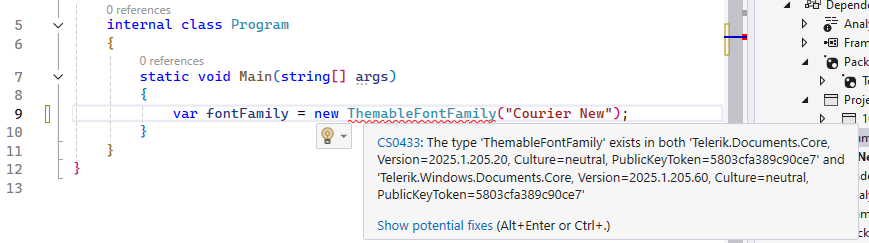
The issue arises due to identical namespaces in both assemblies when both platform-specific projects and cross-platform projects are part of the solution.
This is an example scenario for WPF combined with SpreadProcessing. Such ambiguity can occur regardless of the project type or library, as long as the project is cross-platform and references both the .NET Standard and .NET Framework version of the same DPL assembly.
Solution
The Telerik Document Processing libraries are available in .NET Framework, .NET 8/.NET 9 (or later) for Windows, and .NET Standard compatible versions. All versions are available as NuGet packages. The assemblies and packages for .NET Standard do not contain the word Windows in their name. Learn What Versions of Document Processing Libraries are Distributed with the Telerik Products.
In a WPF project, you need to use the assemblies containing the word Windows and avoid mixing .NET Framework and .NET Standard compatible versions.
However, to resolve the ambiguous reference error in a WPF application that uses RadSpreadProcessing alongside a cross-platform project, use the extern alias directive. This approach allows you to differentiate between assemblies that have the same namespace but target different platforms. Follow the steps below to apply this solution:
-
Assign an alias to the conflicting assembly in the WPF project. Right-click the referenced assembly in the Solution Explorer and select Properties. In the Aliases field, enter a unique alias (for example,
NetFramework).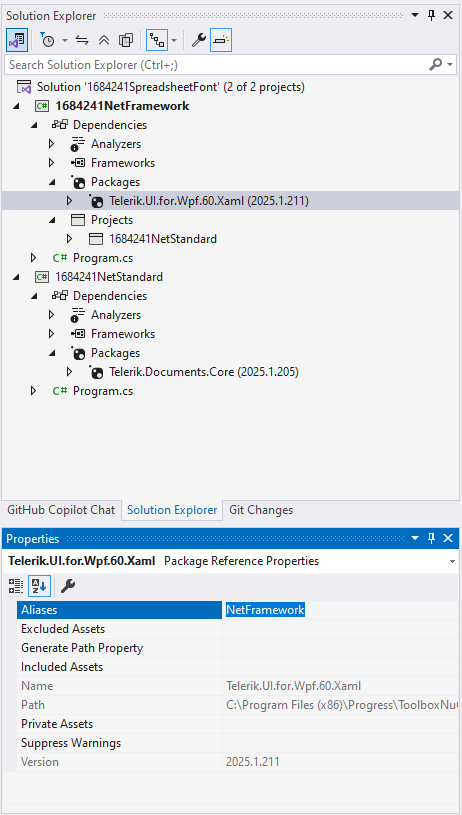
-
Use the
extern aliasdirective in your WPF project code. At the top of your C# file where you are facing the ambiguous reference, declare the alias defined in step 1. This explicitly specifies which assembly to use for the conflicting types.
extern alias NetFramework;
using NetFramework::Telerik.Documents.Common.Model;- Reference the ThemableFontFamily using the alias. After specifying the extern alias, use it to qualify the namespace of the
ThemableFontFamilyclass or any other ambiguous type. This disambiguates the reference and allows your code to compile successfully.
namespace YourNamespace
{
    public class YourClass
    {
        public void YourMethod()
        {
            // Use the ThemableFontFamily from the aliased assembly
            ThemableFontFamily fontFamily = new ThemableFontFamily("Courier New");
        }
    }
}
These steps resolve the ambiguous reference error and allow you to set the spreadsheet font in a WPF application that uses RadSpreadProcessing alongside cross-platform projects.