New to Telerik UI for WinUI? Start a free 30-day trial
Overview
Updated on Mar 26, 2026
RadLegendControl is a stand-alone control that facilitates the reading and understanding of the displayed information in RadChart.
RadLegendControl Visual Structure
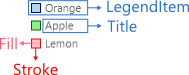
To access the RadLegendControl, add the following namespace: xmlns:telerikPrimitives="using:Telerik.UI.Xaml.Controls.Primitives"
To setup the legend control, you can use the following properties:
LegendProvider—It accepts an element that implements theILegendInfoProviderinterface. The chart controls, likeRadCartesianChart, implements the interface. The legend uses the provider to get its legend items.
Setting the LegendProvider
XAML
<telerikPrimitives:RadLegendControl LegendProvider="{Binding ElementName=chartName}"/>ItemsPanel—The items panel used by the legend to arrange the items.
Setting the ItemsPanel
XAML
<telerikPrimitives:RadLegendControl.ItemsPanel>
	<ItemsPanelTemplate>
		<StackPanel/>
	</ItemsPanelTemplate>
</telerikPrimitives:RadLegendControl.ItemsPanel>ItemTemplate—Sets theDataTemplateused to define the appearance of the legend items.
Setting the ItemTemplate
XAML
<telerikPrimitives:RadLegendControl.ItemTemplate>
	<DataTemplate>
		<StackPanel Orientation="Horizontal">
			<Ellipse Fill="{Binding Fill}" Stroke="{Binding Stroke}" StrokeThickness="1" Width="10" Height="10"/>
			<TextBlock Text="{Binding Title}" Foreground="{Binding Fill}" Margin="10">
			</TextBlock>
		</StackPanel>
	</DataTemplate>
</telerikPrimitives:RadLegendControl.ItemTemplate>LegendItems: A collection ofLegendItemobjects that describes the visuals in the control. It can be used to manually populate the legend with items.
Populating the LegendItems
XAML
<telerikPrimitives:RadLegendControl>
	<telerikPrimitives:RadLegendControl.LegendItems>
		<telerikPrimitives:LegendItem Fill="#1E98E4" Stroke="#1E98E4" Title="Dogs"/>
		<telerikPrimitives:LegendItem Fill="#FFC500" Stroke="#FFC500" Title="Cats"/>
		<telerikPrimitives:LegendItem Fill="#FF2A00" Stroke="#FF2A00" Title="Birds"/>
	</telerikPrimitives:RadLegendControl.LegendItems>
</telerikPrimitives:RadLegendControl>
Populating with LegendItems
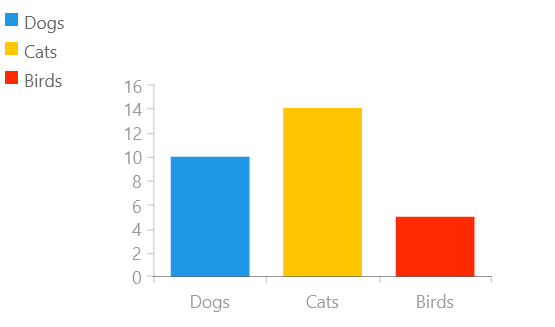
The following example shows how to add a chart and a legend next to it, where the controls are independent from one another.
Defining the model and viewmodel
C#
public class CustomPoint
{
	public double Value { get; set; }

	public string Category { get; set; }
}

public class ViewModel
{
	public ViewModel()
	{
		this.SeriesData = new List<CustomPoint>()
		{
			new CustomPoint { Category = "Dogs", Value = 10 },
			new CustomPoint { Category = "Cats", Value = 14 },
			new CustomPoint { Category = "Birds", Value = 5 },
		};
	}

	public List<CustomPoint> SeriesData { get; set; }
}
Defining the RadCartesianChart and RadLegendControl
XAML
 <Grid xmlns:telerikChart="using:Telerik.UI.Xaml.Controls.Chart"
	   xmlns:telerikPrimitives="using:Telerik.UI.Xaml.Controls.Primitives">
	<telerikChart:RadCartesianChart PaletteName="DefaultLight" Width="300" Height="200">
		<telerikChart:RadCartesianChart.DataContext>
			<local:ViewModel/>
		</telerikChart:RadCartesianChart.DataContext>
		<telerikChart:BarSeries ItemsSource="{Binding SeriesData}" PaletteMode="DataPoint">
			<telerikChart:BarSeries.HorizontalAxis>
				<telerikChart:CategoricalAxis/>
			</telerikChart:BarSeries.HorizontalAxis>
			<telerikChart:BarSeries.VerticalAxis>
				<telerikChart:LinearAxis/>
			</telerikChart:BarSeries.VerticalAxis>
			<telerikChart:BarSeries.CategoryBinding>
				<telerikChart:PropertyNameDataPointBinding PropertyName="Category"/>
			</telerikChart:BarSeries.CategoryBinding>
			<telerikChart:BarSeries.ValueBinding>
				<telerikChart:PropertyNameDataPointBinding PropertyName="Value"/>
			</telerikChart:BarSeries.ValueBinding>
		</telerikChart:BarSeries>
	</telerikChart:RadCartesianChart>

	<telerikPrimitives:RadLegendControl>
		<telerikPrimitives:RadLegendControl.LegendItems>
			<telerikPrimitives:LegendItem Fill="#1E98E4" Stroke="#1E98E4" Title="Dogs"/>
			<telerikPrimitives:LegendItem Fill="#FFC500" Stroke="#FFC500" Title="Cats"/>
			<telerikPrimitives:LegendItem Fill="#FF2A00" Stroke="#FF2A00" Title="Birds"/>
		</telerikPrimitives:RadLegendControl.LegendItems>
	</telerikPrimitives:RadLegendControl>
</Grid>
Unbound RadLegendControl