Parameterize the Location of a WPF Application
Currently Test Studio Dev is rigged that you cannot run a WPF Test unless you provide a definite (non-parameterized) location for the application under testing.
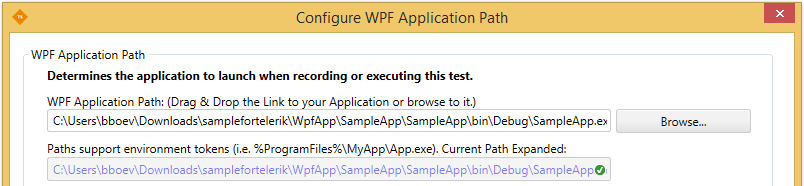
Solution
To work around this limitation, create a mock application to feed to Test Studio Dev. Then change the application under testing in a coded step. This allows you to use a parameterization method of your choosing for the app's location.
1.Create a mock WPF Application. The content of the application is irrelevant. Its location needs to be permanent.
2.Record a WPF Test against your "real" application
3.Now configure the WPF Application Path for your test (see screenshot above) to point to the location of the mock application created in step 1.
4.Add a Coded Step to the test and move it to be the first step. In this coded step, define the logic that will shut down the default (mock) app, then start and connect to the "real" app.
Let's assume that the "real" application is in the following location: C:\myapps\Go.exe. Here's the code:
    //Shut down "mock" app
    ActiveApplication.Quit();

    //Define path for the "real" app. You can parameterize the location (the String argument) in a variety of ways
    var pinfo = new System.Diagnostics.ProcessStartInfo(@"C:\Go.exe");

    // set if any argumets are needed
    pinfo.Arguments = " firstArgument secondArgument";

    pinfo.Verb = "Open";
    pinfo.WorkingDirectory = @"C:\";

    //We launch the "real" app
    WpfApplication app = Manager.LaunchNewApplication(pinfo);

    //Check whether we connected successfully
Assert.IsNotNull(app);You can extend this code to include parameterization for the app's location. You can use data binding, for instance. Let's say your test is bound to a data sheet with a column named "paths":
var pinfo = new System.Diagnostics.ProcessStartInfo(Data["paths"]);