RadGridView Scrolling & Paging
I have a lot of data contained in a RadGridView with scrolling and paging. I need to find a specific element in the grid. To find it, I need to scroll down through the entire GridView and go through every page verifying the data.
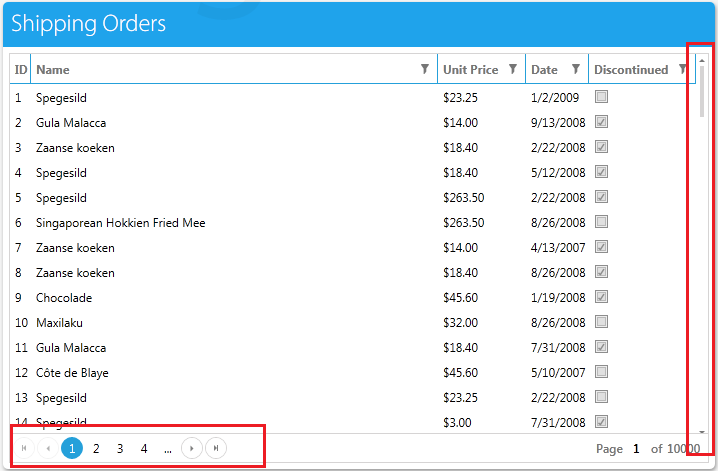
Solution
This is possible with a coded solution. To accomplish the main goal, we need to combine the solutions of the two sub-problems. We need to take the following steps to implement the solution:
1.Change the default Find Strategy of the Grid to WhenNotVisibleReturnNull, otherwise the Find method will return a FindElementException if the element is not found.
2.Scroll down to the bottom of the Grid.
3.Go through the Grid page by page, repeating step two until the desired element is found
The following code demonstrates how to accomplish this on a Telerik demo site.
    public FrameworkElement FindElementByTextContent(string content)
    {
        int extentHeight; // The total height of the grid, visible plus non-visible
        int rowHeight; // The height of the row
        int viewPortHeight; // The height of the visible part of the grid
        int verticalOffset = 0; // Holds the current vertical offset in the viewport

        // Copy the RadGridView into a local variable as a shortcut
        RadGridView grid = Pages.TelerikGridViewFor.SilverlightApp.GridViewRadgridview;

        // Grab the VirtualizingPanel contained in the RadGridView. This is used to control the viewable portion of the grid.
        FrameworkElement VirtualizingPanel = grid.Find.ByType("GridViewVirtualizingPanel");

        // Detect the extent height, view port height and the row height
        extentHeight = (int)VirtualizingPanel.GetProperty(new AutomationProperty("ExtentHeight", typeof(int)));
        rowHeight = (int)grid.GetProperty(new AutomationProperty("RowHeight", typeof(int)));
        viewPortHeight = (int)VirtualizingPanel.GetProperty(new AutomationProperty("ViewportHeight", typeof(int)));

        //Save the original find Find Strategy
        FindStrategy originalStrategy = grid.Find.Strategy;

        //Change the Find Strategy for the RadGridView
        grid.Find.Strategy = FindStrategy.WhenNotVisibleReturnNull;

        // Scroll through each RadGridView page until the element is found or until the "Next Page" is no longer Enabled
        do
        {
            verticalOffset = 0;
            VirtualizingPanel.InvokeMethod("SetVerticalOffset", 0);
            while (verticalOffset < extentHeight)
            {
                    FrameworkElement fe = grid.Find.ByTextContent(content);
                    if(fe != null)
                    {
                        //Return the original strategy
                        grid.Find.Strategy = originalStrategy;

                        //Return the element
                        return fe;
                    }

                    verticalOffset += viewPortHeight;
                    VirtualizingPanel.InvokeMethod("SetVerticalOffset", verticalOffset);

            }
            Pages.TelerikGridViewFor.SilverlightApp.MoveToNextPageButtonRadbutton.User.Click(ArtOfTest.WebAii.Core.MouseClickType.LeftClick);
        }
        while(Pages.TelerikGridViewFor.SilverlightApp.MoveToNextPageButtonRadbutton.IsEnabled);

        //Return the original strategy
        grid.Find.Strategy = originalStrategy;
        return null;
}Place this in the code-behind and then call this method from a coded step.