New to Telerik Test Studio Dev Edition? Start a free 30-day trial
Write into Data Source
I have a data driven test that checks whether a specific condition is met. I'd like to write a message into each corresponding row based on a condition.
Solution
This is possible with a coded solution. Here's an example:
Let's automate checkdomain.com to check whether the domains listed in an Excel file are still available. We'll write Registered or Available into the first column of the Excel file for each domain name.
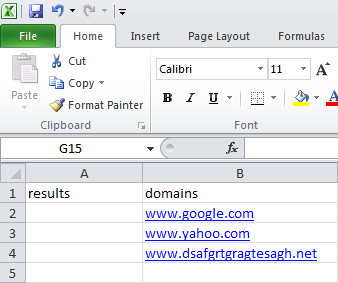 **Before Test Run** | 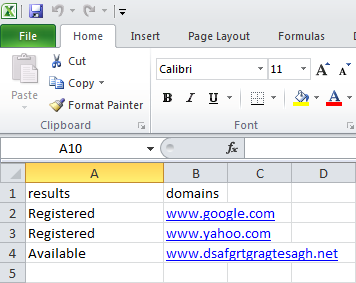 **After Test Run** |
The test needs to navigate to checkdomain.com, enter the domain for the respective iteration and click on Submit. Add a coded step and insert the below code:
C#
    string dataSourcePath = this.ExecutionContext.DeploymentDirectory + @"\Data\domainResults.xlsx";
    string myPath = "C:\\domainResults.xlsx";

    if (!System.IO.File.Exists(myPath))
    {
        System.IO.File.Copy(dataSourcePath, myPath);
    }

    Microsoft.Office.Interop.Excel.Application excelApp = new Microsoft.Office.Interop.Excel.Application();
    Microsoft.Office.Interop.Excel.Workbook workbook = excelApp.Workbooks.Open(myPath);

    System.Threading.Thread.Sleep(1000);
    ActiveBrowser.RefreshDomTree();

    if (ActiveBrowser.ContainsText("already been registered"))
    {
        excelApp.Cells[Data.IterationIndex + 2 , 1] = "Registered";
    }
    if (ActiveBrowser.ContainsText("is still available"))
    {
        excelApp.Cells[Data.IterationIndex + 2 , 1] = "Available";
    }

    excelApp.Visible = true;
    excelApp.ActiveWorkbook.Save();

    workbook.Close(false, Type.Missing, Type.Missing);
    excelApp.Workbooks.Close();
    System.Runtime.InteropServices.Marshal.ReleaseComObject(workbook);

    excelApp.Quit();
    GC.Collect();
System.Runtime.InteropServices.Marshal.ReleaseComObject(excelApp);Note: Add an Assembly Reference to Microsoft.Office.Interop.Excel.