or
0 answers
126 views
According to the Kendo documentation, grids will "expand to fit the width and height of its container and contents" by default. This is what I want. However, some script is automatically generating a style="height:129px" for the .k-widget div, and style="height: 99px;" for the .k-grid-content div. I can't figure out where this 130px height is coming from, I haven't specified it anywhere, and the grid is inside a container that is much larger than 130px high, and the content of the grid is thousands of pixels high..
This is the Javascript I'm using:
Is there a way to manually force a grid to have height:auto or height:100%? (As you can see above, I've tried putting 100% in the Javascript to no avail.)
This is the Javascript I'm using:
$Elem.children(".table").kendoGrid({ dataSource: data, /* height: "100%", (do not specify height) */ scrollable: true, selectable: true, sortable: true, filterable: true, pageable: false, resizable: true, rowTemplate: kendo.template($chanElem.children(".rowTemplate").html())});Is there a way to manually force a grid to have height:auto or height:100%? (As you can see above, I've tried putting 100% in the Javascript to no avail.)

0 answers
128 views
Hi,
I want to stream a users timeline from twitter into a listview. I have tried to do this using the pull to refresh - scroll to load example and querying the username instead of html5. However this doesn't return all the users tweets only tweets up-to a certain date (17/10/2012 - 09/10/2012 no later!). So I changed the datasource to the code below:
This doesn't work and nothing loads! I can't work out what's different from this apart from using 'screen_name' instead of 'q'. The query works if you put it into your browser: "https://api.twitter.com/1/statuses/user_timeline.json?screen_name=USER_ID".
The documentation from Twitter can be found here: https://dev.twitter.com/docs/api/1/get/statuses/user_timeline
What is wrong? Why isn't it working?
Thanks,
Thomas
I want to stream a users timeline from twitter into a listview. I have tried to do this using the pull to refresh - scroll to load example and querying the username instead of html5. However this doesn't return all the users tweets only tweets up-to a certain date (17/10/2012 - 09/10/2012 no later!). So I changed the datasource to the code below:
var dataSource = new kendo.data.DataSource({ serverPaging: true, pageSize: 10, transport: { read: { // the remote service url // JSONP is required for cross-domain AJAX dataType: "jsonp", // additional parameters sent to the remote service data: { screen_name: "USER_ID" } } }, schema: { // describe the result format data: "results" // the data which the data source will be bound to is in the "results" field }});This doesn't work and nothing loads! I can't work out what's different from this apart from using 'screen_name' instead of 'q'. The query works if you put it into your browser: "https://api.twitter.com/1/statuses/user_timeline.json?screen_name=USER_ID".
The documentation from Twitter can be found here: https://dev.twitter.com/docs/api/1/get/statuses/user_timeline
What is wrong? Why isn't it working?
Thanks,
Thomas

Thomas
Top achievements
 Rank 1
Rank 1
asked
on
17 Oct 2012
2 answers
337 views
I'm using the code below for my combobox:
Calling the following code will return the value of the combox except when an item's "Title" starts with an integer such as "2012 resource item title...". In this case executing the code below returns the "Title" property instead of the "ResourceID" property.
$("#ResourcesList").kendoComboBox({ index: 0, placeholder: "Search by title/description", dataTextField: "Title", dataValueField: "ResourceID", filter: "contains", template: '<div style="padding: 10px;"><strong>#= Title #</strong>' + '<div style="margin-top: 5px;" class="t1">#= Description #</div></div>', dataSource: { type: "jsonp", serverFiltering: true, serverPaging: true, pageSize: 20, transport: { read: { url: function (kcb) { var strurl="/mysite/GetResourcesList?filtertext=" + $("#ResourcesList").data().kendoComboBox.text(); return strurl; } } } } });Calling the following code will return the value of the combox except when an item's "Title" starts with an integer such as "2012 resource item title...". In this case executing the code below returns the "Title" property instead of the "ResourceID" property.
alert($("#ResourcesList").data("kendoComboBox").value())10 answers
469 views
When I use popup editing, the dialog window created for the editing is appended to the DOM. If I do several rename/delete/add actions there are several k-window divs still attached to the DOM. It's unlikely to cause a problem, but I find it unexpected.
Atanas Korchev
Telerik team

answered
on
17 Oct 2012
0 answers
180 views
Hi,
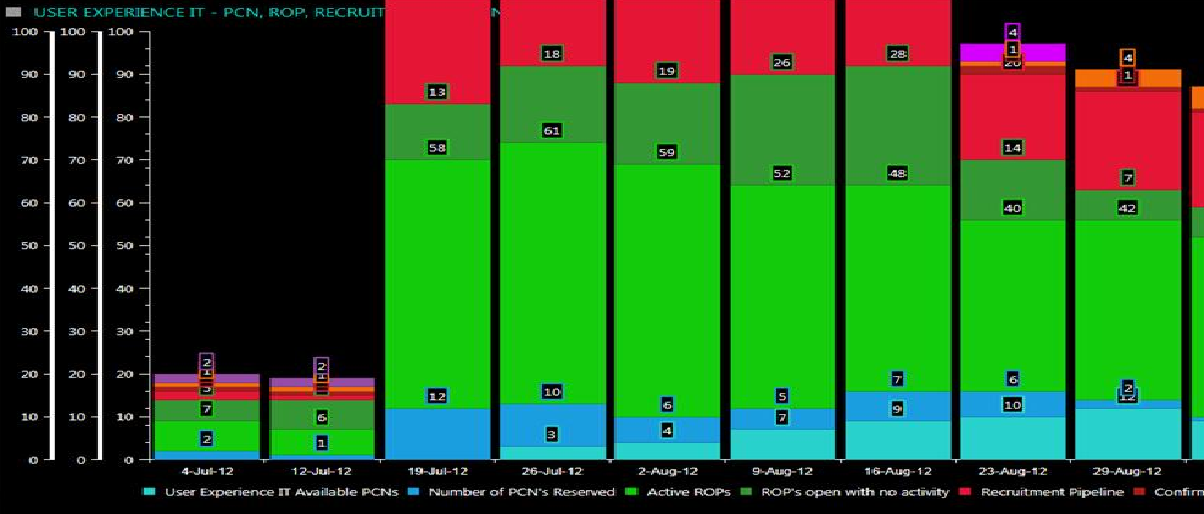
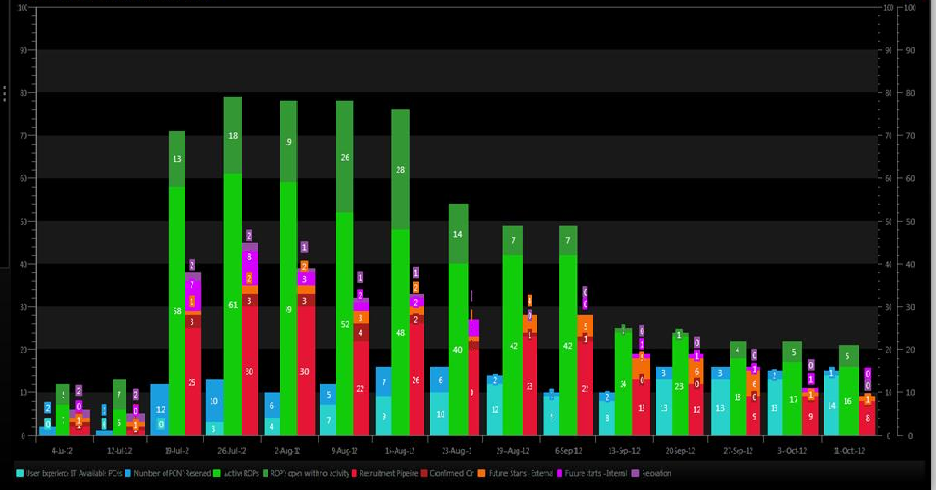
I'm trying to bind multiple axis for stacked bar chart.
Is it possible to show x axis series based on category axis(y)...?
Please find the below kendoui chart and silverlight chart images.
We have requirement to show chart as image2. Is it possible in kendoui..?
Kendoui chart(image1)
silverlight chart(image2)
Thanks,
Rajesh
I'm trying to bind multiple axis for stacked bar chart.
Is it possible to show x axis series based on category axis(y)...?
Please find the below kendoui chart and silverlight chart images.
We have requirement to show chart as image2. Is it possible in kendoui..?
Kendoui chart(image1)
silverlight chart(image2)
Thanks,
Rajesh
3 answers
151 views
Hello guys,
I found a bug, when I tap on an item of listview to switch from one view to another, if during the transition of slide effect I touch the view from below upwards, the view moves.
Is there a way to apply the preventDefault during the slide transition effect?
I found a bug, when I tap on an item of listview to switch from one view to another, if during the transition of slide effect I touch the view from below upwards, the view moves.
Is there a way to apply the preventDefault during the slide transition effect?
Alexander Valchev
Telerik team
answered
on
17 Oct 2012
5 answers
542 views
Simply put, I want to allow dragging items from one tree to another -- but prevent the moving of the dragged tree item to the destination tree.
I want it cloned and put in the droppable place within the destination tree. Is there a simple event method or configuration setting I can use to accomplish this?
I want it cloned and put in the droppable place within the destination tree. Is there a simple event method or configuration setting I can use to accomplish this?

2 answers
157 views
I am working with the good example of Editing custom editor under the MVC examples.
It shows how to build a dropdownlist for use when editing a cell in a grid.
I have to create a new post in the grid and I add the following to the file; Editing_Custom.cshtml:
.Create(create => create.Action("EditingCustom_Create", "Grid"))
.ToolBar(toolBar => { toolBar.Save(); toolBar.Create(); })
And I already get an error here before I come to do the coding in the .cs-file.
When debugging with firebug, I get an error from javascript that says: ReferenceError: EnrollTypes is not defined.
EnrollTypes is the class that is used for making the dropdownlist.
Could someone please give me a hint on what I have to do when creating a post in a grid with relational data?
I saw in some forum that Foregin key will sove this problem, but in my case there is no key column which can be named as foreign key. I just want to have a dropdown in grid column and it should also appear when I click on Add New Item button.
Regards,
Nitin
5 answers
446 views
Hi,
I have a simple splitter set up with two panes. Some navigation stuff in the left pane, and content on the right. The html is as follows:
<div id="koulutuspuuSplitter" style="height:500px;" >
<div id="koulutuspuu"></div>
<div id="koulutusPuuKomponentti"></div>
</div>
In document.ready I call
$("#koulutuspuuSplitter").kendoSplitter({
panes: [
{ collapsible: true, size: "350px" },
{ collapsible: true },
]
});
After which the contents of the left pane are loaded by ajax. The contents of the right pane are not loaded until an item is clicked in the left pane. So it is empty for now.
The problem: When the page loads, the splitter bar appears on the left edge (to the left of the "left pane"). The left pane is loaded just fine, with its own scrollbar and everything. But in place of the right pane is just empty space, and clicking on an item to load contents doesn't fill it (so the pane is not where its supposed to be). Doing any kind of resize event (resize browser window, open firebug panel, etc.) causes the splitter bar to "jump" from the left, to its proper position in between the panes. After this jump, the right pane contents also show up properly.
Presumably there is just something I am doing wrong. Perhaps wrong order of operations? Perhaps the problem is that the panes have no content when splitter is loaded? Something else?
I have a simple splitter set up with two panes. Some navigation stuff in the left pane, and content on the right. The html is as follows:
<div id="koulutuspuuSplitter" style="height:500px;" >
<div id="koulutuspuu"></div>
<div id="koulutusPuuKomponentti"></div>
</div>
In document.ready I call
$("#koulutuspuuSplitter").kendoSplitter({
panes: [
{ collapsible: true, size: "350px" },
{ collapsible: true },
]
});
After which the contents of the left pane are loaded by ajax. The contents of the right pane are not loaded until an item is clicked in the left pane. So it is empty for now.
The problem: When the page loads, the splitter bar appears on the left edge (to the left of the "left pane"). The left pane is loaded just fine, with its own scrollbar and everything. But in place of the right pane is just empty space, and clicking on an item to load contents doesn't fill it (so the pane is not where its supposed to be). Doing any kind of resize event (resize browser window, open firebug panel, etc.) causes the splitter bar to "jump" from the left, to its proper position in between the panes. After this jump, the right pane contents also show up properly.
Presumably there is just something I am doing wrong. Perhaps wrong order of operations? Perhaps the problem is that the panes have no content when splitter is loaded? Something else?

Dimo
Telerik team
answered
on
17 Oct 2012
1 answer
128 views
Implementing the Popup editing in this way:
$("#gridAddresses").kendoGrid({
dataSource: {
type: "json",
transport: {
read: {url:'api/AddressInfo?type=customer&id=' + idEntity, type:'GET'},
update: {url:'api/AddressInfo', type:'PUT'},
destroy:{url:'api/AddressInfo',type:'DELETE'},
create: {url:'api/AddressInfo?idCustomer=' + idEntity, type:'POST'}
},
pageSize: 3,
batch:false,
schema: {
model: {
id: "idAddressInfo",
fields: {
idAddressInfo: { editable: false },
Description: {type:"string" },
Address: {type:"string" },
City: { type:"string"},
State: { type:"string"} ,
ZipCode: { type:"string"}
}
}
}
},
toolbar: [{name:"create",text:"",width:20}],
columns: [
{ field:"Description", title: "Description", width: "180px" },
{ field:"Address", title: "Address", width: "200px" },
{ field: "City", title:"City", width: "150px" },
{ field: "State", title:"State", width: "90px" },
{ field: "ZipCode", title:"Zip", width: "60px" },
{ command: [{name:"edit",text:"",width:20}, {name:"destroy",text:"",width:20}], title: " ", width: "150px" }],
editable:{
mode: "popup"
}
});
Clicking in "Create" button a void "Edit" popup is shown (not a "Create" popup as I axpected)...
Clicking the "Update" on the popup dialog the PUT method is invoked instead PUSH... so the server persisting procedure fails.
What is the problem?
$("#gridAddresses").kendoGrid({
dataSource: {
type: "json",
transport: {
read: {url:'api/AddressInfo?type=customer&id=' + idEntity, type:'GET'},
update: {url:'api/AddressInfo', type:'PUT'},
destroy:{url:'api/AddressInfo',type:'DELETE'},
create: {url:'api/AddressInfo?idCustomer=' + idEntity, type:'POST'}
},
pageSize: 3,
batch:false,
schema: {
model: {
id: "idAddressInfo",
fields: {
idAddressInfo: { editable: false },
Description: {type:"string" },
Address: {type:"string" },
City: { type:"string"},
State: { type:"string"} ,
ZipCode: { type:"string"}
}
}
}
},
toolbar: [{name:"create",text:"",width:20}],
columns: [
{ field:"Description", title: "Description", width: "180px" },
{ field:"Address", title: "Address", width: "200px" },
{ field: "City", title:"City", width: "150px" },
{ field: "State", title:"State", width: "90px" },
{ field: "ZipCode", title:"Zip", width: "60px" },
{ command: [{name:"edit",text:"",width:20}, {name:"destroy",text:"",width:20}], title: " ", width: "150px" }],
editable:{
mode: "popup"
}
});
Clicking the "Update" on the popup dialog the PUT method is invoked instead PUSH... so the server persisting procedure fails.
What is the problem?





