or
5 answers
524 views
Trying to get a drop down to display during the edit of a foreign key column. The examples all provided appear overly complex and I am unable to get my code functioning. Furthermore, the ASPX and Razor examples do not match their HTML counterparts. The examples also use ViewData and another uses a "Template". I am unable to unwind all the different parts of the examples since they are not self-contained.
http://demos.kendoui.com/web/grid/foreignkeycolumn.html
My Code Simplified:
In non-edit mode, the EquipmentTypeName resolves correctly, but upon edit, the EquipmentTypeId is displayed (as an int). I need to bind a dropdown in edit mode to a model action.
http://demos.kendoui.com/web/grid/foreignkeycolumn.html
My Code Simplified:
@(Html.Kendo().Grid<Business.EquipmentModel>() .Name("Grid") .Columns(columns => { columns.Bound(e => e.EquipmentId); columns.Bound(e => e.Make); columns.Bound(e => e.Model); columns.Bound(e => e.EquipmentTypeId); columns.ForeignKey(e => e.EquipmentTypeId, (System.Collections.IEnumerable)Business.EquipmentTypeModel.All(), "EquipmentTypeId", "EquipmentTypeName"); columns.Bound(e => e.FacilityId); columns.Command(command => { command.Edit(); command.Destroy(); }).Width(200); }) .ToolBar(toolbar => toolbar.Create()) .Editable(editable => editable.Mode(GridEditMode.InLine)) .Pageable() .Sortable() .Scrollable() .Filterable() .DataSource(dataSource => dataSource .Ajax() .Model(model => model.Id(e => e.EquipmentId)) .Read(read => read.Action("Equipment_Read", "Facilities")) .Create(update => update.Action("Equipment_Create", "Facilities")) .Update(update => update.Action("Equipment_Update", "Facilities")) .Destroy(update => update.Action("Equipment_Destroy", "Facilities")) ))9 answers
214 views
Is localization supported in Q3? What about the various strings that are output by the widgets or the framework? Can they be translated to other languages easily?
Maybe localization is already prepared by language-specific Javascript files, which contain nothing but text in one specific language?
Michael G. Schneider
Maybe localization is already prepared by language-specific Javascript files, which contain nothing but text in one specific language?
Michael G. Schneider

mgs
Top achievements
 Rank 1
Rank 1
answered
on
15 Nov 2012
0 answers
134 views
Hi,
I have a solution to perform crud operation.
I have some problem with update operation.
The scenario is, I have a sharepoint2010 list. this list is binded with grid.
for update operation I am specifying the event provided by Kendo UI Framework that is "k-grid-update".
please just suggest me how can I access the newly edited values in my event handler". Following is my handler.
$("#grid").on("click", "k-grid-update", function(e){
// How can I retrieve newest edited or added values.
});
.
So that I can update the sharepoint list as well with grid it is update itself.
Please suggest me soon.
Thanks,
Kalpesh
I have a solution to perform crud operation.
I have some problem with update operation.
The scenario is, I have a sharepoint2010 list. this list is binded with grid.
for update operation I am specifying the event provided by Kendo UI Framework that is "k-grid-update".
please just suggest me how can I access the newly edited values in my event handler". Following is my handler.
$("#grid").on("click", "k-grid-update", function(e){
// How can I retrieve newest edited or added values.
});
.
So that I can update the sharepoint list as well with grid it is update itself.
Please suggest me soon.
Thanks,
Kalpesh
2 answers
82 views
Is there a fix for this issue? Here is the scenario:
Choose some date in the control, i.e.: November 14, 2012
Choose a time other than midnight, i.e.: 2:30 PM
Select another date in November. Notice that "2:30 PM" is retained.
Without changing months, select one of the grayed-out dates for October.
Notice that "2:30 PM" is replaced by "12:00 AM".
Expected user result is that when the date outside of the November dates are selected, the time is retained.
Choose some date in the control, i.e.: November 14, 2012
Choose a time other than midnight, i.e.: 2:30 PM
Select another date in November. Notice that "2:30 PM" is retained.
Without changing months, select one of the grayed-out dates for October.
Notice that "2:30 PM" is replaced by "12:00 AM".
Expected user result is that when the date outside of the November dates are selected, the time is retained.

Sarah
Top achievements
Rank 1
Rank 1
answered
on
15 Nov 2012
1 answer
102 views
|
Requirements |
|
|
Kendo UI Mobile |
|
|
jquery-1.8.2 |
|
|
IOS |
|
|
group button & popover |
|
PROJECT DESCRIPTION
Here is a sample of a group-button opening a popover. The folks at the help desk got me started with a solution.
Used the select index, selectTimeout function, and openFor method. The document is attached below.
setTimeout(function() {
$("#foo").data("kendoMobilePopOver").openFor($("#fooBtn"));
}, 0);
Alexander Valchev
Telerik team

answered
on
15 Nov 2012
2 answers
204 views
As far as I understood, HierarchicalDataSource does not have get method, meaning recursively traverse the structure for a node by its attribute. Am I correct?
Vladimir Iliev
Telerik team
answered
on
15 Nov 2012
2 answers
127 views
While working with the Treeview, I noticed that checkboxes would only work if I switched from 2012.2.xxxx to 2012.3.xxxx. Fine. After switching to the 3Q release, I get bad behavior with the Grid. Without changing the code, only switching the reference from 2Q to 3Q CSS & JS, the checked-treeview now works but the Grid does not. Am I missing something? See the JSFiddle here: http://jsfiddle.net/TJxFZ/
Paul Seabury
Top achievements
Rank 1
Rank 1
answered
on
15 Nov 2012
1 answer
886 views
When I have a date time with milliseconds, the milliseconds will always be set to 0 if you change the date with the calandar while the hours, minutes and seconds remains the same.
Am I the only one dealing with this issue?
Am I the only one dealing with this issue?
Georgi Krustev
Telerik team
answered
on
15 Nov 2012
1 answer
650 views
I have a pageable list-view (mobile) bound to a remote data set.
So far, so good. I can connect, get the data, scroll on demand.
Sometimes, however, I need to "reset" the data-source because some parameters that are used for the read are changed and I need to restart reading from scratch.
I am not sure how to do that.
an alternative for me would be to 'unbind' the list-view element, and assign a new data source that I create to it - but I am not sure how to access the data of a list-view item I already created with kendoMobileListView already.
So far, so good. I can connect, get the data, scroll on demand.
Sometimes, however, I need to "reset" the data-source because some parameters that are used for the read are changed and I need to restart reading from scratch.
I am not sure how to do that.
an alternative for me would be to 'unbind' the list-view element, and assign a new data source that I create to it - but I am not sure how to access the data of a list-view item I already created with kendoMobileListView already.
Alexander Valchev
Telerik team
answered
on
15 Nov 2012
4 answers
366 views
I have simple Kendo UI Grid in partialview to display information using AJAX binding.
Sample Code Below
@(Html.Kendo().Grid(Model)
.Name("Grid")
.Columns(columns => {
columns.Bound(p => p.Id).Groupable(false).Hidden();
columns.Bound(p => p.Name);
})
.DataSource(dataSource => dataSource
.Ajax()
.Read(read => read.Action("Value_Read", "Value"))
)
.Pageable()
.Sortable()
.Filterable()
I have problem with filtering. When I clicks on Filtering icon, it works as sorting.
If I add filtering only without sorting, then it works.
Only way to make filtering working along with sorting is by turning on Compatibility View
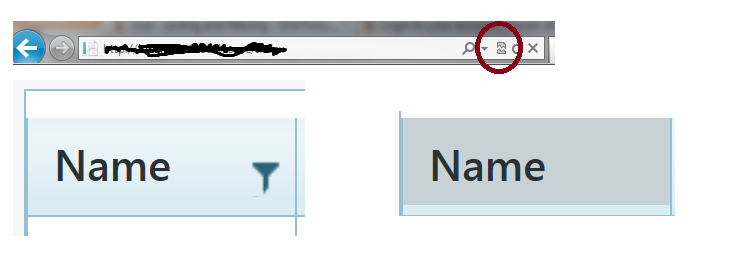
Below is pictorial explanation. Hope this helps.
launch partialview with Grid. You see filtering icon next to name.
when hover over filtering icon to click, the icon disappears.
Tries to click filtering icon, sorting will work.
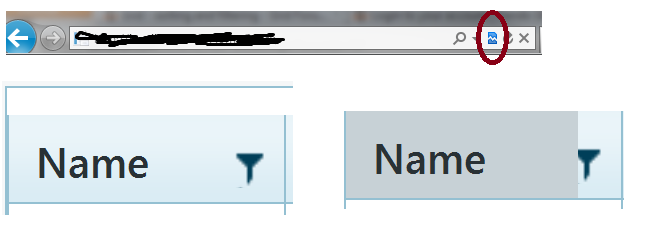
Do same step as above. But this time I turn on Compatibility View (Notice red circle)
This times, when I hover over on Filtering icon, I can see filtering icon.
Filtering and sorting are working here.
I have IE9.
I ran this with Firefox, I cannot make filtering works regardless what.
I added below as order suggested.
<script src="@Url.Content("~/Scripts/jquery.min.js")"></script>
<script src="@Url.Content("~/Scripts/kendo/2012.2.710/kendo.web.min.js")"></script>
<script src="@Url.Content("~/Scripts/kendo/2012.2.710/kendo.aspnetmvc.min.js")"></script>
I also have jQuery 1.7.2 and 1.8.20
Please let me if there is any information I need to provide. I really spent huge amount of time to figure out this issue.
Thank you in advance.
Sample Code Below
@(Html.Kendo().Grid(Model)
.Name("Grid")
.Columns(columns => {
columns.Bound(p => p.Id).Groupable(false).Hidden();
columns.Bound(p => p.Name);
})
.DataSource(dataSource => dataSource
.Ajax()
.Read(read => read.Action("Value_Read", "Value"))
)
.Pageable()
.Sortable()
.Filterable()
I have problem with filtering. When I clicks on Filtering icon, it works as sorting.
If I add filtering only without sorting, then it works.
Only way to make filtering working along with sorting is by turning on Compatibility View
Below is pictorial explanation. Hope this helps.
launch partialview with Grid. You see filtering icon next to name.
when hover over filtering icon to click, the icon disappears.
Tries to click filtering icon, sorting will work.
Do same step as above. But this time I turn on Compatibility View (Notice red circle)
This times, when I hover over on Filtering icon, I can see filtering icon.
Filtering and sorting are working here.
I have IE9.
I ran this with Firefox, I cannot make filtering works regardless what.
I added below as order suggested.
<script src="@Url.Content("~/Scripts/jquery.min.js")"></script>
<script src="@Url.Content("~/Scripts/kendo/2012.2.710/kendo.web.min.js")"></script>
<script src="@Url.Content("~/Scripts/kendo/2012.2.710/kendo.aspnetmvc.min.js")"></script>
I also have jQuery 1.7.2 and 1.8.20
Please let me if there is any information I need to provide. I really spent huge amount of time to figure out this issue.
Thank you in advance.






