or
1 answer
159 views
Hi there, I've used Fiddler occasionally for years, but am new to Fiddler Anywhere. I want to use Fiddler to accurately time page load times of my Dynamics 365 CRM system. I used to do this by filtering on the URL of my CRM system, clearing the traffic window, loading a page, clicking Ctrl+A in the traffic window to highlight all the sessions, and then reading off the total time from start to end (currently shown as the Max Duration figure in the Overview Window).
This method is working for me some of the time currently, but only for about one in three page loads that I test. The problem seems to be related to the "Client Connected" time which sometimes doesn't reset for each page load. In the screenshot below, you can see that I clicked the link in my browser at 11:54:12, but the system is providing a timing which starts at 11:53:59 as the Client Connected time. It incorrectly tells me the session lasted 13.67s when it actually only began at the Client Begin Request time and took less than a second to complete.
Is there a way to tell Fiddler Anywhere to ignore the Client Connected time and measure from Client Begin Request instead? Alternatively, can I force my browser to start a new connection each time I load a page (which it seems to sometimes, if I've been idle for a minute or so)?
Any help greatly appreciated,
Best wishes,
Tony

Nick Iliev
Telerik team

answered
on
06 Mar 2025
1 answer
136 views
I'm trying to learn about the API that my Amazon Echo device uses when I ask Alexa for information.
So I'd like to be able to run my Echo traffic through Fiddler (classic or everywhere).
But everything I've read requires using a browser or configuring a proxy on the remote device or some other step that I can't do on my Amazon Echo.
So is there some way to configure Fiddler to work in the scenario where I can only do stuff (e.g., VLANs, port mirroring) on an AP/PC-as-hotspot/gateway/router?
Nick Iliev
Telerik team
answered
on
03 Mar 2025
1 answer
150 views
Im supporting multiple users who are all reporting that something has changed recently and while they can capture network traffic in Google Chrome and Microsoft Outlook they only get network calls from Fiddler. Tested with VPN and endpoint protection enabled/disabled. Logs captured, screen recordings available if needed.
Environment - Fiddler is deployed using Jamf with extension and proxy.
MacOS - Multiple versions 14.7.X and 15.X
Logs have multiple entries like this
error 09:22:08.150612+0000 com.progress-telerik.fiddler.fiddler-extension (3348778651): No interface found for (edited IP removed), not re-setting the interface
error 09:22:08.242428+0000 com.progress-telerik.fiddler.fiddler-extension (1259812390): No interface found for (edited IP removed), not re-setting the interface
Nick Iliev
Telerik team
answered
on
17 Feb 2025
1 answer
140 views
There are some sites like this https://vk.com/ that just because fiddler is open makes the site loop the capcha challenge and not stop doing it. How to resolve this? Thanks.
Nick Iliev
Telerik team
answered
on
10 Feb 2025
1 answer
270 views
Video Explaining My Issue
I was trying, as a test run, to capture the traffic from Facebook. I did what someone suggested in my previous post about removing the "https" and just using "facebook." I did that, clicked "Actions," and selected "Run Filter Set Now." I then refreshed the tab I was currently on, which was Facebook, and as you can see in the video link, no traffic was captured.
So, what am I supposed to do if I want to capture only the tab with Facebook traffic ? Do I really have to close my Firefox window, reopen Firefox, and have just one tab open with Facebook? Then, I would use Fiddler Classic. How is this realistic at all?
If anyone can please inform me how I can capture all of Facebook's traffic in the session list without any other traffic being captured-thus sparing me the hassle of sorting through the list to identify which traffic belongs to Facebook- that would be great. Otherwise, I see no reason to continue using Fiddler Classic or to subscribe.
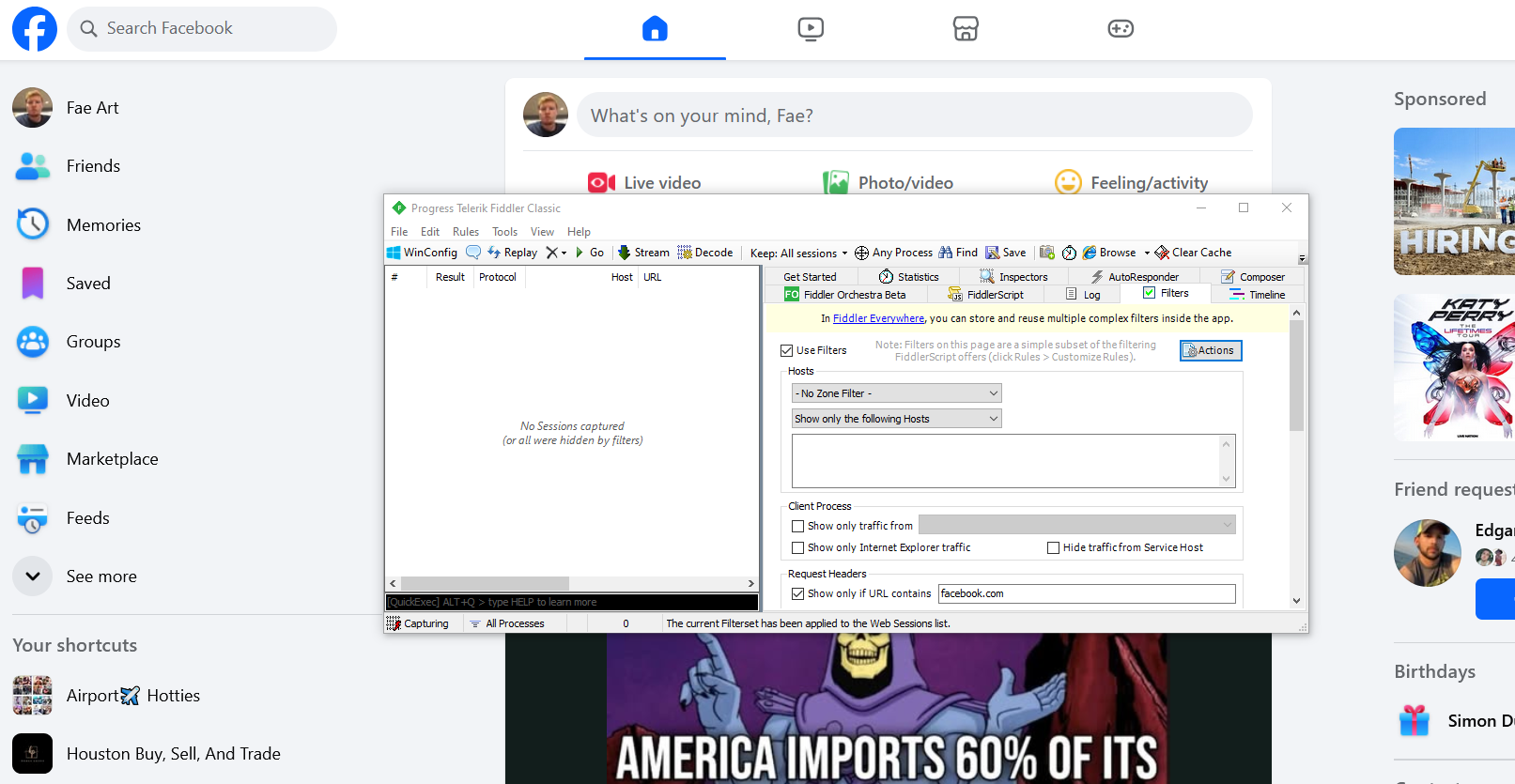
I was trying, as a test run, to capture the traffic from Facebook. I did what someone suggested in my previous post about removing the "https" and just using "facebook." I did that, clicked "Actions," and selected "Run Filter Set Now." I then refreshed the tab I was currently on, which was Facebook, and as you can see in the video link, no traffic was captured.
So, what am I supposed to do if I want to capture only the tab with Facebook traffic ? Do I really have to close my Firefox window, reopen Firefox, and have just one tab open with Facebook? Then, I would use Fiddler Classic. How is this realistic at all?
If anyone can please inform me how I can capture all of Facebook's traffic in the session list without any other traffic being captured-thus sparing me the hassle of sorting through the list to identify which traffic belongs to Facebook- that would be great. Otherwise, I see no reason to continue using Fiddler Classic or to subscribe.
Nick Iliev
Telerik team
answered
on
04 Feb 2025
1 answer
132 views
I'm trying to capture traffic/
requests
from a specific website, but I
don't
know how. I've tried endless
Google
searches, and the documentation on
Fiddler
did
mention
filters
.
However, I'm worried that
if
I
set a filter to show only if
the
URL contains, for example, bluestorm.com
,
the session list won't display anything if the request
URLs
when browsing that website
do
not
include
"
bluestorm."
Similarly,
if I use
Facebook,
I feel it will only list
URLs
that
contain the
word
"Facebook."
What I want is to input the exact URL, for instance, Facebook, so that now the session list will show all the URL requests or traffic that occur while the Facebook tab is currently open . Right now, I'm only getting traffic from my Firefox browser, but I want the traffic from a specific tab within Firefox, and I want all the URL traffic that occurs in that tab.
For example, if I want to capture the traffic from Facebook, I don't want to filter and have it display only URLs related to Facebook because I feel that will just show traffic for URLs like facebook.com . There are other URLs on Facebook that don't contain the word "Facebook" at all. So, I want it to retrieve and capture all the traffic from the Facebook tab.
What I want is to input the exact URL, for instance, Facebook, so that now the session list will show all the URL requests or traffic that occur while the Facebook tab is currently open . Right now, I'm only getting traffic from my Firefox browser, but I want the traffic from a specific tab within Firefox, and I want all the URL traffic that occurs in that tab.
For example, if I want to capture the traffic from Facebook, I don't want to filter and have it display only URLs related to Facebook because I feel that will just show traffic for URLs like facebook.com . There are other URLs on Facebook that don't contain the word "Facebook" at all. So, I want it to retrieve and capture all the traffic from the Facebook tab.
I filtered to show only if the URL contains, as you can see in the image, but no URLs from Facebook are being listed when I refresh the tab that's currently on the Facebook URL.
Nick Iliev
Telerik team
answered
on
03 Feb 2025
1 answer
235 views
Here's the error message it told me to paste onto here. I have tried uninstalling and reinstalling Fiddler but nothing changed.
---------------------------
Loading custom MIME mappings failed
---------------------------
Fiddler has encountered an unexpected problem. If you believe this is a bug in Fiddler, please copy this message by hitting CTRL+C, and submit a bug report at http://www.telerik.com/forums/fiddler.
The cloud file provider is not running.
Type: System.IO.IOException
Source: mscorlib
at System.IO.__Error.WinIOError(Int32 errorCode, String maybeFullPath)
at System.IO.FileStream.ReadCore(Byte[] buffer, Int32 offset, Int32 count)
at System.IO.FileStream.Read(Byte[] array, Int32 offset, Int32 count)
at System.Xml.XmlTextReaderImpl.InitStreamInput(Uri baseUri, String baseUriStr, Stream stream, Byte[] bytes, Int32 byteCount, Encoding encoding)
at System.Xml.XmlTextReaderImpl..ctor(String url, Stream input, XmlNameTable nt)
at System.Xml.XmlTextReader..ctor(Stream input)
at System.Xml.Serialization.XmlSerializer.Deserialize(Stream stream)
at Fiddler.XmlFileMimeMappings..ctor(String filePath)
at Fiddler.frmViewer.PrepareConsumer(Object info, EventArgs counter)
Fiddler v5.0.20251.1171 (x64 AMD64) [.NET 4.0.30319.42000 on Microsoft Windows NT 10.0.22631.0]
---------------------------
OK
---------------------------
Nick Iliev
Telerik team
answered
on
03 Feb 2025
0 answers
281 views
I have tried editing the rules on fiddler script editor
static function OnBeforeRequest(oSession: Session) {
// Check if the request URL matches a pattern (for example, you can forward requests to a specific domain)
if (oSession.url.Contains("example.com")) {
// Get the request body (as a string)
var requestBody = oSession.GetRequestBodyAsString();
// Parse the request body as JSON
var data = parseJSON(requestBody);
if (data == null) {
// If the data is not valid JSON, handle the error
oSession.ResponseBody = "Invalid JSON received";
oSession.oResponse.headers["Content-Type"] = "text/plain";
return;
}
// Prepare the data to send to the PHP server
var dataToSend = {
"method": oSession.oRequest.headers["Method"],
"url": oSession.url,
"headers": oSession.oRequest.headers.ToString(),
"body": data
};
// Define the PHP server URL (running on localhost:8000)
var phpServerUrl = "http://localhost:8000/process_request.php";
// Prepare HTTP request to send to the PHP server
var oHTTP = new HTTPRequest(phpServerUrl, "POST", stringifyJSON(dataToSend));
// Send the request
var oResponse = oHTTP.Send();
// Handle the PHP server's response
if (oResponse.StatusCode == 200) {
oSession.ResponseBody = oResponse.Body;
oSession.oResponse.headers["Content-Type"] = "application/json";
}
}
}
But the code doesnt work because JSON object is not recordgnized.
Is there any waY I can broadcast/forward all requests captured that belong to example.com domain?>
static function OnBeforeRequest(oSession: Session) {
// Check if the request URL matches a pattern (for example, you can forward requests to a specific domain)
if (oSession.url.Contains("example.com")) {
// Get the request body (as a string)
var requestBody = oSession.GetRequestBodyAsString();
// Parse the request body as JSON
var data = parseJSON(requestBody);
if (data == null) {
// If the data is not valid JSON, handle the error
oSession.ResponseBody = "Invalid JSON received";
oSession.oResponse.headers["Content-Type"] = "text/plain";
return;
}
// Prepare the data to send to the PHP server
var dataToSend = {
"method": oSession.oRequest.headers["Method"],
"url": oSession.url,
"headers": oSession.oRequest.headers.ToString(),
"body": data
};
// Define the PHP server URL (running on localhost:8000)
var phpServerUrl = "http://localhost:8000/process_request.php";
// Prepare HTTP request to send to the PHP server
var oHTTP = new HTTPRequest(phpServerUrl, "POST", stringifyJSON(dataToSend));
// Send the request
var oResponse = oHTTP.Send();
// Handle the PHP server's response
if (oResponse.StatusCode == 200) {
oSession.ResponseBody = oResponse.Body;
oSession.oResponse.headers["Content-Type"] = "application/json";
}
}
}
But the code doesnt work because JSON object is not recordgnized.
Is there any waY I can broadcast/forward all requests captured that belong to example.com domain?>

arsa
Top achievements
 Rank 1
Rank 1
asked
on
01 Feb 2025
1 answer
454 views
i can't find snapshots menu in mac fiddler app. where is it?
i'm using free account now.
Nick Iliev
Telerik team
answered
on
29 Jan 2025
1 answer
447 views
I disabled System proxy and tried to enable "Network Capture" with basic settings, but it's keep spinning and not enabling this feature.
If anyone can help me figure this out that will be so helpful.
Thank you
Nick Iliev
Telerik team
answered
on
23 Jan 2025





