Colors and Color Spaces
The ColorBase abstract class encapsulates colors in different color spaces. The classes that inherit from ColorBase are:
SimpleColor
Simple colors represent colors defined with color components. The following colors are categorized as simple:
RgbColor
Represents an ARGB (alpha, red, green, blue) color. The RgbColor class exposes the following properties:
| Property | Description |
|---|---|
A | The alpha component value. |
R | The red component value. |
G | The green component value. |
B | The blue component value. |
The following example shows how to create an RgbColor and assign it as Fill of a Path element.
Create RgbColor
RgbColor magenta = new RgbColor(255, 0, 255);
Telerik.Documents.Fixed.Model.Graphics.Path path = new Telerik.Documents.Fixed.Model.Graphics.Path();
path.Fill = magenta;
GrayColor
Represents a grayscale color with a single component. RadPdfProcessing exposes GrayColor publicly so you can read the gray value through its G property. The GrayColor class exposes the following property:
| Property | Description |
|---|---|
G | The gray component value, from 0 (black) to 255 (white). |
Use GrayColor when importing PDFs that contain grayscale fills or strokes. You can convert it to RGB by using the G component for the red, green, and blue values.
The following example covers the most common GrayColor scenarios: default and explicit grayscale values, reading G, converting to RGB, checking equality, and getting the string representation.
Create GrayColor
GrayColor black = new GrayColor();    // G = 0
GrayColor gray = new GrayColor(128);   // G = 128
GrayColor white = new GrayColor(255);  // G = 255

byte g = gray.G;
bool sameGray = gray.Equals(new GrayColor(g));
CmykColor
Represents a CMYK (cyan, magenta, yellow, key) color. The CmykColor class was introduced in Q4 2024 and it exposes the following properties:
| Property | Description |
|---|---|
C | The cyan component of the color, a value between 0.0 and 1.0. |
M | The magenta component of the color, a value between 0.0 and 1.0. |
Y | The yellow component of the color, a value between 0.0 and 1.0. |
K | The key (black) component of the color, a value between 0.0 and 1.0. |
Create CmykColor
RadFixedDocument document = new RadFixedDocument();
RadFixedPage page = document.Pages.AddPage();
FixedContentEditor containerEditor = new FixedContentEditor(page);

double c = 0.46;
double m = 0.3;
double y = 0.76;
double k = 0.12;

CmykColor cmykColor = new CmykColor(c, m, y, k);
containerEditor.GraphicProperties.FillColor = cmykColor;
containerEditor.DrawRectangle(new Rect(10, 10, 48, 29));
The difference between the RGB and CMYK color spaces is an essential aspect of color management in the design industry. While CMYK is used for traditional print, the RGB color space is used for screen-based media.
PatternColor
The abstract PatternColor class represents colors defined with the pattern color space. A pattern color paints with a pattern rather than a single color. PatternColor is inherited by the Gradient and TilingBase classes.
Gradient
Gradient provides a smooth transition between colors across an area. The gradient color is represented by the Gradient abstract class, which exposes the following properties:
| Property | Description |
|---|---|
StartPoint | A Point object representing the starting two-dimensional coordinates of the gradient. |
EndPoint | A Point object representing the ending two-dimensional coordinates of the gradient. |
ExtendBefore | Specifies whether to extend the gradient beyond the starting point. |
ExtendAfter | Specifies whether to extend the gradient beyond the ending point. |
Background | A SimpleColor object representing the background color. |
GradientStops | A collection of GradientStop objects representing the gradient stops. |
The Gradient class is inherited by the following classes:
-
LinearGradient: Defines a color blend along a line between two points, optionally extended beyond the boundary points by continuing the boundary colors.Example 2 shows how to create a
LinearGradientand assign it as theFillColorof a FixedContentEditor.Create LinearGradient
C#FixedContentEditor containerEditor = new FixedContentEditor(container); LinearGradient linearGradient = new LinearGradient(new Point(0, 0), new Point(30, 30)); linearGradient.GradientStops.Add(new GradientStop(new RgbColor(0, 207, 0), 0)); linearGradient.GradientStops.Add(new GradientStop(new RgbColor(0, 102, 204), 1)); containerEditor.GraphicProperties.FillColor = linearGradient; containerEditor.DrawRectangle(new Rect(10, 10, 48, 29));
The gradient created in Example 2 is shown in Figure 1.
Figure 1: LinearGradient

RadialGradient: Defines a blend between two circles, optionally extended beyond the boundary circles by continuing the boundary colors. TheRadialGradientclass exposes the following additional properties:
| Property | Description |
|---|---|
StartRadius | Decimal number determining the radius of the starting circle. |
EndRadius | Decimal number determining the radius of the ending circle. |
Example 3 demonstrates how to create a RadialGradient and assign it as the FillColor of a FixedContentEditor.
Example 3: Create RadialGradient
FixedContentEditor containerEditor = new FixedContentEditor(container);

LinearGradient linearGradient = new LinearGradient(new Point(0, 0), new Point(30, 30));
linearGradient.GradientStops.Add(new GradientStop(new RgbColor(0, 207, 0), 0));
linearGradient.GradientStops.Add(new GradientStop(new RgbColor(0, 102, 204), 1));

containerEditor.GraphicProperties.FillColor = linearGradient;
containerEditor.DrawRectangle(new Rect(10, 10, 48, 29));
The result from Example 3 is shown in Figure 2.
Figure 2: RadialGradient

Tiling Pattern
A tiling pattern consists of a small graphical figure called a pattern cell. Painting with the pattern replicates the cell at fixed horizontal and vertical intervals to fill an area. The tiling pattern is represented by the TilingBase abstract class, which exposes the following properties:
| Property | Description |
|---|---|
BoundingBox | Of type Rect, representing the dimensions of the pattern cell. |
VerticalSpacing | Decimal number determining the vertical spacing between pattern cells. |
HorizontalSpacing | Decimal number determining the horizontal spacing between pattern cells. |
Size | The size of the bounding box. |
Content | The collection of content elements inside a pattern cell. |
Position | The position of the tiling pattern. |
TilingType | Of type TilingType, represents the tiling type. Possible values: AllowSmallDistortion (cells spaced consistently with slight distortion), NoDistortion (cells not distorted but spacing may vary), FastTiling (consistent spacing with additional distortion for efficient painting). |
The TilingBase class is inherited by the following classes:
-
Tiling: Represents a tiling pattern. -
UncoloredTiling: Represents an uncolored tiling pattern. You can define this type of tiling pattern with some specific content, and then reuse it with a different color. It exposes two additional properties:Tilingwhich represents the tiling to be used, andColorrepresenting the color of the content of the specified tiling.
Because the TilingBase class implements the IContentRootElement interface like RadFixedPage, you can modify the content of the tiling using the FixedContentEditor class. Example 4 shows how to create a tiling pattern.
Example 4: Create Tiling
FixedContentEditor containerEditor = new FixedContentEditor(container);

Tiling tiling = new Tiling(new Rect(0, 0, 10, 10));
FixedContentEditor tilingEditor = new FixedContentEditor(tiling);
tilingEditor.GraphicProperties.IsStroked = false;
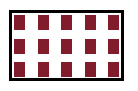
tilingEditor.GraphicProperties.FillColor = new RgbColor(128, 28, 43);
tilingEditor.DrawRectangle(new Rect(2, 2, 5, 7));

containerEditor.GraphicProperties.FillColor = tiling;
containerEditor.DrawCircle(new Point(30, 30), 20);
The tiling created in Example 4 is shown in Figure 3.
Figure 3: Tiling
LabColor
The LAB color space is device-independent. L represents lightness or brightness, A represents the red-green axis, and B represents the yellow-blue axis.
Create LabColor
double[] whitePoint = new double[3] { 1, 2, 3 };
double[] range = new double[4] { 4, 5, 6, 7 };
double[] expectedBlackPoint = new double[3] { 0, 0, 0 };

LabColor labColor = new LabColor(1, 2, 3, whitePoint, range);