New to Telerik Document Processing? Start a free 30-day trial
Generate PDF Expense Report
Updated on Jun 5, 2026
Environment
| Version | Product | Author |
|---|---|---|
| 2026.1.210 | RadPdfProcessing | Desislava Yordanova |
Description
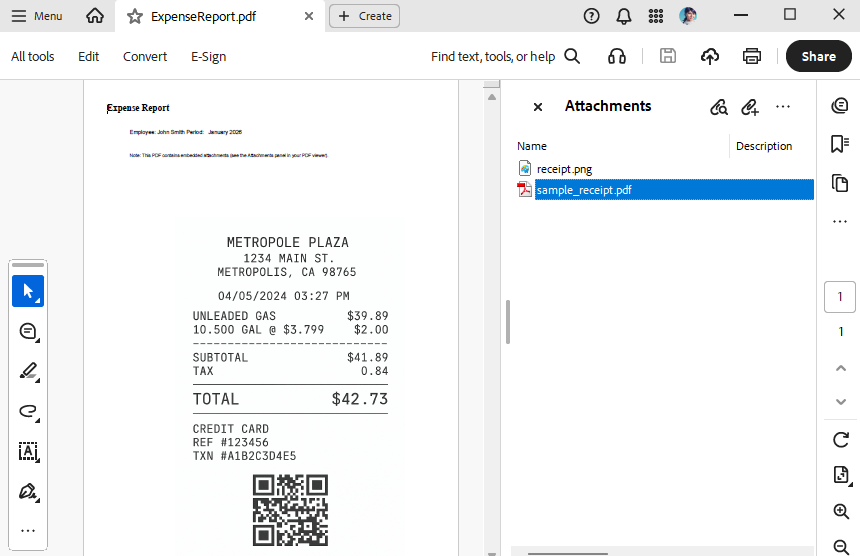
This article shows how to generate a PDF expense report. The report contains receipt images (for example, gas, toll, meal) or PDF attachments of receipts.
Solution
To achieve this, use RadPdfProcessing from the Telerik Document Processing libraries. The library provides functionality for creating PDF documents, inserting images, embedding files, and merging multiple PDF documents.
Steps to Generate the PDF Report
- Create a new instance of RadFixedDocument.
- Add a new page to the document.
- Use FixedContentEditor to draw text, images, and other content onto the page.
- Embed images and PDF files as attachments by using EmbeddedFiles.Add().
- Export the constructed document to a PDF file by using PdfFormatProvider.
Code Example
The following code demonstrates how to create a PDF report that contains embedded images and PDF files:
csharp
internal class Program
{
    static void Main(string[] args)
    {
        string outputFilePath = "ExpenseReport.pdf";
        File.Delete(outputFilePath);
        string receiptImagePath = "receipt.png"; // Replace with your image path
        string receiptPdfPath = "sample_receipt.pdf"; // Replace with your PDF path
        Build("John Smith", "January 2026", receiptImagePath, receiptPdfPath, outputFilePath);

        Process.Start(new ProcessStartInfo() { FileName = outputFilePath, UseShellExecute = true });
    }

    public static void Build(string employeeName,
                             string periodLabel,
                             string receiptImagePath,
                             string receiptPdfPath,
                             string outputPdfPath)
    {
        var document = new RadFixedDocument();
        var page = document.Pages.AddPage();
        var editor = new FixedContentEditor(page);
        const double left = 50, top = 50;
        editor.Position.Translate(left, top);

        var h1 = new Block();
        h1.TextProperties.FontSize = 20;
        h1.TextProperties.Font = FontsRepository.TimesBold;
        h1.InsertText("Expense Report");
        editor.DrawBlock(h1);
        editor.Position.Translate(editor.Position.Matrix.OffsetX + 50, editor.Position.Matrix.OffsetY + 50);

        var info = new Block();
        info.SpacingBefore = 6;
        info.TextProperties.FontSize = 12;
        info.InsertText($"Employee: {employeeName}\n");
        info.InsertText($"Period:   {periodLabel}\n");
        editor.DrawBlock(info);
        editor.Position.Translate(editor.Position.Matrix.OffsetX, editor.Position.Matrix.OffsetY + 50);

        var note = new Block();
        note.SpacingBefore = 8;
        note.TextProperties.FontSize = 10;
        note.InsertText("Note: This PDF contains embedded attachments (see the Attachments panel in your PDF viewer).");
        editor.DrawBlock(note);
        editor.Position.Translate(editor.Position.Matrix.OffsetX, editor.Position.Matrix.OffsetY + 50);

        if (File.Exists(receiptImagePath))
        {
            Telerik.Windows.Documents.Fixed.Model.Objects.Image img = new Telerik.Windows.Documents.Fixed.Model.Objects.Image();
            using (FileStream fileStream = new FileStream(receiptImagePath, FileMode.Open))
            {
                ImageSource imageSrc = new ImageSource(fileStream);
                img.ImageSource = imageSrc;
                img.Width = 500;
                img.Height = 740;
                SimplePosition simplePosition = new SimplePosition();
                simplePosition.Translate(200, 300);
                img.Position = simplePosition;
                page.Content.Add(img);
            }

            byte[] pdfBytes = File.ReadAllBytes(receiptImagePath);
            var embedded = document.EmbeddedFiles.Add(Path.GetFileName(receiptImagePath), pdfBytes);
            embedded.MimeType = "image/png";
        }

        if (File.Exists(receiptPdfPath))
        {
            byte[] pdfBytes = File.ReadAllBytes(receiptPdfPath);
            var embedded = document.EmbeddedFiles.Add(Path.GetFileName(receiptPdfPath), pdfBytes);
            embedded.MimeType = "application/pdf";
        }

        var provider = new PdfFormatProvider();
        Directory.CreateDirectory(Path.GetDirectoryName(Path.GetFullPath(outputPdfPath)) ?? ".");
        using var outStream = File.Create(outputPdfPath);
        provider.Export(document, outStream, TimeSpan.FromSeconds(10));
    }
}