Embedded File Streams - Overview
| Minimum Version | Q1 2024 |
|---|
RadPdfProcessing allows embedding file streams into the document. Thus, the content of the referenced files is embedded directly within the body of the PDF file.
The EmbeddedFile Class
RadFixedDocument stores the integrated files in an EmbeddedFilesCollection accessed by the EmbeddedFiles property. Each EmbeddedFile requires Name (string) and Data (byte[]) properties. The specified Name should be unique and it represents the textual description of the embedded file, which can be displayed in the user interface of a viewer application. The Data stores the byte[] of the file stream.
The Name for the EmbeddedFile should contain the file extension as well, e.g. MySampleTextFile.txt.
| Property | Description |
|---|---|
| Name | Gets or sets the attachment's display file name (including extension) shown in viewer UIs. |
| Data | Represents the file data as a byte array. |
| MimeType | Gets or sets the MIME type of the embedded file. The MIME type string (e.g., "application/xml", "text/xml", etc.). If not specified, the default value of "application/octet-stream" will be used. (introduced in Q1 2026) |
| Description | Gets or sets the description of the embedded file. This value is displayed in the Description column of a PDF Portfolio when the schema includes an AddDescriptionField(). (introduced in Q1 2026) |
| CreationDate | Gets or sets the creation date of the embedded file. This value is displayed in the Created column of a PDF Portfolio when the schema includes an AddCreationDateField(). (introduced in Q1 2026) |
| ModificationDate | Gets or sets the modification date of the embedded file. This value is displayed in the Modified column of a PDF Portfolio when the schema includes an AddModificationDateField(). (introduced in Q1 2026) |
| Size | Gets the size of the embedded file in bytes. This value is automatically calculated from the Data property. (introduced in Q1 2026) |
| CollectionItems | Gets the collection item values for this embedded file in a PDF Portfolio. Use this property to set metadata that appears in the portfolio's columns when viewing embedded files. (introduced in Q1 2026) |
Creating an Embedded File Stream
Creating an embedded file stream
RadFixedDocument document = new RadFixedDocument();
RadFixedPage page = document.Pages.AddPage();
byte[] textFile = File.ReadAllBytes(@"..\..\Embedded_File_Streams.txt");
document.EmbeddedFiles.Add("Text file.txt", textFile);
byte[] imageFile = File.ReadAllBytes(@"..\..\Basel.JPG");
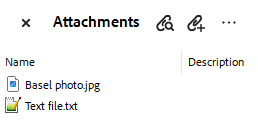
document.EmbeddedFiles.Add("Basel photo.jpg", imageFile);
DuplicatedEmbeddedFileNameException is thrown when adding an embedded file with a name that is already added to the collection.
Attachments section in Adobe
Specifying the MIME Type
| Minimum Version | Q1 2026 |
|---|
RadPdfProcessing allows you to explicitly set the correct MIME type when embedding the file into the PDF. This is especially important for standards like PDF/A-3 and Factur-X, which require strict metadata and MIME type declarations for embedded files.
RadFixedDocument document = new RadFixedDocument();
byte[] textFile = File.ReadAllBytes(@"..\..\Embedded_File_Streams.txt");
EmbeddedFile embeddedFile = document.EmbeddedFiles.Add("Text file.txt", textFile);
embeddedFile.MimeType = "text/plain";
Creating an Embedded Electronic (ZUGFeRD) Invoice
RadPdfProcessing provides support for embedding ZUGFeRD invoices.
Using the MergedEmbeddedFileNameResolving event
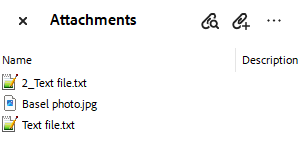
The MergedEmbeddedFileNameResolving event occurs when trying to resolve conflicts between the embedded file names while merging RadFixedDocument instances. The DuplicatedEmbeddedFileNameResolvingEventArgs allows you to specify the NewName to be used for adding the file to the EmbeddedFiles collection.
| DuplicatedEmbeddedFileNameResolvingEventArgs | Description |
|---|---|
| Name | Gets the current embedded file name. |
| NewName | Gets or sets the new embedded file name. |
| UsedNames | Gets the names that are already used for embedded files in the same RadFixedDocument. |
Resolving Duplicated Names
RadFixedDocument doc1 = new RadFixedDocument();
RadFixedPage page1 = doc1.Pages.AddPage();
byte[] textFile1 = File.ReadAllBytes(@"..\..\Embedded_File_Streams.txt");
doc1.EmbeddedFiles.Add("Text file.txt", textFile1);
byte[] imageFile = File.ReadAllBytes(@"..\..\Basel.JPG");
doc1.EmbeddedFiles.Add("Basel photo.jpg", imageFile);

RadFixedDocument doc2 = new RadFixedDocument();
RadFixedPage page2 = doc2.Pages.AddPage();
byte[] textFile2 = File.ReadAllBytes(@"..\..\Release_Notes.txt");
doc2.EmbeddedFiles.Add("Text file.txt", textFile2);

doc1.MergedEmbeddedFileNameResolving += (s, a) =>
{
    string myNewName = "2_" + a.Name;
    if (!a.UsedNames.Contains(myNewName))
    {
        a.NewName = myNewName;
    }
};

doc1.Merge(doc2);
Resolved Duplicated Names
Using the PdfImportSettings.DuplicatedEmbeddedFileNameResolving event
When importing a PDF document containing embedded files, the DuplicatedEmbeddedFileNameResolving event that the PdfImportSettings offers, allows you to handle duplicated names and properly resolve them.