New to Telerik Document Processing? Start a free 30-day trial
Editing Cell Values of Existing Documents using SpreadStreamProcessing
Updated on Jun 5, 2026
Environment
| Version | Product | Author |
|---|---|---|
| 2026.1.210 | RadSpreadStreamProcessing | Desislava Yordanova |
Description
RadSpreadStreamProcessing cannot directly edit existing cell values in-place. It is designed as a forward-only, low-memory streaming API. This design gives you great performance for very large Excel files, but it also introduces an important limitation:
- Read existing Excel files sequentially
- Generate new Excel files sequentially
- Cannot seek back or modify cells in an already-existing XLSX document in place
Once a row or cell has been read from the stream, you cannot go back and change it. Likewise, you cannot open an XLSX file and update a cell while keeping the same file instance.
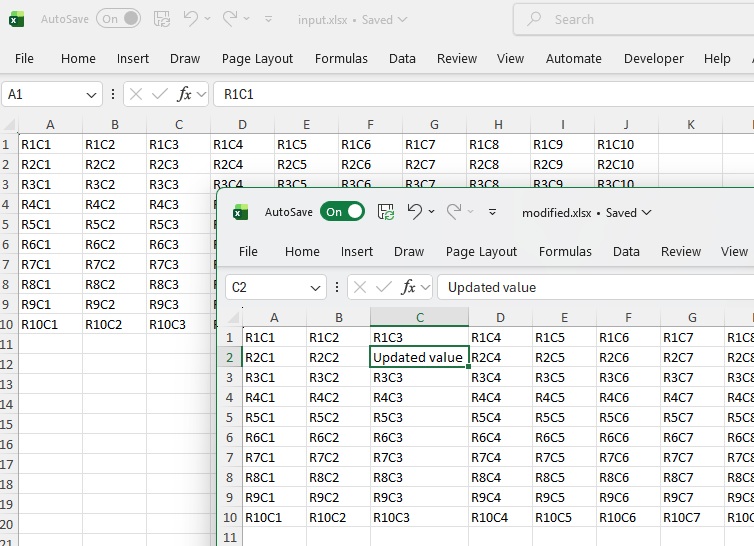
This article shows how to edit cells in existing XLSX documents using the SpreadStreamProcessing library.
Solution
You can effectively edit data by:
-
Reading the existing Excel file with RadSpreadStreamProcessing
-
Modifying values during the read
-
Writing everything to a new XLSX file
csharpstatic void Main(string[] args) { string inputFilePath = "input.xlsx"; string outputFilePath = "modified.xlsx"; CreateWorksheet(inputFilePath); UpdateExistingWorksheet(inputFilePath, outputFilePath); Process.Start(new ProcessStartInfo() { FileName = outputFilePath, UseShellExecute = true }); } private static void CreateWorksheet(string inputFilePath) { File.Delete(inputFilePath); using (FileStream stream = new FileStream(inputFilePath, FileMode.Create, FileAccess.Write)) using (IWorkbookExporter workbookExporter = SpreadExporter.CreateWorkbookExporter(SpreadDocumentFormat.Xlsx, stream)) { using (IWorksheetExporter worksheetExporter = workbookExporter.CreateWorksheetExporter("DummyData")) { for (int row = 0; row < 10; row++) { using (IRowExporter rowExporter = worksheetExporter.CreateRowExporter()) { for (int col = 0; col < 10; col++) { using (ICellExporter cellExporter = rowExporter.CreateCellExporter()) { cellExporter.SetValue($"R{row + 1}C{col + 1}"); } } } } } } Console.WriteLine("Excel file generated successfully."); } private static void UpdateExistingWorksheet(string inputFilePath, string outputFilePath) { File.Delete(outputFilePath); using (FileStream input = File.OpenRead(inputFilePath)) using (FileStream output = File.Create(outputFilePath)) using (IWorkbookImporter importer = SpreadImporter.CreateWorkbookImporter(SpreadDocumentFormat.Xlsx, input)) { using (IWorkbookExporter exporter = SpreadExporter.CreateWorkbookExporter(SpreadDocumentFormat.Xlsx, output)) { foreach (IWorksheetImporter worksheetImporter in importer.WorksheetImporters) { using (IWorksheetExporter worksheetExporter = exporter.CreateWorksheetExporter(worksheetImporter.Name)) { foreach (IRowImporter rowImporter in worksheetImporter.Rows) { using (IRowExporter rowExporter = worksheetExporter.CreateRowExporter()) { foreach (ICellImporter cellImporter in rowImporter.Cells) { using (ICellExporter cellExporter = rowExporter.CreateCellExporter()) { string value = cellImporter.Value; if (cellImporter.ColumnIndex == 2 && cellImporter.RowIndex == 1) { value = "Updated value"; } cellExporter.SetValue(value); } } } } } } } } }