or
1 answer
24 views
Hi Guys
I am having problem with output pdf shrunk with too much {top, left, right and bottom} margins.
Is there a way to fix output pdf result to not shrink the page margins?
ASP.NET C# WebForm Framework 4.7.2 and Using Telerik File Ver 2017.1.213.40
using System;
using System.Collections.Generic;
using System.IO;
using System.Linq;
using System.Web;
using Telerik.Windows.Documents.Flow.FormatProviders.Html;
using Telerik.Windows.Documents.Flow.FormatProviders.Pdf;
using Telerik.Windows.Documents.Flow.Model;

public static byte[] ConvertHtmlToPdf(string htmlContent)
        {
            // 1. Initialize the HTML provider to parse the string
            HtmlFormatProvider htmlProvider = new HtmlFormatProvider();

            // 2. Import the HTML into a Telerik RadFlowDocument object
            RadFlowDocument document = htmlProvider.Import(htmlContent);

            // 3. Initialize the PDF provider to convert the document object
            PdfFormatProvider pdfProvider = new PdfFormatProvider();

            // 4. Export the document structure to a byte array
            byte[] pdfBytes = pdfProvider.Export(document);

            return pdfBytes;
        }

Martin
Telerik team

answered
on
10 Aug 2026
1 answer
32 views
Hi Guys,
Is there is way to fix the shrinking when converting Html To PDF?
I am using the following code which it does convert the streamed html to PDF fine but the result output .PDF is shrunk it does not show the 100% on the 8.5 x 11 page size, it adds to much {top, left, right and bottom} margins to the output
public static byte[] ConvertHtmlToPdf(string htmlContent)
        {
            // 1. Initialize the HTML provider to parse the string
            HtmlFormatProvider htmlProvider = new HtmlFormatProvider();

            // 2. Import the HTML into a Telerik RadFlowDocument object
            RadFlowDocument document = htmlProvider.Import(htmlContent);

            // 3. Initialize the PDF provider to convert the document object
            PdfFormatProvider pdfProvider = new PdfFormatProvider();

            // 4. Export the document structure to a byte array
            byte[] pdfBytes = pdfProvider.Export(document);

            return pdfBytes;
        }
I am using ASP.NET C# Webform Framework 4.7.2 and Telerik File Version 2017.1.213.40, hope this info helps
See attached result output content are all stretched.
Any Idea would be appreciated.
Thanks
Jose S.
Martin
Telerik team
answered
on
10 Aug 2026
1 answer
23 views
Product
Telerik Document Processing – PdfProcessing
Environment
Telerik.Documents.Fixed: 2026.2.723
Telerik.UI.for.Blazor: 14.0.0
.NET: 10.0
Blazor WebAssembly
Windows 11
Description
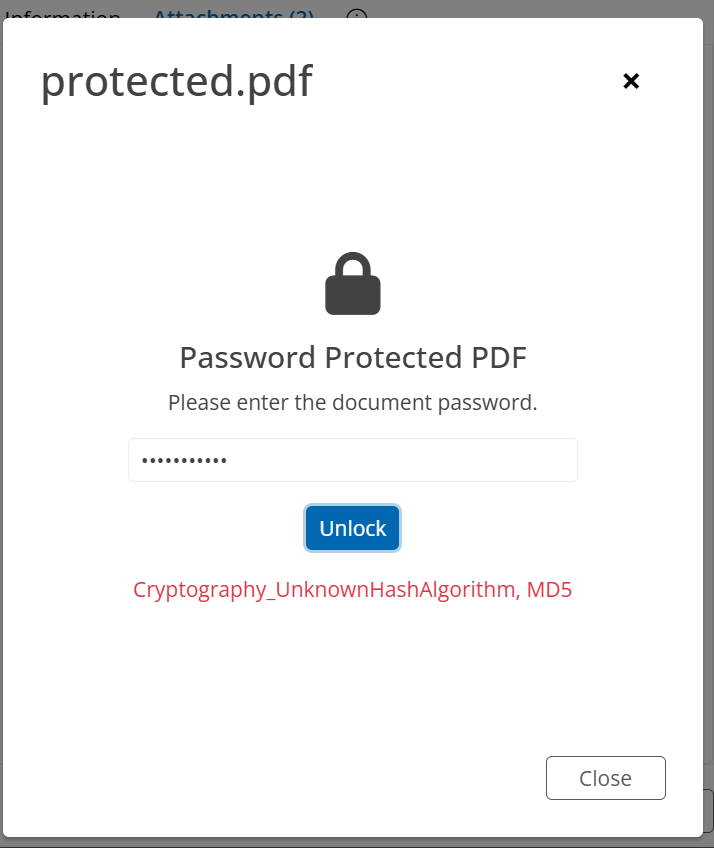
I'm implementing support for previewing password-protected PDFs in a Blazor application.
The workflow is:
User opens a password-protected PDF.
Application prompts for the password.
Password is supplied through PdfImportSettings.UserPasswordNeeded.
PdfFormatProvider.Import() is called.
The import fails with:
Cryptography_UnknownHashAlgorithm, MD5
The password is correct.
The same PDF opens successfully in Adobe Acrobat using the same password.
PDF Security
Adobe Acrobat reports:
Security Method: Password Security
Document Open Password: Yes
Permissions Password: No
Encryption Level:
128-bit RC4
Code used
using Telerik.Windows.Documents.Fixed.FormatProviders.Pdf;
using Telerik.Windows.Documents.Fixed.FormatProviders.Pdf.Import;
var provider = new PdfFormatProvider();
var settings = new PdfImportSettings();
settings.UserPasswordNeeded += (s, e) =>
{
e.Password = "samplefiles";
};
settings.OwnerPasswordNeeded += (s, e) =>
{
e.Password = "samplefiles";
};
provider.ImportSettings = settings;
using var stream = new MemoryStream(pdfBytes);
var document = provider.Import(
stream,
TimeSpan.FromSeconds(30));
Expected Result
The PDF should be imported successfully and the returned RadFixedDocument should be available for rendering/export.
Actual Result
provider.Import() throws:
Cryptography_UnknownHashAlgorithm, MD5
before the document is imported.
Additional Information
The password is verified by Adobe Acrobat and opens the document successfully.
The exception occurs even when the correct password is provided.
The PDF uses 128-bit RC4 encryption.
We would like to know whether:
RC4/MD5 encrypted PDFs are supported by Telerik.Documents.Fixed,
this is a known issue with .NET 10,
or whether there is a recommended workaround.
Telerik Document Processing – PdfProcessing
Environment
Telerik.Documents.Fixed: 2026.2.723
Telerik.UI.for.Blazor: 14.0.0
.NET: 10.0
Blazor WebAssembly
Windows 11
Description
I'm implementing support for previewing password-protected PDFs in a Blazor application.
The workflow is:
User opens a password-protected PDF.
Application prompts for the password.
Password is supplied through PdfImportSettings.UserPasswordNeeded.
PdfFormatProvider.Import() is called.
The import fails with:
Cryptography_UnknownHashAlgorithm, MD5
The password is correct.
The same PDF opens successfully in Adobe Acrobat using the same password.
PDF Security
Adobe Acrobat reports:
Security Method: Password Security
Document Open Password: Yes
Permissions Password: No
Encryption Level:
128-bit RC4
Code used
using Telerik.Windows.Documents.Fixed.FormatProviders.Pdf;
using Telerik.Windows.Documents.Fixed.FormatProviders.Pdf.Import;
var provider = new PdfFormatProvider();
var settings = new PdfImportSettings();
settings.UserPasswordNeeded += (s, e) =>
{
e.Password = "samplefiles";
};
settings.OwnerPasswordNeeded += (s, e) =>
{
e.Password = "samplefiles";
};
provider.ImportSettings = settings;
using var stream = new MemoryStream(pdfBytes);
var document = provider.Import(
stream,
TimeSpan.FromSeconds(30));
Expected Result
The PDF should be imported successfully and the returned RadFixedDocument should be available for rendering/export.
Actual Result
provider.Import() throws:
Cryptography_UnknownHashAlgorithm, MD5
before the document is imported.
Additional Information
The password is verified by Adobe Acrobat and opens the document successfully.
The exception occurs even when the correct password is provided.
The PDF uses 128-bit RC4 encryption.
We would like to know whether:
RC4/MD5 encrypted PDFs are supported by Telerik.Documents.Fixed,
this is a known issue with .NET 10,
or whether there is a recommended workaround.

Yoan
Telerik team
answered
on
06 Aug 2026
1 answer
47 views
I am using Telerik Document Processing (RadPdfProcessing) in an ASP.NET Core API to extract text from uploaded PDF files.
The current approach works fine for simple PDFs with embedded text, but I am facing issues with certain PDF files where no text is extracted at all (empty result), even though the PDF is readable visually.
PdfFormatProvider provider = new PdfFormatProvider();
RadFixedDocument document = provider.Import(stream);

StringBuilder sb = new StringBuilder();

foreach (RadFixedPage page in document.Pages)
{
    var textFragments = page.Content.OfType<TextFragment>();

    foreach (var fragment in textFragments)
    {
        sb.Append(fragment.Text);
    }

    sb.AppendLine();
}

string extractedText = sb.ToString();
Please help us resolve this issue.
Regards,
Rajendra

Dess | Tech Support Engineer, Principal
Telerik team
answered
on
13 May 2026
1 answer
106 views
Good Afternoon,
I am trying to create a PDF with an empty signature field. It was working a few months ago, when the site was first built, but now when a user opens the PDF in Acrobat to sign the document, they get an error saying the document could not be read (23).
I have stripped away all the code so it's now only generating an empty signature field. It's still refusing to work properly in Adobe Acrobat. When attempting to sign, there is a message about constructs that could affect appearance with a 4000 code for Unrecognized PDF Content. When I proceed, I get the error messages attached.
Any advice would be greatly appreciated, I have been struggling with this for hours!
I am using Telerik Version 2025.3.806. I have updated Adobe Acrobat to the latest version and restarted my computer several times.
This code is taken directly from the Telerik docs, so I expected it to work. I've included the produced PDF, as well.
public void PdfExportSignatureTest()
{
    // Create a new PDF document and a page
    RadFixedDocument document = new RadFixedDocument();
    RadFixedPage page = document.Pages.AddPage();

    // Define the rectangle for the signature field
    Rect signatureRect = new Rect(50, 700, 200, 50);

    // Create the signature field (do not assign a certificate or signature)
    SignatureField signatureField = document.AcroForm.FormFields.AddSignature("SignatureFieldUniqueName");

    // Add a widget for the signature field and set its position and size
    SignatureWidget signatureWidget = signatureField.Widgets.AddWidget();
    signatureWidget.Rect = signatureRect;

    // Add the widget to the page's annotations
    page.Annotations.Add(signatureWidget);

    PdfFormatProvider provider = new();

    // Save the document
    string filePath = "EmptySignatureWidget.pdf";
    File.Delete(filePath);
    using (var output = new System.IO.FileStream(filePath, System.IO.FileMode.Create, System.IO.FileAccess.Write))
    {
        provider.Export(document, output, TimeSpan.FromSeconds(10));
    }
}
Yoan
Telerik team
answered
on
04 Feb 2026
1 answer
109 views
Hi
I import a docx document with a strikerhough text in it.
When I then convert it to PDF using PdfFormatProvider export. the strikethrough effect does not appeared, in the the text is shown.
var docxProvider = new DocxFormatProvider();
outputStream.Position = 0;
var flowDocument = docxProvider.Import(outputStream);
var pdfProvider = new Telerik.Windows.Documents.Flow.FormatProviders.Pdf.PdfFormatProvider();
var pdfStream = new MemoryStream();
pdfProvider.Export(flowDocument, pdfStream);
Yoan
Telerik team
answered
on
12 Dec 2025
1 answer
120 views
I have a DOCX that undergoes a merge leaving me with 3 text fields after merge. All 3 fields are Times New Roman 12. I'm not using any custom font provider.
After export to PDF, 2 of the fields remain intact but one of them is always blank.
I've attached screenshots showing the 3 fields plus the DOCX and PDF.
Can you tell me what the issue is? There are no special characters around the text and it's using the same font as the other fields? Printing it to PDF from Word locally works fine, giving me the 3 fields.
Here's the code that the export happens in -
        private async Task<Tuple<int, bool>> MakePDFFromWordDocxBytes(string pdfFilePath, byte[] bytes, string traceInfo, bool isSecondaryMergeNeeded)
        {
            int result = 0;
            byte[] pdfBytes = null;
            bool isError = false;
            try
            {
                RadFlowDocument document = ReplaceSignatureFieldsAndEmptyTables(bytes);

                // Create a new list with the data to avoid enumeration issues
                RadFlowDocument merged = PartialMailMerge(document, isSecondaryMergeNeeded); //   document.MailMerge(dataSource);

                if (isSecondaryMergeNeeded)
                {
                    DocxFormatProvider docProvider = new DocxFormatProvider();
                    string docxFileName = pdfFilePath.Replace(".pdf", ".docx");
                    using (IFileManager fileMan = FileCommon.GetFileInstance(docxFileName))
                    {
                        var docxBytes = docProvider.Export(merged, TimeSpan.FromSeconds(docLoadTimeoutSeconds));
                        fileMan.SaveFile(docxFileName, docxBytes);
                    }
                }
                TelPDFFlow.PdfFormatProvider pdfProvider = new TelPDFFlow.PdfFormatProvider();
                pdfProvider.ExportSettings = new TelPDFFlow.Export.PdfExportSettings()
                {
                    ComplianceLevel = TelPDFFixed.Export.PdfComplianceLevel.PdfA1B,
                    FontEmbeddingType = TelPDFFixed.Export.FontEmbeddingType.Full
                };
                pdfBytes = pdfProvider.Export(merged, TimeSpan.FromSeconds(docLoadTimeoutSeconds));
            }
            catch (Exception ex)
            {
                EventLogger.WriteError(traceInfo, ex);
                pdfBytes = ExceptionPDFAsBytes(ex, $"ERROR {traceInfo}");
                isError = true;
            }

            using (IFileManager fileManager = FileCommon.GetFileInstance(pdfFilePath))
            {
                fileManager.SaveFile(pdfFilePath, pdfBytes);
            }
            result = GetPDFPageCountFromPDFBytes(pdfBytes);
            return new Tuple<int, bool>(result, isError);
        }
Yoan
Telerik team
answered
on
17 Nov 2025
1 answer
129 views
Hello,
I want to ask how can make the exported PDF from RTF follows spacing on RTF.
I have RTF file (as attached) , when i try tp export to pdf some paragraph not looking exactly like the RTF , i suspect it because using Justified setting.
Is it a bug ? or can we export the RTF to PDF that have exacts look after exporting to PDF ?
i use Telerik.Documents.Core, Fixed, Flow, Flow.FormattedProvider.Pdf , File Version : 2025.2.520.20
The project is a .NET 8 class library
Please see attached file (RTF source and exported PDF).
private bool ConvertRtfToPdfWithTelerik(string rtfPath, string pdfPath)
{
    try
    {
        Console.WriteLine("Converting RTF to PDF using Telerik Document Processing...");

        // Create RTF format provider
        RtfFormatProvider rtfProvider = new RtfFormatProvider();

        Telerik.Windows.Documents.Extensibility.FontsProviderBase fontsProvider = new FontsProvider();
        Telerik.Windows.Documents.Extensibility.FixedExtensibilityManager.FontsProvider = fontsProvider;

        // Load RTF document
        RadFlowDocument document;
        //Size oSize = new Size();
        //Padding oPadding = null;

        using (FileStream rtfStream = new FileStream(rtfPath, FileMode.Open))
        {
            document = rtfProvider.Import(rtfStream, null);
            //oSize = document.Sections[0].PageSize;
            //oPadding = document.Sections[0].PageMargins;
        }

        //foreach (var item in document.Sections)
        //{
        //    //item.PageMargins = new Padding(90);
        //    item.PageSize = PaperTypeConverter.ToSize(PaperTypes.Letter);
        //}

        Console.WriteLine("RTF document loaded successfully with Telerik");

        // Create PDF format provider
        PdfFormatProvider pdfProvider = new PdfFormatProvider();

        // Export to PDF
        using (FileStream pdfStream = new FileStream(pdfPath, FileMode.Create))
        {
            pdfProvider.ExportSettings.FontEmbeddingType = Telerik.Windows.Documents.Fixed.FormatProviders.Pdf.Export.FontEmbeddingType.Full;
            pdfProvider.ExportSettings.ImageQuality = Telerik.Windows.Documents.Fixed.FormatProviders.Pdf.Export.ImageQuality.High;
            pdfProvider.Export(document, pdfStream, null);
        }

        Console.WriteLine("PDF generated successfully using Telerik Document Processing");
        return true;
    }
    catch (Exception ex)
    {
        Console.WriteLine("Error converting RTF to PDF with Telerik: " + ex.Message);
        return false;
    }
}

public class FontsProvider : Telerik.Windows.Documents.Extensibility.FontsProviderBase
{
    public override byte[] GetFontData(Telerik.Windows.Documents.Core.Fonts.FontProperties fontProperties)
    {
        string fontFileName = fontProperties.FontFamilyName + ".ttf";
        string fontFolder = Environment.GetFolderPath(Environment.SpecialFolder.Fonts);

        //The fonts can differ depending on the file
        if (fontProperties.FontFamilyName == "Calibri")
        {
            if (fontProperties.FontStyle == FontStyles.Italic && fontProperties.FontWeight == FontWeights.Bold)
            {
                fontFileName = $"calibriz.ttf";
            }
            else if (fontProperties.FontStyle == FontStyles.Italic)
            {
                fontFileName = $"calibrii.ttf";
            }
            else if (fontProperties.FontWeight == FontWeights.Normal)
            {
                fontFileName = "calibri.ttf";
            }
            else if (fontProperties.FontWeight == FontWeights.Bold)
            {
                fontFileName = $"calibrib.ttf";
            }
        }

        else if (fontProperties.FontFamilyName == "Century Gothic")
        {
            if (fontProperties.FontStyle == FontStyles.Italic && fontProperties.FontWeight == FontWeights.Bold)
            {
                fontFileName = $"gothicbi.ttf";
            }
            else if (fontProperties.FontStyle == FontStyles.Italic)
            {
                fontFileName = $"gothici.ttf";
            }
            else if (fontProperties.FontWeight == FontWeights.Normal)
            {
                fontFileName = "gothic.ttf";
            }
            else if (fontProperties.FontWeight == FontWeights.Bold)
            {
                fontFileName = $"gothicb.ttf";
            }
        }

        else if (fontProperties.FontFamilyName == "Wingdings")
        {
            if (fontProperties.FontWeight == FontWeights.Normal)
            {
                fontFileName = $"wingding.ttf";
            }
        }

        //...add more fonts if needed...

        DirectoryInfo directory = new DirectoryInfo(fontFolder);
        FileInfo[] fontFiles = directory.GetFiles();

        var fontFile = fontFiles.FirstOrDefault(f => f.Name.Equals(fontFileName, StringComparison.InvariantCultureIgnoreCase));
        if (fontFile != null)
        {
            var targetPath = fontFile.FullName;
            using (FileStream fileStream = File.OpenRead(targetPath))
            {
                using (MemoryStream memoryStream = new MemoryStream())
                {
                    fileStream.CopyTo(memoryStream);
                    return memoryStream.ToArray();
                }
            }
        }

        return null;
    }
}
Yoan
Telerik team
answered
on
11 Nov 2025
1 answer
187 views
Hi,
We are trying to merge an existing PDF (not /A) into a PDF/A.
Target file is generated successfully but veraPDF validator (and others) is complaining because it cannot find embedded fonts.
We read the following articles : PDF/A standard and Register fonts . But no luck.
Part of the code is available below.
Do you know why fonts are not embedded ?
Thanks for your help.
Alain.
public static void MergeInNewFile(string sourceFile, string outputFilePath, bool registerFonts)
{
    RadFixedDocument resultFile = new RadFixedDocument();

    Telerik.Windows.Documents.Fixed.FormatProviders.Pdf.PdfFormatProvider pdfFormatProvider = new Telerik.Windows.Documents.Fixed.FormatProviders.Pdf.PdfFormatProvider();

    pdfFormatProvider.ExportSettings.FontEmbeddingType = FontEmbeddingType.Full;

    PdfExportSettings settings = new PdfExportSettings();
    pdfFormatProvider.ExportSettings = settings;

    settings.ComplianceLevel = PdfComplianceLevel.PdfA3B;
    settings.TaggingStrategy = TaggingStrategyType.UseExisting;
    settings.FontEmbeddingType = FontEmbeddingType.Full;

    if (registerFonts)
    {
        RegisterFont("Helvetica");
        RegisterFont("Helvetica-Bold");
        RegisterFont("Helvetica-Oblique");
    }

    // Merge source in new file
    using (Stream stream = File.OpenRead(sourceFile))
    {
        resultFile = pdfFormatProvider.Import(stream, TimeSpan.FromSeconds(100));
        resultFile.Merge(resultFile);
    }

    // Export new file
    File.Delete(outputFilePath);
    using (Stream output = File.OpenWrite(outputFilePath))
    {
        pdfFormatProvider.Export(resultFile, output, TimeSpan.FromSeconds(10));
    }
}

private static void RegisterFont(string fontName)
{
    byte[] fontData = File.ReadAllBytes(System.IO.Path.Combine(AppDomain.CurrentDomain.BaseDirectory, "Ressources", $"{fontName}.ttf"));
    System.Windows.Media.FontFamily fontFamily = new System.Windows.Media.FontFamily(fontName);
    FontsRepository.RegisterFont(fontFamily, System.Windows.FontStyles.Normal, System.Windows.FontWeights.Bold, fontData);
}
Dess | Tech Support Engineer, Principal
Telerik team
answered
on
10 Nov 2025
1 answer
95 views
Issue Summary:
When previewing PDF documents using RadPdfView (Telerik UI for WPF), the logo positioned at the top-left corner of the page fails to render consistently across machines. While the rest of the document displays correctly, the logo either appears distorted or is missing entirely.
Environment:
- Control Used:
RadPdfView(Telerik UI for WPF) - Telerik Libraries:
Telerik.Windows.Documents.dll– Version 2023.1.315.45Telerik.Windows.Documents.Core.dll– Version 2023.1.307.40
- Operating Systems Tested:
- Windows 10 Pro: Logo appears stretched and centered
- Windows 11 Pro (Version 25H2, OS Build 26200.6899): Logo is missing
Symptoms:
- The logo, embedded in the PDF and originally positioned at the top-left corner, does not render correctly in RadPdfView.
- The issue is isolated to RadPdfView; the same PDF displays the logo correctly in WebView2 and standard web browsers.
Troubleshooting Steps Taken:
- Verified that the logo is present when viewed in other PDF viewers.
- Tested across multiple machines using identical code and PDF files.
Temporary Workaround:
Using <wv2:WebView2> to preview the PDF resolves the issue, indicating that the problem is specific to RadPdfView’s rendering engine.
Request:
Please confirm whether this is a known issue with the specified Telerik versions and advise if a fix or recommended workaround is available to ensure consistent logo rendering in RadPdfView across platforms.
Note: Using .NET version 4.8
Dess | Tech Support Engineer, Principal
Telerik team
answered
on
06 Nov 2025









