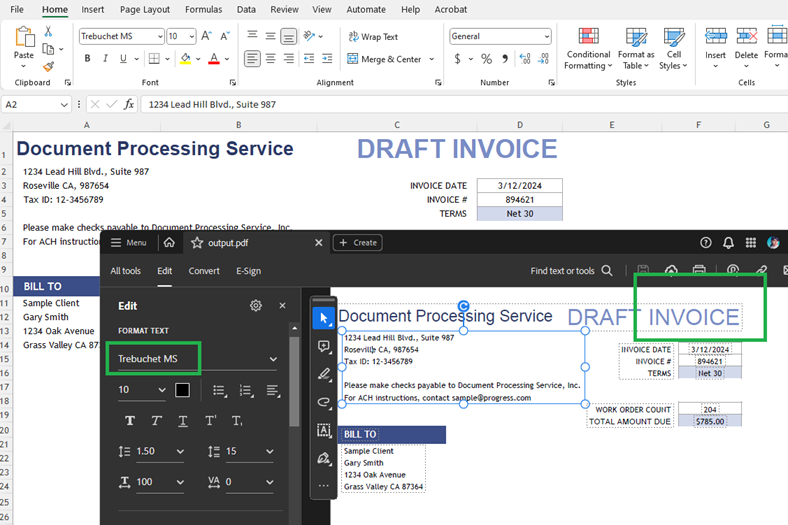
How to Eliminate Formatting Issues when Exporting XLSX to PDF Format
Environment
| Version | Product | Author |
|---|---|---|
| .NET Standard | RadSpreadProcessing | Desislava Yordanova |
Description
This article shows how to handle formatting difficulties when exporting an XLSX file to PDF using the RadSpreadProcessing library in .NET Standard.
The most common scenario is:
1. Export an XLSX file to PDF using the RadSpreadProcessing library.
2. Observe the resulting PDF file with truncated columns or a different font.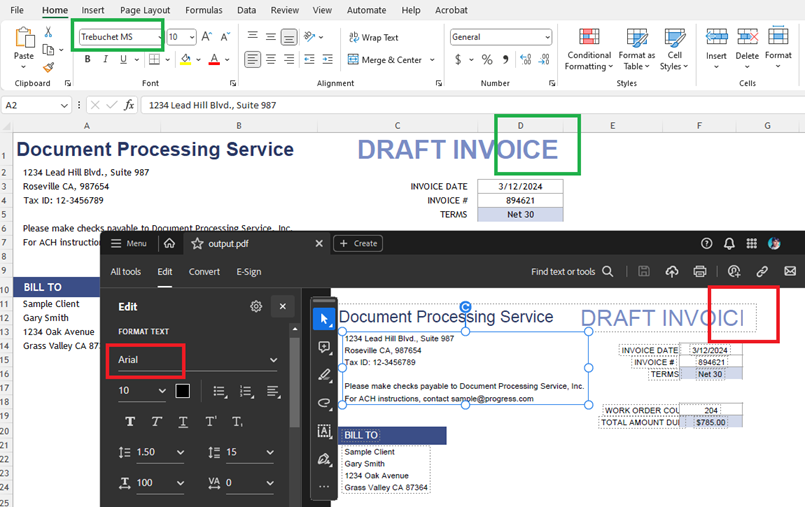
Solution
The limitations of .NET Standard may cause differences in the font and text size (text measuring) when you convert to PDF format.
1. To address the size discrepancy, set a SpreadFixedTextMeasurer to handle the text measurement:
        SpreadTextMeasurerBase fixedTextMeasurer = new SpreadFixedTextMeasurer();
        SpreadExtensibilityManager.TextMeasurer = fixedTextMeasurer;
2. Implement a FontsProvider to handle differences in fonts.
        FontsProviderBase fontsProvider = new FontsProvider();
        FixedExtensibilityManager.FontsProvider = fontsProvider;
This class provides a mechanism to read the fonts used in the document:
    public class FontsProvider : Telerik.Windows.Documents.Extensibility.FontsProviderBase
    {
        public override byte[] GetFontData(Telerik.Windows.Documents.Core.Fonts.FontProperties fontProperties)
        {
            string fontFileName = fontProperties.FontFamilyName + ".ttf";
            string fontFolder = Environment.GetFolderPath(Environment.SpecialFolder.Fonts);

            //The fonts can differ depending on the file
            if (fontProperties.FontFamilyName == "Trebuchet MS")
            {
                if (fontProperties.FontStyle == FontStyles.Italic && fontProperties.FontWeight == FontWeights.Bold)
                {
                    fontFileName = $"trebucbi.ttf";
                }
                else if (fontProperties.FontStyle == FontStyles.Italic)
                {
                    fontFileName = $"trebucit.ttf";
                }
                else if (fontProperties.FontWeight == FontWeights.Normal)
                {
                    fontFileName = "trebuc.ttf";
                }
                else if (fontProperties.FontWeight == FontWeights.Bold)
                {
                    fontFileName = $"trebucbd.ttf";
                }
            }


            //...add more fonts if needed...

            DirectoryInfo directory = new DirectoryInfo(fontFolder);
            FileInfo[] fontFiles = directory.GetFiles();

            var fontFile = fontFiles.FirstOrDefault(f => f.Name.Equals(fontFileName, StringComparison.InvariantCultureIgnoreCase));
            if (fontFile != null)
            {
                var targetPath = fontFile.FullName;
                using (FileStream fileStream = File.OpenRead(targetPath))
                {
                    using (MemoryStream memoryStream = new MemoryStream())
                    {
                        fileStream.CopyTo(memoryStream);
                        return memoryStream.ToArray();
                    }
                }
            }

            return null;
        }
    }
Now, the font in the exported PDF document is correct and the text is not clipped.