Building a RAG (Retrieval-Augmented Generation) in ASP.NET Core
 by
by 
Summarize with AI:
RAG is a technique that enhances language models by integrating them with internal knowledge sources. In this post, you’ll understand the concept of RAG and learn how to implement it in an ASP.NET Core application, exploring a practical, real-world scenario.
The use of artificial intelligence has become increasingly common in web applications, so it’s important to consider how to optimize the use of AI via large language models (LLMs) for efficiency and cost reduction.
In this article, we’ll explore how to use the Retrieval-Augmented Generation (RAG) concept in ASP,NET Core projects to create an automated return policy system. We’ll understand how RAG combines information retrieval and text generation to enable LLMs to respond based on real, up-to-date data, reducing the need for retraining.
Understanding the RAG Concept
Retrieval Augmented Generation, or RAG, is a technique (sometimes referred to as an architecture) used to optimize the performance of an AI model. It consists of connecting a model to an internal knowledge base, which can be a text file or even a database, to provide more relevant answers without the need for additional training.
In simple terms, instead of relying only on its training data, RAG allows the model to retrieve up-to-date or domain-specific information to generate a more accurate answer.
How Does RAG Work?
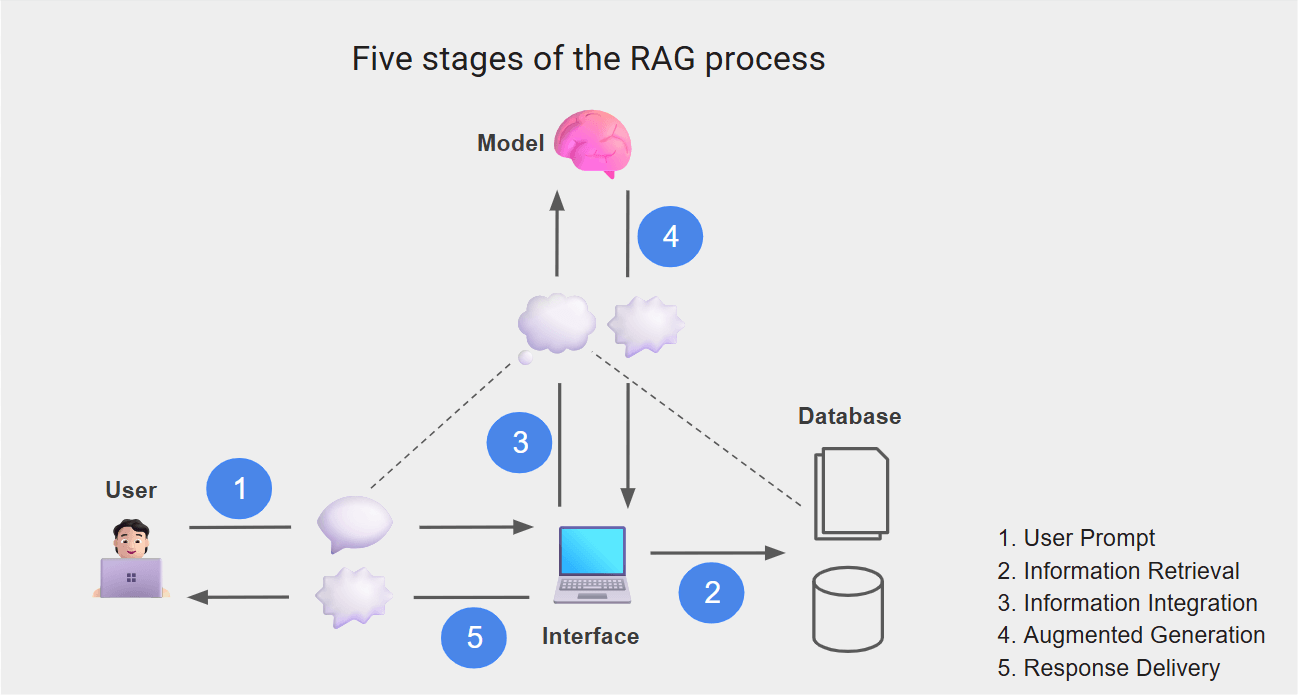
The operation of RAG basically involves combining information retrieval models with generative AI models, and then returning a more accurate result. RAG systems typically follow a five-stage process:
User Input (User Prompt)
The user asks a question or sends a command, for example, “What are the company’s security policies?”Information Retrieval (Retrieval)
A retrieval model, such as a vector search engine, is triggered to search for relevant data in an external knowledge base, such as corporate documents or databases. This step transforms the prompt into embeddings and searches for the semantically closest documents.Integration (Integration / Context Assembly)
The most relevant information found is returned and combined with the original prompt. In this stage, the system assembles an augmented prompt that contains both the user’s question and the relevant snippets retrieved from the internal knowledge base.Generation (Augmented Generation)
The language model receives this augmented prompt and generates a contextualized response, taking into account the retrieved data.Output to the User (Response Delivery)
The final result is then delivered to the user, usually accompanied by references to the sources or links that support the answer.
These five steps constitute the complete RAG workflow, which goes beyond a simple question-and-answer approach. It combines querying, filtering, context assembly and contextualized generation, enabling more accurate and up-to-date responses. The image below summarizes this workflow:
Creating a RAG in ASP,NET Core
To practice using RAG, we will develop an API in ASP,NET Core that will answer questions about a product return policy. The API will retrieve the information from a knowledge base, a text file containing the return policy. This data will be converted into embeddings and stored in an SQLite database.
Then, the API will send the relevant content to the OpenAI API, which will generate a contextualized response and return it in the request response.
You can check the complete source code in this GitHub repository: Return Policy source code.
Prerequisites
To practice the example in this tutorial, you will need to have the following:
API Key. If you don’t already have an API key, you can use this tutorial to create it: Get Started Integrating AI in Your ASP.NET Core Applications.
A project created on the OpenAI website
The following models configured in your API key:
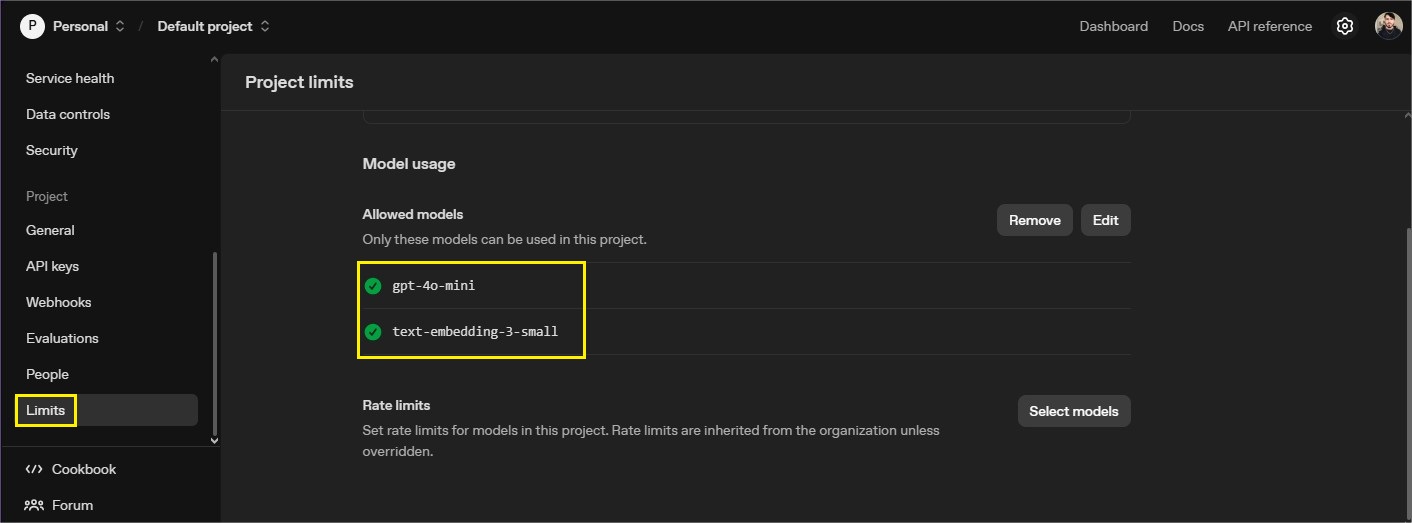
You can use other models of your choice, but other libraries and additional configurations may be necessary.
So, to create the sample application and download the packages you can use the following commands on the terminal:
dotnet new web -o ReturnPolicy
dotnet add package Microsoft.Data.Sqlite --version 9.0.10
dotnet add package OpenAI --version 2.5.0
Next, let’s create the single model class used in the application, it will be used to request the data. So, create a new folder called “Models” and, inside it, add the following record:
namespace ReturnPolicy.Models;

public record QuestionRequest(string Question);
Creating the Return Policy File
Now let’s create a text file that will serve as the knowledge base to be sent to the model to formulate the response. It will contain a common example of a return policy. Create a new folder called “Data” and, inside it, create a file called return_policy.txt and add to it the following text:
Return Policy - Updated July 2025

Our customers may return most new, unopened items within 30 days of delivery for a full refund.
Products that are defective or damaged can be returned or exchanged at any time.

To be eligible for a return:

- The product must be in the same condition as received.
- Proof of purchase is required.
- Returns after 30 days are subject to manager approval.

Please contact our support team before sending any returns.
Creating the Logic for Generating the Response
Now, let’s create the logic to generate, register and retrieve the embeddings, as well as formulate the response generated by the model.
Create a new folder called “Service” and, inside it, add the class below.
Note that we will first create the class and throughout the post we will add methods to it until it is complete. This is intended to explain each method separately for better understanding.
using Microsoft.Data.Sqlite;
using OpenAI;
using OpenAI.Chat;
using OpenAI.Embeddings;

namespace ReturnPolicy.Services
{
    public class PolicyService
    {
        private readonly ChatClient _chatClient;
        private readonly EmbeddingClient _embeddingClient;
        private readonly string _policyPath;
        private readonly string _dbPath;

        public PolicyService(IConfiguration config)
        {
            var apiKey = config["OpenAI:ApiKey"];

            if (string.IsNullOrWhiteSpace(apiKey))
                throw new InvalidOperationException("Missing OpenAI:ApiKey in configuration.");

            var client = new OpenAIClient(apiKey);

            _chatClient = client.GetChatClient("gpt-4o-mini");
            _embeddingClient = client.GetEmbeddingClient("text-embedding-3-small");

            _policyPath = Path.Combine(Directory.GetCurrentDirectory(), "Data", "return_policy.txt");
            _dbPath = Path.Combine(Directory.GetCurrentDirectory(), "Data", "embeddings.db");

            InitializeDatabase();
            LoadPolicyIntoDatabaseAsync().Wait();
        }
    }
}
Here we are using the PolicyService class to integrate the application with the OpenAI API and prepare the necessary data to work with RAG.
At the beginning, four private fields are declared: _chatClient and _embeddingClient are responsible for communicating with the OpenAI API. The first handles the chat model (in this case, gpt-4o-mini), while the second works with the embeddings model.
Meanwhile, _policyPath stores the path to the text file containing the return policy we created earlier, and _dbPath indicates the location where the SQLite database will be created.
The class constructor starts by reading the OpenAI API key from the application’s configuration file. If the key is not present, an exception is thrown indicating that it is required. Then, an OpenAIClient object is created, which serves as an access point to the different OpenAI services.
With this client, two components are initialized: the _chatClient, which will be used to generate intelligent responses, and the _embeddingClient, which will handle the creation of the text embeddings for the policy. After that, we define the paths of the data files, so that both the original text and the embeddings database are stored within the project’s Data folder.
Finally, two important actions are performed: InitializeDatabase() to prepare the SQLite database, creating the necessary tables if they do not already exist, and LoadPolicyIntoDatabaseAsync().Wait(), which reads the content of the return policy file, generates the embeddings and saves them to the database for later use.
Now, let’s create the methods to insert and retrieve the embeddings from the database. In the PolicyService class, add the methods below:
private void InitializeDatabase()
{
    using var conn = new SqliteConnection($"Data Source={_dbPath}");
    conn.Open();

    var cmd = conn.CreateCommand();
    cmd.CommandText = @"CREATE TABLE IF NOT EXISTS PolicyChunks (
                        Id INTEGER PRIMARY KEY AUTOINCREMENT,
                        Text TEXT NOT NULL,
                        Embedding BLOB NOT NULL
                        );";
    cmd.ExecuteNonQuery();
}

private async Task LoadPolicyIntoDatabaseAsync()
{
    var policyText = await File.ReadAllTextAsync(_policyPath);
    var chunks = SplitIntoChunks(policyText, 500);

    using var conn = new SqliteConnection($"Data Source={_dbPath}");
    conn.Open();

    foreach (var chunk in chunks)
    {
        var checkCmd = conn.CreateCommand();

        checkCmd.CommandText = "SELECT COUNT(*) FROM PolicyChunks WHERE Text = $text";

        checkCmd.Parameters.AddWithValue("$text", chunk);

        bool exists = Convert.ToInt32(checkCmd.ExecuteScalar()) > 0;

        if (exists) continue;

        try
        {
            var embeddingResult = await _embeddingClient.GenerateEmbeddingAsync(chunk);

            float[] vector = embeddingResult.Value.ToFloats().ToArray();

            var insertComand = conn.CreateCommand();

            insertComand.CommandText = "INSERT INTO PolicyChunks (Text, Embedding) VALUES ($text, $embedding)";

            insertComand.Parameters.AddWithValue("$text", chunk);
            insertComand.Parameters.AddWithValue("$embedding", FloatArrayToBytes(vector));

            insertComand.ExecuteNonQuery();
        }
        catch (Exception ex)
        {
            Console.WriteLine(ex.Message);
        }
    }
}
Here, the InitializeDatabase() method creates the basic structure of the SQLite database, if it doesn’t already exist. First, it establishes a connection to the file defined in _dbPath, which is the same path configured in the class constructor. Then, it opens this connection and executes an SQL command responsible for creating the table PolicyChunks.
Note that the table consists of three columns: Id for the primary key, Text, which will store the text segment (or chunk) extracted from the policy file, and Embedding, a BLOB (Binary Large Object), that is, a binary field where the numerical vector that semantically represents that text segment will be stored. This means that the database is ready to receive and store the text data and their respective embeddings.
The LoadPolicyIntoDatabaseAsync() method is responsible for loading the policy content and saving its embeddings to the database.
First, it reads the entire content of the policy file, located at _policyPath, and then divides it into smaller parts using the SplitIntoChunks() method. This division is important because OpenAI’s language models have input size limits. Therefore, the text is broken into blocks of up to 500 characters or tokens.
Then, a new connection to the database is opened, and each text segment (chunk) is processed. For each segment, it checks if the content is already stored in the table. This is done through a query that counts how many records have the same text. If the segment already exists, it is ignored to avoid duplication.
When a new segment is found, the method requests the OpenAI embeddings model to generate a numerical vector representing the meaning of that text. The result is then converted to a float array, which is then transformed into bytes using the FloatArrayToBytes() method, to be compatible with the BLOB type of the database.
Finally, the vector and the text are inserted together into the PolicyChunks table.
If any error occurs during the process, such as a communication failure with the API, for example, the exception is displayed in the console, allowing processing to continue with the remaining segments.
Now let’s add the most important part of the service, where the intelligent search and generation of responses based on the company’s return policy takes place. So, add the following code to the PolicyService class:
public async Task<string> GetAnswerAsync(string question)
{
    var queryEmbedding = await _embeddingClient.GenerateEmbeddingAsync(question);
    var queryVector = queryEmbedding.Value.ToFloats().ToArray();

    var topChunks = GetTopChunks(queryVector, 3);

    var context = string.Join("\n\n", topChunks);

    List<ChatMessage> messages = new()
    {
        ChatMessage.CreateSystemMessage("You are a helpful assistant that answers based on company return policies."),
        ChatMessage.CreateUserMessage($"Use only the following policy text to answer the question:\n\n{context}\n\nQuestion: {question}")
    };

    var response = await _chatClient.CompleteChatAsync(messages);
    return response.Value.Content[0].Text.Trim();
}

private List<string> GetTopChunks(float[] queryEmbedding, int topN)
{
    using var conn = new SqliteConnection($"Data Source={_dbPath}");
    conn.Open();

    var selectCmd = conn.CreateCommand();

    selectCmd.CommandText = "SELECT Text, Embedding FROM PolicyChunks";

    using var reader = selectCmd.ExecuteReader();

    var scoredChunks = new List<(string Text, double Score)>();

    while (reader.Read())
    {
        var text = reader.GetString(0);
        var embeddingBytes = (byte[])reader["Embedding"];
        var embedding = BytesToFloatArray(embeddingBytes);

        var similarity = CosineSimilarity(embedding, queryEmbedding);
        scoredChunks.Add((text, similarity));
    }

    return scoredChunks
        .OrderByDescending(x => x.Score)
        .Take(topN)
        .Select(x => x.Text)
        .ToList();
}

private static IEnumerable<string> SplitIntoChunks(string text, int maxLength)
{
    for (int i = 0; i < text.Length; i += maxLength)
        yield return text.Substring(i, Math.Min(maxLength, text.Length - i));
}

private static double CosineSimilarity(float[] v1, float[] v2)
{
    double dot = 0.0, mag1 = 0.0, mag2 = 0.0;
    for (int i = 0; i < v1.Length; i++)
    {
        dot += v1[i] * v2[i];
        mag1 += v1[i] * v1[i];
        mag2 += v2[i] * v2[i];
    }
    return dot / (Math.Sqrt(mag1) * Math.Sqrt(mag2));
}

private static byte[] FloatArrayToBytes(float[] array)
{
    var bytes = new byte[array.Length * sizeof(float)];
    Buffer.BlockCopy(array, 0, bytes, 0, bytes.Length);
    return bytes;
}

private static float[] BytesToFloatArray(byte[] bytes)
{
    var floats = new float[bytes.Length / sizeof(float)];

    Buffer.BlockCopy(bytes, 0, floats, 0, bytes.Length);
    return floats;
}
Now, let’s analyze each method:
1. GetAnswerAsync(string question)
This method receives the user’s question and returns an AI-generated answer based on the policy content stored in the database.
First, it transforms the question into an embedding vector, using the same embedding model configured previously. This numerical vector (queryVector) represents the semantic meaning of the question.
Next, the method calls GetTopChunks(), which searches the database for the chunks most similar to the meaning of the question, i.e., the parts of the policy that contain information relevant to the answer. It requests the three most relevant chunks (topChunks), and then combines these texts into a single string called context.
With the context ready, the method assembles a list of messages to send to the chat model. The first message is an instruction, stating that the assistant should only answer based on the company policy. The second message contains both the policy text and the user’s original question.
Finally, the code calls the CompleteChatAsync() method of the OpenAI client, which returns a generated response based on the provided context. The final text is extracted, cleaned and then returned.
2. GetTopChunks(float[] queryEmbedding, int topN)
This method identifies which chunks in the database are most semantically similar to the question asked.
It opens a connection to the SQLite database and reads all records from the PolicyChunks table, which contains the texts and their embeddings.
For each record, it calculates the cosine similarity between the query vector (queryEmbedding) and the stored text vector. This calculation generates a number between 0 and 1; the closer to 1, the more similar the meaning between the two texts.
After calculating the scores, the method sorts the results in descending order and returns the topN most relevant chunks (in this case, three). These chunks will serve as the knowledge base for the model to answer correctly.
3. SplitIntoChunks(string text, int maxLength)
This method divides long texts into smaller parts, respecting a defined maximum size (for example, 500 characters).
It iterates through the original text and, in each iteration, returns a chunk that can be processed without exceeding the model’s token limit. It is essential to use techniques like this when working with large documents in RAG systems.
4. CosineSimilarity(float[] v1, float[] v2)
This method is the mathematical basis of the semantic search system. It calculates the angle between two vectors in the embedding space—the smaller the angle (or the larger the cosine), the closer the meanings of the texts represented by those vectors.
It is with this metric that the system determines which sections of the policy are most relevant to a specific question.
5. FloatArrayToBytes(float[] array) and BytesToFloatArray(byte[] bytes)
These two methods convert between arrays of numbers and bytes. Since SQLite does not have a native data type to store arrays of floats, the embeddings are converted into a binary format (BLOB) before being saved to the database. When they need to be used again, these bytes are converted back into an array of floats, preserving all the information of the original vector.
Adding the API Key
To access the OpenAI API, you need an API key. With the key in hand, add the following code to the application’s appsettings.json file:
"OpenAI": {
  "ApiKey": "YOUR_OPEN_AI_API_KEY"
},
Finally, in the Program class, add the following code:
using ReturnPolicy.Services;

var builder = WebApplication.CreateBuilder(args);

builder.Services.AddControllers();
builder.Services.AddEndpointsApiExplorer();
builder.Services.AddSingleton<PolicyService>();

var app = builder.Build();
app.UseStaticFiles();
app.MapControllers();

app.Run();
Running the Application and Testing the RAG
Now that everything is configured, we can run the application and test the endpoint that will generate the response. In this post, we’ll use Progress Telerik Fiddler Everywhere for this. Run the application and make the following request:
Route: POST - https://localhost:PORT/api/policy/ask
Body:
{
    "question": "Can I return an opened product?"
}
So the generated response will be something like this:
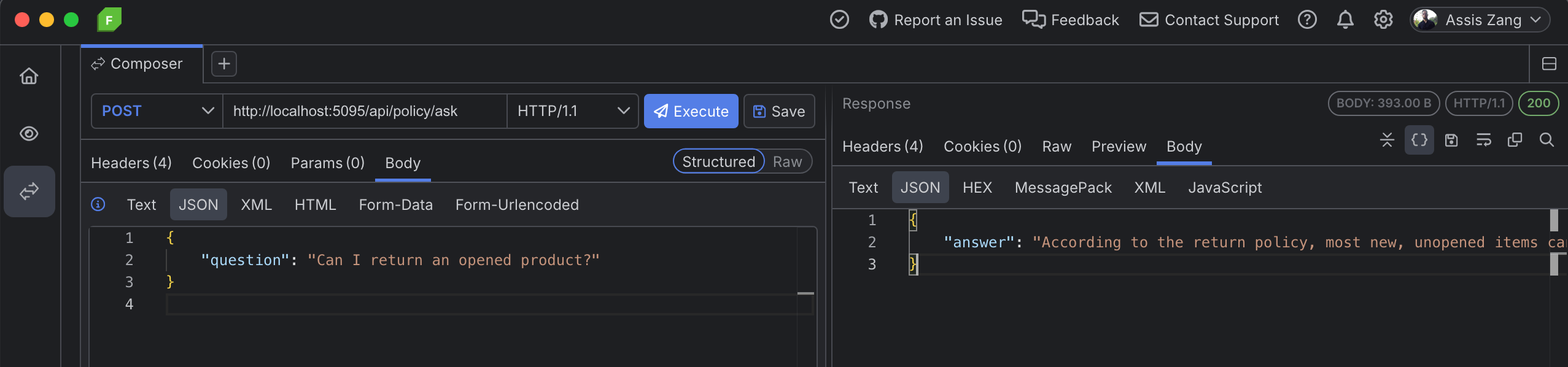
The complete response returned by the model was:
According to the return policy, most new, unopened items can be returned within 30 days for a full refund. If you have an opened product that is defective or damaged, it can be returned or exchanged at any time. If you need further assistance, please contact our support team.
Note that the answer provided by the model is aligned with the policy, which states that new and unused items can be returned within 30 days. Furthermore, it demonstrates clarity and objectivity by directly addressing the user’s question, conveying confidence and concern for the customer, which contributes to a good support experience.
Conclusion
The RAG technique allows for the generation of contextualized and intelligent responses, integrating the retrieval of relevant information with advanced synthesis capabilities. The responses produced by RAGs reduce ambiguities, improve the user experience and increase the reliability of interactions, especially in scenarios where document-based accuracy is essential.
In this post, we created a complete RAG system in ASP,NET Core, integrating it with OpenAI services for generating embeddings and producing contextualized responses. I hope this content serves as a practical reference, facilitating the adoption of the RAG technique whenever you have the opportunity to apply it in your projects.
If this all seems like a lot of work, there are professional RAG platforms you can explore, such as Progress Agentic RAG.
Progress Agentic RAG
Progress Agentic RAG is a RAG-as-a-Service platform that simplifies the creation of augmented reality (AR) retrieval and generation solutions. Instead of requiring proprietary infrastructure or multiple separate tools, it offers a ready-to-use environment for indexing documents, files and even videos, along with integrated metrics to evaluate RAG quality.
In practice, Progress Agentic RAG stands out for:
- Generative search for websites, which can interpret user intent and build responses using existing content on the page itself.
- Use in sensitive areas, such as the financial sector, supporting decision-making without compromising privacy and security.
- The ability to handle unstructured data, covering more than 60 formats: PDFs, videos, spreadsheets, texts, among others. This greatly helps teams like legal departments, who need quick and accurate answers.
- Intelligent video indexing, allowing the location of specific segments and generating responses based on audiovisual content.
For developers, Progress Agentic RAG functions as an intelligence layer that can be integrated with minimal effort. This reduces the need to build a RAG pipeline from scratch and accelerates the development of generative AI-based solutions.
Keep reading: Understand more about RAG and get a walk-through of Progress Agentic RAG.
Related Posts
Comments
All articles
Topics
Web MobileMobile
Desktop
Design
Productivity
People