Data Fetching in Modern Angular

Summarize with AI:
See how data fetching has changed in Angular 21 with the resource API and httpResource API.
As I write this article, Angular 21.0 has been released, and it has changed the way data should be fetched in modern Angular apps. Usually, in an Angular application, data comes from an API and can be categorized as:
- Fetching data from the server
- Mutating data on the server
In modern Angular apps, there are two new signal-based ways to fetch data:
- resource API
- httpResource API
Both the resource and httpResource APIs serve the same purpose, but they differ in how they make HTTP requests. The resource API uses the browser’s native fetch function, while httpResource relies on Angular’s HttpClient service to perform the request.
Since httpResource uses Angular’s built-in HttpClient, it automatically works with other Angular features such as interceptors.
To dive deeper, let us start by creating a model interface that represents the API response structure.
export interface IProduct{
    id:number;
    name : string;
    price : number;
    description?: string;
    cateogry?: string;
}
Now you can use the resource API to fetch data, as shown below. It really is this simple under the hood; it uses the browser’s native fetch API to perform the HTTP request.
   productApiResource = resource({
    loader: async () => {
      return fetch('http://localhost:3000/product').then(
        (res) => res.json() as Promise<IProduct[]>
      );
    },
  });
The Resource API returns a WritableResource and has read-only properties such as:
- value
- status
- error
- isLoading
Besides the above read-only properties, it also has a hasValue() function to check whether the resource value property has any value or not.
You can use the value signal to read the data returned in a reactive context, in this case, a template as shown below:
<table>
    <tr>
        <th>Id</th>
        <th>Name</th>
        <th>Price</th>
        <th>description</th>
    </tr>
    @for(p of productApiResource.value();track p.id) {
    <tr>
        <td>{{p.id}}</td>
        <td>{{p.name}}</td>
        <td>{{p.price}}</td>
        <td>{{p.description}}</td>
    </tr>
    }
</table>
Using the httpResource, you can fetch data from the API as shown in the following code listing.
productApiResource = httpResource<IProduct[]>(() => ({
    url: `http://localhost:3000/product`,
    method: 'GET'
  }));
Here, we are passing the URL and the HTTP method (GET) to fetch the data. Like the Resource API, the httpResource API returns a WritableResource and has read-only properties such as:
- value
- status
- error
- isLoading
In the same way you use the resource API, you can also use the httpResource API within a reactive context, for example, inside the template, as shown below.
<table>
    <tr>
        <th>Id</th>
        <th>Name</th>
        <th>Price</th>
        <th>description</th>
    </tr>
    @for(p of productApiResource.value();track p.id) {
    <tr>
        <td>{{p.id}}</td>
        <td>{{p.name}}</td>
        <td>{{p.price}}</td>
        <td>{{p.description}}</td>
    </tr>
    }
</table>
The primary purposes of both the resource and httpResource APIs are as follows, but they are most often used to fetch data from the server.
- Fetch data from the API
- Update data locally
- Asynchronously load local resource
Neither of these APIs should be used for server mutations. In other words, avoid using them for HTTP operations like POST, PUT or DELETE. They are intended only for GET requests. However, suppose you have API endpoints that return data via a POST request without actually mutating data on the server. In that case, you can safely use these APIs for that purpose as well.
As the resource and httpResource APIs return various signal-based read-only properties, they can be read and tracked within reactive contexts, effects and computed values.
constructor() {
    effect(() => {
      console.log('Product Resource Data has value ', this.productApiResource.hasValue());
      console.log('Product Resource Data ', this.productApiResource.value());
      console.log('Product Resource Staus  ', this.productApiResource.status());
      console.log('Product Resource Error ', this.productApiResource.error());
      console.log('Product Resource is Loading  ', this.productApiResource.isLoading());

    })

  }

  productApiResource = resource({
    loader: async () => {
      return fetch('http://localhost:3000/product').then(
        (res) => res.json() as Promise<IProduct[]>
      );
    },
  });
Angular prints values as below:
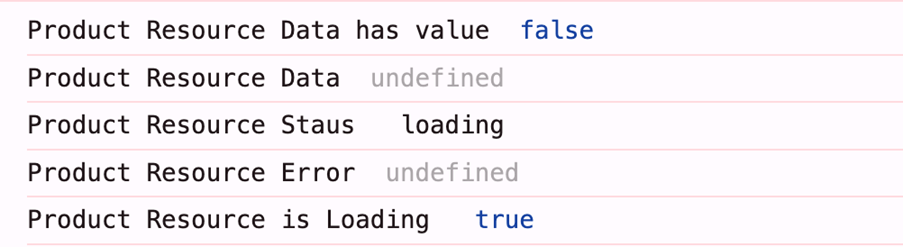
Once the resource is resolved, its properties’ values are updated, and, because they are signals, the updated values are automatically picked up inside the effect.

As you can see, the status value changes from loading to resolved. Both the resource and httpResource APIs provide these status values as strings.
- idle – The resource has no valid request and will not perform any loading. Here,
value()is undefined. - loading – The resource is currently loading a new value. Here,
value()is undefined. - reloading – The resource is currently reloading the new value. Here,
value()is the previously fetched value. - error – The resource failed to load the value. Here,
value()is undefined. - resolved – The resource has completed loading. Here,
value()is returned from the loader. - local – The resource value was set locally by
set()orupdate().
You can also use these properties to compute other values. For example, if you need to calculate the total price of all products, you can do it as shown below.
  totalPrice = computed(() => {
    if (this.productApiResource.hasValue()) {
      let products = this.productApiResource.value() || [];
      return products.reduce((sum, product) => sum + product.price, 0);
    }
    return 0;
  });
You can use the totalPrice computed signal on the template:
<h2>Total Price of Product = {{totalPrice()}}</h2>
The same explanation applies to httpResource as well, since it is built on top of resource.
Sometimes you may need to pass parameters to a resource. For example, if you want to fetch a specific product from the API, you will need to pass its id. To support this, the resource API accepts an optional params argument that lets you provide these values.
sProduct = signal(1);

  selectedProductApiResource: any = resource({
    params: () => ({ id: this.sProduct() }),
    loader: async ({ params }) => {
      let id = params.id;
      return fetch('http://localhost:3000/product/' + id).then(
        (res) => res.json() as Promise<IProduct>
      );
    },
  });

selectProduct(id: number) {
    this.sProduct.set(id);
  }
Angular tracks the params, so whenever any signal used inside them changes, Angular automatically reruns the resource loader. This is why it’s a good practice to pass parameters as signal-based values through params.
You can use the selected product using the selectedProductApiResource as shown below:
<h2>Selected Product Details</h2>
@if(selectedProductApiResource.hasValue()){
    <div>
        <b>Id:</b> {{selectedProductApiResource.value()?.id}} <br/>
        <b>Name:</b> {{selectedProductApiResource.value()?.name}} <br/>
        <b>Price:</b> {{selectedProductApiResource.value()?.price}} <br/>
        <b>Description:</b> {{selectedProductApiResource.value()?.description}} <br/>
    </div>
}
You should avoid reading signal-based inputs directly inside the loader, because the loader itself is not tracked. Even if the signal value changes, Angular will not rerun the loader. As a result, the code below will not fetch the product for the selected ID.
  selectedProductApiResource: any = resource({
    loader: async ({ params }) => {
      return fetch('http://localhost:3000/product/' + this.sProduct()).then(
        (res) => res.json() as Promise<IProduct>
      );
    },
  });
The Angular resource API does not automatically handle API errors. For example, if you request an ID that doesn’t exist and the API returns a 404, the error property will remain undefined.
selectedProductApiResource: any = resource({
    params: () => ({ id: this.sProduct() }),
    loader: async ({ params }) => {
      // let id = params.id;
      let id = 340399 // setting random ID to simulate api error
      return fetch('http://localhost:3000/product/' + id).then(
        (res) => res.json() as Promise<IProduct>
      );
    },
  });
Then print different properties in the effect.
  constructor(){
    effect(() => {
      console.log('selected product data -', this.selectedProductApiResource.value());
      console.log('selected product status -', this.selectedProductApiResource.status());
      console.log('selected product error -', this.selectedProductApiResource.error());
      console.log('selected product is loading -', this.selectedProductApiResource.isLoading());
    });
  }
As you see, the error remains undefined and the resource resolves successfully.
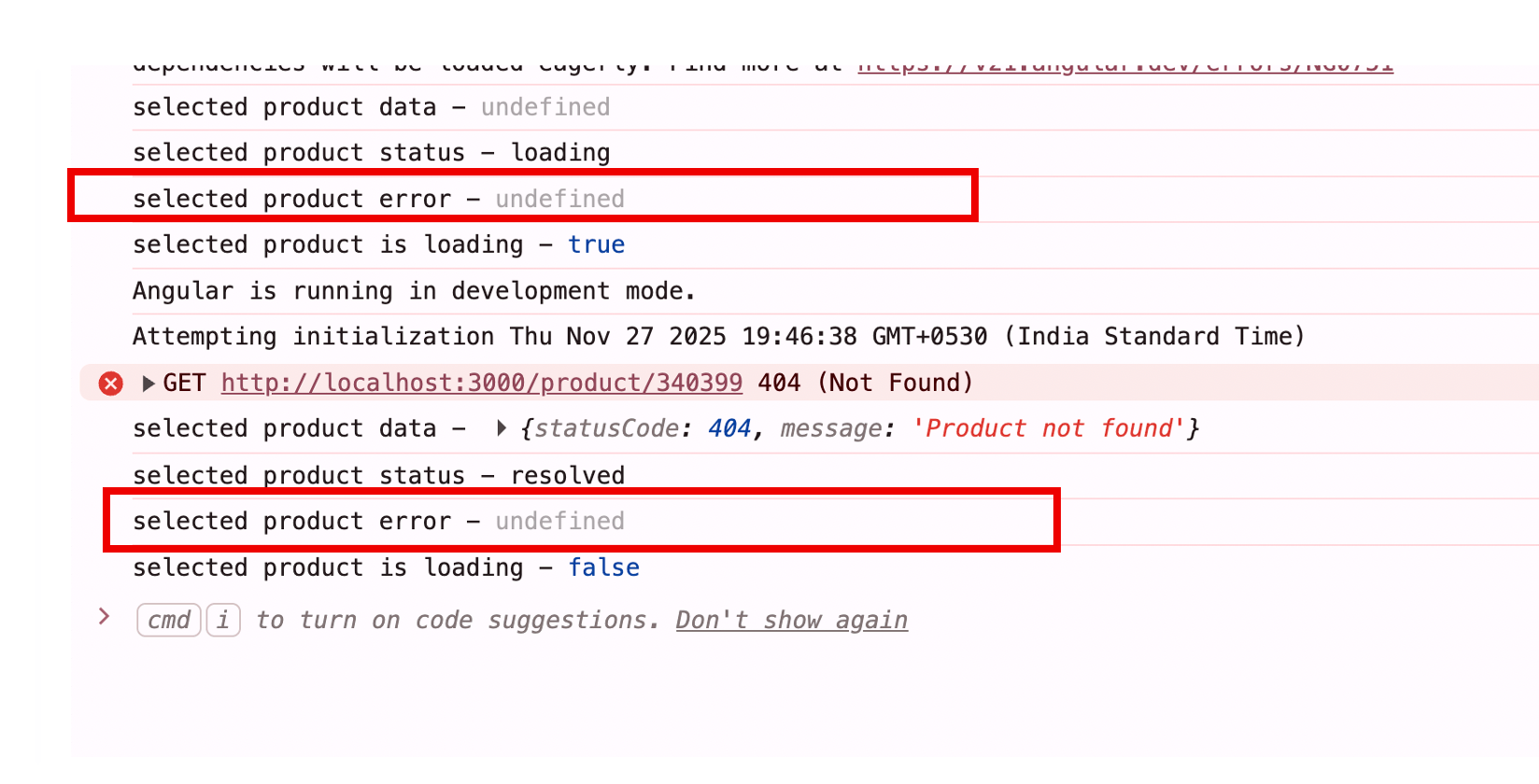
So, you should handle API errors separately and avoid relying on the error value returned by the resource API. However, any promise rejection will still be reflected in the resource’s error status. To see this in action, let’s throw a promise error as shown below.
selectedProductApiResource: any = resource({
    params: () => ({ id: this.sProduct() }),
    loader: async ({ params }) => {
      // let id = params.id;
      let id = 340399 // setting random ID to simulate api error
      return Promise.reject(new Error(`Promise rejected for ID: ${params.id}`));
    },
  });
In effect, you will see that the error value is set as shown below:
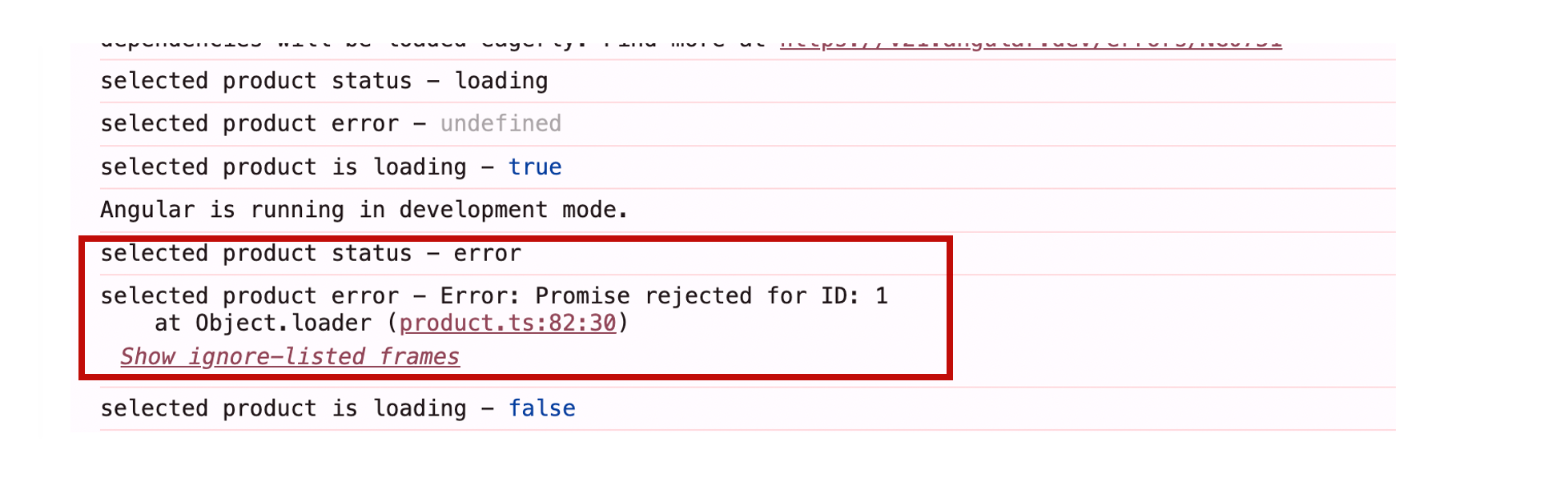
One important thing to remember is that if a resource is in an error state and you try to read its value() property, Angular will throw a runtime error. So it’s always best practice to read a resource’s value only after checking hasValue(), as shown below.
constructor(){
    effect(() => {
      if(this.selectedProductApiResource.hasValue()){
        console.log('selected product data -', this.selectedProductApiResource.value());
      }
    });
  }
More About httpResource API
The httpResource extends the Resource API by using the HttpClient under the hood.
- The httpResource is built on top of the resource primitive.
- It uses HttpClient as its loader, whereas the Resource API uses fetch.
- It makes HTTP requests via Angular’s HTTP stack, so it works with interceptors and related features.
You can create a httpResource using the httpResource function as shown below:
  productApiResource = httpResource<IProduct[]>(() => ({
    url: `http://localhost:3000/product`,
    method: 'GET'
  }));
The httpResource function creates a Resource that fetches data using an HTTP GET request and automatically updates when the URL changes through signals. It uses HttpClient, so it supports interceptors, testing tools and all HttpClient features. The response is parsed as JSON by default, with options like httpResource.text() for alternate parsing.
Let’s look at how you can use httpResource effectively to fetch data and bind it to a component.
The first thing is to create the httpResource inside an Angular service as shown below:
export class ProductService {

  productApiResource = httpResource<IProduct[]>(() => ({
    url: `http://localhost:3000/product`,
    method: 'GET'
  }));

}
Next, in the component, read the value signal from the httpResource inside a computed signal, as shown below.
@Component(
{...}
)
export class Product {

  productService = inject(ProductService);
  products = computed(() => {
    if (this.productService.productApiResource.hasValue()) {
      return this.productService.productApiResource.value()
    }
    return [];
  });
On the template, render the fetched response as shown below.
<table>
    <tr>
        <th>Id</th>
        <th>Name</th>
        <th>Price</th>
        <th>description</th>
    </tr>
    @for(p of products();track p.id) {
    <tr>
        <td>{{p.id}}</td>
        <td>{{p.name}}</td>
        <td>{{p.price}}</td>
        <td>{{p.description}}</td>
        <td><button (click)=" select(p.id)">select</button></td>
    </tr>
    }
</table>
We have added a Select button to choose a specific product. To support this in the service:
- Add a signal to store the selected product’s ID.
- Add a resource that fetches the selected product based on that ID.
  public selectedProduct: WritableSignal<number> = signal<number>(1);

   selectedProductApiResource  = httpResource<IProduct>(() => ({
    url: `http://localhost:3000/product/${this.selectedProduct()}`,
    method: 'GET',
  }));
Then, in the component, set the selected ID and read the selected product through a computed signal.
  selectedProduct = computed(() => {
    if (this.productService.selectedProductApiResource.hasValue()) {
      return this.productService.selectedProductApiResource.value()
    }
    return null;
  });

  select(id: number) {
    this.productService.selectedProduct.set(id);
  }
You may also notice that, unlike a resource, httpResource automatically tracks any signals used in the URL. Since the ID is part of the URL, each time the ID changes, httpResource triggers a new API call. On the template, the selected product can be displayed as shown below.
<h2>Selected Product Details</h2>

    <div>
        <b>Id:</b> {{selectedProduct()?.id}} <br/>
        <b>Name:</b> {{selectedProduct()?.name}} <br/>
        <b>Price:</b> {{selectedProduct()?.price}} <br/>
        <b>Description:</b> {{selectedProduct()?.description}} <br/>
    </div>
This is how you can use httpResource to fetch data from an API and consume it in a component.
By default, httpResource parses the response as JSON. To handle other data types, it provides dedicated methods for other response types. They are as follows:
- httpResource.text fetches data as plain text
- httpResource.blob fetches as a blob
- httpResource.arrayBuffer fetches data as an ArrayBuffer
For example, you can download an image blob using the httpResource as shown below:
imageName: WritableSignal<string> = signal<string>('a.png');
  imageResource = httpResource.blob<any>(() => ({
    url: `http://localhost:3000/product/image/${this.imageName()}`,
    method: 'GET',
    type: 'blob'
  }));
Then, in the component, read the image blob in the computed signal.
  productImage = computed(() => {
    if (this.productService.imageResource.hasValue()) {
      let blob = this.productService.imageResource.value();
      console.log('Blob Image ', blob);
      return URL.createObjectURL(blob);
    }
    return null;
  });
Then, in the template, use the computed signal as the source of an image:
<img [src]="productImage()" />
For advanced requests, the httpResource API supports a request object with several fields. Among them, only the URL is required—all other fields are optional.
- url
- method
- body
- params
- headers
- context
- reportProgress
- withCredentials
- transferCache
- timeOut
- Etc.
Although the httpResource object supports other verbs, such as POST, PUT and DELETE, it is advisable to use the httpResource API only to fetch data from the backend and not to perform mutations using other HTTP verbs.
Summary
In modern Angular, where reactivity is powered by signals, resource and httpResource should be used to fetch data from APIs. These two APIs, combined with deferred views, form the foundation of building robust, modern Angular applications.
I hope you found this article helpful. Thanks for reading.

Dhananjay Kumar
Dhananjay Kumar is the founder of nomadcoder, an AI-driven developer community and training platform in India. Through nomadcoder, he organizes leading tech conferences such as ng-India and AI-India. He partners with startups to rapidly build MVPs and ship production-ready applications. His expertise spans Angular, modern web architecture and AI agents, and he is available for training, consulting or product acceleration from Angular to API to agents.
Related Posts
Comments
All articles
Topics
Web MobileMobile
Desktop
Design
Productivity
People