10 Answers, 1 is accepted

Thanks for contacting us. Currently, RadRibbonForm is not designed to be used as a MDI child form. It's main functionality is to provide Office 2007 like appearance for all top level forms in your application. I hope this answers your questions.
Do not hesitate to write back anytime you have further questions or need assistance.
All the best,
Deyan
the Telerik team
Do you want to have your say when we set our development plans? Do you want to know when a feature you care about is added or when a bug fixed? Explore the Telerik Public Issue Tracking system and vote to affect the priority of the items.

 Rank 1
Rank 1
Rank 1
Can Rad Ribbon Form be used as MDI Form?
Regards

 Rank 2
you can use RadRibbonForm as an MDI Container by setting IsMDIContainer = true and then deleting the Panel1 which is in the centre of the form.
Hope that helps
Richard
 Rank 2
I try (in a WPF project) to had the IsMDIContainer = true to my RadRibbonForm and I always get an error....Could you help me?
Error 1 The property 'IsMDIContainer' was not found in type 'RadRibbonWindow'.
Please address your questions related to Windows Presentation Foundation technology in the WPF Forum section.
Best wishes,Svett
the Telerik team
Thank you for being the most amazing .NET community! Your unfailing support is what helps us charge forward! We'd appreciate your vote for Telerik in this year's DevProConnections Awards. We are competing in mind-blowing 20 categories and every vote counts! VOTE for Telerik NOW >>
Rank 1
I found the RadMenuItem that I can set MdiList to true - that's what I did on the first picture. But it does not show any items at run time when I open children..May be I need to set some other properties on in the code ??
.Also I can not find this option on the Ribbon menu ..
I want to have something like this:
Thank you ,
Victoria.
The MdiList menu item is intended to work only in the context of RadMenu, following the behavior of the standard menu control. You can see at the screenshot below, what effect the MdiList property has on the "MDI List 1" accommodated by RadMenu:
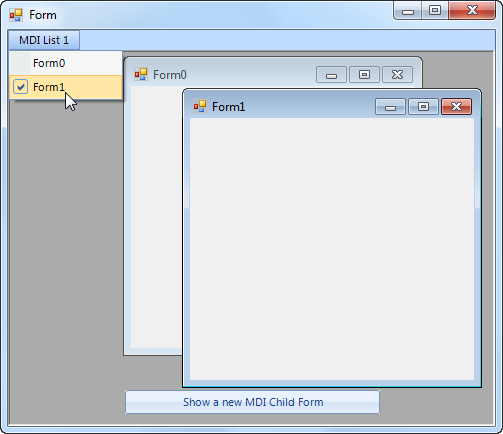
There is no implementation for this feature in the context of the menu in RadRibbonBar. We will consider introducing such a feature in one of our next releases. I am not able to provide you with any time frame though. For the time being, you can try to simulate the desired behavior by following the approach demonstrated in the attached project.
I hope this helps.
Nikolay
the Telerik team
Q3’11 of RadControls for WinForms is available for download (see what's new). Get it today.
Rank 1

Thank you for writing.
This is still not implemented and for now you can use the approach suggested by Nikolay. I have logged a feature request for this in our Feedback Portal. You can track the item for status changes and add your vote for it here.
Please let me know if there is something else I can help you with.
Dimitar
Telerik
Check out the Telerik Platform - the only platform that combines a rich set of UI tools with powerful cloud services to develop web, hybrid and native mobile apps.