React Basics: Memoization in React

Summarize with AI:
Don’t let re-rendering hamstring your React app: memoize! Learn when and how to memorize to improve the performance of your React app.
If you’ve ever worked on a React app that started out snappy and slowly turned sluggish as it grew, you’ve probably run into one of React’s classic performance puzzles—re-renders.
You click a button, update a state and suddenly half your component tree decides to re-render itself. Now, the UI works fine, but something feels off. Things start to lag. And before long, you’re Googling “why is my React component re-rendering” for the 10th time that week.
That’s where memoization steps in. It’s one of those optimization tools that, once you understand it, gives you control over when your components and calculations actually update, instead of letting React do it blindly.
But if you’ve ever tried to optimize performance in a large React app, you know how easy it is to overdo it. Suddenly, your code is buried under layers of memo hooks, dependency arrays and “why isn’t this memoized” comments. Performance tuning starts to feel like superstition; sometimes it helps, sometimes it hurts, and often it just adds noise.
In this deep dive, we will unpack how memoization really works in React and how the landscape is changing with React 19’s compiler, which is rewriting the rules entirely. By the end, you’ll not only understand memoization, but you’ll also know when to stop worrying about it and finally how React 19 is making manual memoization almost obsolete.
Why Memoization Matters
React’s rendering model is simple but aggressive. Whenever a parent component re-renders, its children will usually re-render too, even if their props haven’t changed. Most of the time, this is fine. But when your components grow complex or involve expensive computations (such as filtering, sorting or formatting data), unnecessary renders start to accumulate.
Let’s say you have a large list of users, and every time you type in a search box, the entire list recalculates and re-renders. Even if only one prop changed, React doesn’t know whether the results are the same, so it plays it safe and re-renders everything.
Memoization helps fix that by letting React remember what didn’t change.
What Is Memoization, Exactly?
Memoization is just a fancy term for caching the result of a function so you don’t recompute it unnecessarily.
Here’s a plain JavaScript example to show what it means:
function slowSquare(n) {
  console.log('Computing...');
  return n * n;
}

slowSquare(4); // "Computing..." → 16
slowSquare(4); // "Computing..." → 16 again
Every call recalculates. Now let’s memoize it:
const cache = {};
function memoizedSquare(n) {
  if (cache[n]) return cache[n];
  console.log('Computing...');
  cache[n] = n * n;
  return cache[n];
}
memoizedSquare(4); // "Computing..." → 16
memoizedSquare(4); // (no log) → 16 from cache
The second time, it skips the heavy work because the inputs haven’t changed.
That’s all memoization is. It’s a performance optimization that remembers past results based on inputs.
React applies this same concept to rendering and state updates. React’s job is to re-render your UI when state or props change. But sometimes, it’s re-rendering too much. So React gives us three tools to take control of this:
React.memo– memoizes componentsuseMemo– memoizes valuesuseCallback– memoizes functions
Each one targets a different kind of unnecessary work. Let’s go through them one by one.
React.memo: Memoizing Components
When a parent component re-renders, all its children re-render by default, even if their props are identical. React.memo changes that.
It wraps a functional component and tells React:
“If the props are the same as last time, skip re-rendering.”
Here’s an example:
const TodoCard = React.memo(function TodoCard({ name }) {
  console.log('Rendering:', name);
  return <div>{name}</div>;
});
If you render multiple TodoCard components inside a parent that re-renders often, you’ll notice only the ones with changed props actually re-render.
function TodoList({ todos }) {
  return (
    <div>
      {todos.map(todo => (
        <TodoCard key={todo.id} name={todo.name} />
      ))}
    </div>
  );
}
If the todos array reference stays the same, React.memo will prevent redundant renders.
Shallow Comparison Caveat
React.memo uses a shallow comparison for props. That means if you pass a new object or array each time (even with the same contents), React will still think it changed:
<TodoCard todo={{ name: “Write React Article” }} /> // new object every render
In that case, memoization won’t help unless you also memoize the object reference with useMemo or stabilize it in another way.
useMemo: Memoizing Expensive Calculations
Sometimes, the performance hit doesn’t come from re-renders—it comes from recalculations inside the render function. That’s what useMemo is for.
useMemo lets you cache a computed value between renders, only recomputing when its dependencies change.
const cachedValue = useMemo(calculateValue, dependencies)
To cache a calculation between re-renders, wrap it in a useMemo call at the top level of your component:
import { useMemo } from 'react';
function TodoApp() {
…
const filteredTodos = useMemo(() => {
    console.log("Filtering todos...");
    return todos.filter(todo =>
      todo.text.toLowerCase().includes(search.toLowerCase())
    );
  }, [todos, search]);
...
}
When using useMemo, you need to pass two things:
- A
calculation functiontakes no arguments, like() =>, and returns what you wanted to calculate. - A
list of dependenciesincluding every value within your component that’s used inside your calculation.
On the initial render, React runs that calculation and stores the result.
On every subsequent render, React compares the current dependencies to the ones from the previous render (using Object.is for comparison).
- If none of the dependencies have changed, React simply returns the previously cached value—it doesn’t rerun the calculation.
- If at least one dependency has changed, React re-executes the function, updates the stored result and returns the new value.
In short, useMemo remembers the result of a computation between renders and only recalculates it when one of its dependencies changes. It’s React’s way of saying, “I’ve already done this work. Unless something important changed, let’s not do it again.”
Example: Optimizing a Filtered Todo List with useMemo
Let’s look at a simple example where useMemo actually makes a difference—a Todo list with a search filter.
Without useMemo, every time the component re-renders (even when unrelated state changes), your filter logic will run again. That’s fine for small data, but as your list grows, it can start to slow things down unnecessarily.
Here’s the straightforward version first:
function TodoApp() {
  const [search, setSearch] = useState("");
  const [todos, setTodos] = useState([
  { id: 0, name: "Todo 1", done: false },
  { id: 1, name: "Todo 2", done: true},
  { id: 2, name: "Todo 3", done: false },
  ]);

  const filteredTodos = todos.filter(todo =>
    todo.text.toLowerCase().includes(search.toLowerCase())
  );
  return (
    <div>
      <input
        type="text"
        placeholder="Search todos..."
        value={search}
        onChange={e => setSearch(e.target.value)}
      />
      <ul>
        {filteredTodos.map(todo => (
          <li key={todo.id}>{todo.text}</li>
        ))}
      </ul>
    </div>
  );
}
This works, but notice what happens when you type in the search box or add a new todo: React reruns the entire component, including the todos.filter() call.
Now imagine you have hundreds or thousands of todos, or that the filter operation involves heavier logic. You don’t want to run that unnecessarily on every render.
Here’s where useMemo helps:
function TodoApp() {
  const [search, setSearch] = useState("");
  const [todos, setTodos] = useState([
    { id: 1, text: "Buy groceries", done: false },
    { id: 2, text: "Read a book", done: true },
    { id: 3, text: "Go for a walk", done: false },
  ]);

  const filteredTodos = useMemo(() => {
    console.log("Filtering todos...");
    return todos.filter(todo =>
      todo.text.toLowerCase().includes(search.toLowerCase())
    );
  }, [todos, search]);

  return (
    <div>
      <input
        type="text"
        placeholder="Search todos..."
        value={search}
        onChange={e => setSearch(e.target.value)}
      />

      <ul>
        {filteredTodos.map(todo => (
          <li key={todo.id}>{todo.text}</li>
        ))}
      </ul>
    </div>
  );
}
Now, the filter only runs when either todos or search changes. If you trigger a re-render for any other reason (say, toggling a modal or updating unrelated state higher up in the tree), React will reuse the cached filtered list from the previous render.
useMemo shines in situations like this when you’re doing expensive or repetitive calculations during render that don’t need to run every single time. It’s not about squeezing out microseconds; it’s about keeping your renders predictable and efficient as your app scales.
In this todo example, the difference is subtle, but in a real-world app where filtering, sorting or formatting can get complex, memoization can save a noticeable amount of work.
useCallback: Memoizing Functions for Stability
If useMemo helps React remember values, then `useCallback helps React remember functions.
At first,this might sound unnecessary—after all, functions are cheap to create, right? But in React, passing functions down as props can sometimes cause subtle and frustrating re-renders that you don’t expect.
The useCallback() hook is one of React’s built-in tools for optimizing re-renders. Its job is simple but powerful—it lets React remember your function definitions between renders, so they don’t get recreated every single time your component reruns.
In short, it memoizes the function itself.
Syntax:
const memoizedFunction = useCallback(() => {
  // Your logic here
}, [dependency1, dependency2, ...]);
The useCallback() hook takes two arguments:
- A function to memoize: This is the function you want React to remember. It can take any arguments and return any value.
- A dependency array: This lists every reactive value (state, props or variables) used inside that function. React will only recreate the function if one of those dependencies changes between renders.
Here’s what happens under the hood:
- On the first render, React creates and returns the function.
- On later renders, React checks if any dependencies have changed.
This simple mechanism keeps the function reference stable across renders, which is exactly what you want when passing callbacks to memoized child components.
Remember: Since useCallback is a hook, it must follow the rules of hooks. Call it only at the top level of a React component or custom hook, never inside loops, conditionals or nested functions.
Practical Example: Preventing Unnecessary Re-renders
Let’s bring this to life with a practical example.
Suppose you’re building a simple todo app that displays a list of tasks, with the ability to mark each one as done or undone.
Here’s the initial setup:
import React, { useState } from "react";

const TodoItem = React.memo(({ todo, onChange }) => {
  console.log(`Rendering ${todo.name} 😩`);
  return (
    <div>
      <span style={{ textDecoration: todo.done ? "line-through" : "none" }}>
        {todo.name}
      </span>
      <button onClick={() => onChange(todo.id)}>
        {todo.done ? "Undone" : "Done"}
      </button>
    </div>
  );
});

const demoTodos = [
  { id: 0, name: "Todo 1", done: false },
  { id: 1, name: "Todo 2", done: false },
  { id: 2, name: "Todo 3", done: false },
  { id: 3, name: "Todo 4", done: false },
];

const TodoList = () => {
  const [todos, setTodos] = useState(demoTodos);
  function toggleTodo(id) {
    setTodos(prevTodos =>
      prevTodos.map(todo =>
        todo.id === id ? { ...todo, done: !todo.done } : todo
      )
    );
  }

  return (
    <div>
      <h2>Today’s Todos</h2>
      <ul>
        {todos.map(todo => (
          <li key={todo.id}>
            <TodoItem todo={todo} onChange={toggleTodo} />
          </li>
        ))}
      </ul>
    </div>
  );
};
export default TodoList;
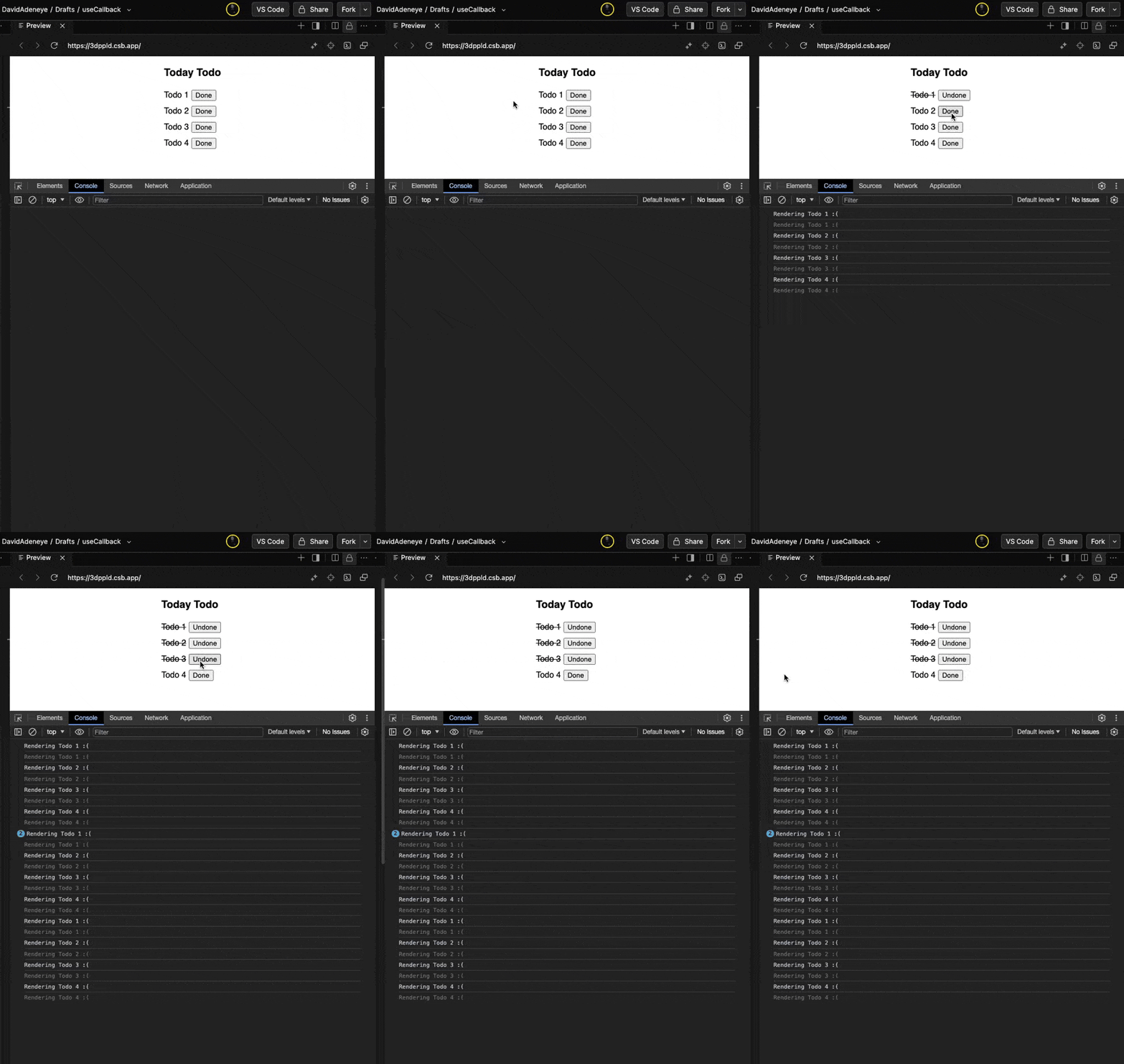
The TodoItem component is wrapped in React.memo, meaning it shouldn’t re-render unless its props change. But if you try this out, you’ll notice something strange—clicking the button causes every TodoItem to re-render, not just the one you toggled:
Why?
Because each time TodoList re-renders, React creates a brand-new toggleTodo function. From React’s perspective, that means the onChange prop on every child is now different, even if the logic is the same, so React.memo decides to re-render everything.
That’s exactly the kind of subtle inefficiency useCallback fixes.
Fixing it with useCallback
Let’s wrap the toggleTodo function in useCallback to make its reference stable:
import React, { useState, useCallback } from "react";
const TodoItem = React.memo(({ todo, onChange }) => {
  console.log(`Rendering ${todo.name} 😎`);
  return (
    <div>
      <span style={{ textDecoration: todo.done ? "line-through" : "none" }}>
        {todo.name}
      </span>
      <button onClick={() => onChange(todo.id)}>
        {todo.done ? "Undone" : "Done"}
      </button>
    </div>
  );
});
const demoTodos = [
  { id: 0, name: "Todo 1", done: false },
  { id: 1, name: "Todo 2", done: false },
  { id: 2, name: "Todo 3", done: false },
  { id: 3, name: "Todo 4", done: false },
];
const TodoList = () => {
  const [todos, setTodos] = useState(demoTodos);
  const toggleTodo = useCallback((id) => {
    setTodos(prevTodos =>
      prevTodos.map(todo =>
        todo.id === id ? { ...todo, done: !todo.done } : todo
      )
    );
  }, []);
  return (
    <div>
      <h2>Today’s Todos</h2>
      <ul>
        {todos.map(todo => (
          <li key={todo.id}>
            <TodoItem todo={todo} onChange={toggleTodo} />
          </li>
        ))}
      </ul>
    </div>
  );
};
export default TodoList;
Now, the toggleTodo function keeps the same reference between renders because its dependency array ([]) is empty. React creates it once and reuses it as long as the component stays mounted.
Since TodoItem receives a stable onChange prop, React.memo can finally do its job—only the toggled TodoItem re-renders, not the entire list.
In a small Todo app, this might feel like a micro-optimization. But in a real app, think of dozens of components, large lists or complex trees. Stabilizing your callbacks can prevent entire subtrees from re-rendering unnecessarily.
That’s not just about performance; it’s about keeping your app predictable, scalable and smooth.
Here’s the CodeSandbox demo if you want to play around with it. Try adding features like add, delete or edit, and see how useCallback helps control re-renders as your app grows.
When (and When Not) to Memoize
Memoization is powerful, but it’s not free. Every memoized value or component adds a bit of overhead. React needs to compare dependencies, store results and decide whether to reuse or recompute. Overusing it can actually make things slower or harder to read.
Use Memoization When:
- A component re-renders often with identical props.
- You’re doing expensive computations (sorting, filtering, formatting).
- You’re passing callbacks to deeply nested children wrapped in
React.memo
Avoid Memoization When:
- The component is small and cheap to render.
- Props change frequently anyway.
- You’re just memoizing out of habit.
In short: Measure first, optimize second. Don’t sprinkle memoization everywhere “just in case.”
React 19: Rethinking Memoization
Here’s where things get interesting. React 19 introduces several architectural improvements that make manual memoization far less critical than before. Under the hood, React’s new compiler can automatically memoize components and hooks at build time—analyzing your component’s dependencies and optimizing re-renders intelligently.
That means in most cases, you no longer need to reach for React.memo, useMemo or useCallback unless you’re dealing with very specific edge cases.
Here’s what changes:
- Automatic memoization: The React compiler now detects pure components and automatically memoizes them, skipping re-renders when inputs haven’t changed.
- Smarter dependency tracking: Instead of relying on manual dependency arrays, React can track dependencies automatically, reducing human error and cleanup code.
- Simplified mental model: You can focus on writing clean, declarative code, and React handles the optimization behind the scenes.
In practice, this means your React 19 codebase becomes simpler and less noisy. Hooks like useCallback and useMemo are still available for advanced control, but they’re no longer the first thing you reach for—React just does the right thing by default.
Final Thoughts
Memoization in React is all about efficiency, caching results or function references to avoid redundant work.
Before React 19, we relied heavily on React.memo, useMemo and useCallback to manage this manually. But with React 19’s new compiler, much of that optimization happens automatically.
Still, knowing how memoization works gives you the mental model to understand what React is doing behind the scenes and when to step in yourself. Because even in the new world of auto-optimization, the best React developers understand the “why,” not just the “what.”
Further Reading

David Adeneye Abiodun
David Adeneye is a software developer and a technical writer passionate about making the web accessible for everyone. When he is not writing code or creating technical content, he spends time researching about how to design and develop good software products.
Related Posts
Comments
All articles
Topics
Web MobileMobile
Desktop
Design
Productivity
People