3 Answers, 1 is accepted
0

Dan
Top achievements
 Rank 1
Rank 1
answered on 25 Jan 2015, 05:15 PM
Here is what I found to work for me:
1. Set a variable when Exporting to Excel - I did this in the ItemCommand Event
2. Check this variable on ItemDataBound event
3. Pull the <tr> out like this: Dim row As TableRow = TryCast(e.Item, TableRow)
4. If you want the row to NOT show in Excel - add this: row.Style("display") = "none"
1. Set a variable when Exporting to Excel - I did this in the ItemCommand Event
2. Check this variable on ItemDataBound event
3. Pull the <tr> out like this: Dim row As TableRow = TryCast(e.Item, TableRow)
4. If you want the row to NOT show in Excel - add this: row.Style("display") = "none"
0
Kevin
Top achievements
Rank 1
Rank 1
answered on 26 Jun 2019, 06:05 PM
My export function look like
static excelExport(e) {
e.workbook.sheets.forEach(function (sheet) {
for (var rowIndex = 1; rowIndex < sheet.rows.length; rowIndex++) {
if (sheet.rows[rowIndex].type == "group-header") {
const row = sheet.rows[rowIndex];
row.Style("display") = "none";
}
}
});
}
I want to remove all of the group header rows. I am not sure how to find the Style for this row.
0


Hi Kevin,
I assume that the code you've shared is JavaScript and is trying to remove the ColGroups on client. It is a bit complicated to do that as the Grid renders multiple rows with multiple table header cells, where the rows might have rowsSpan and cells can have colspan applied.
I suggest using the server-side approach for eliminating the ColumnGroups from the exported file.
Assuming the following structure:
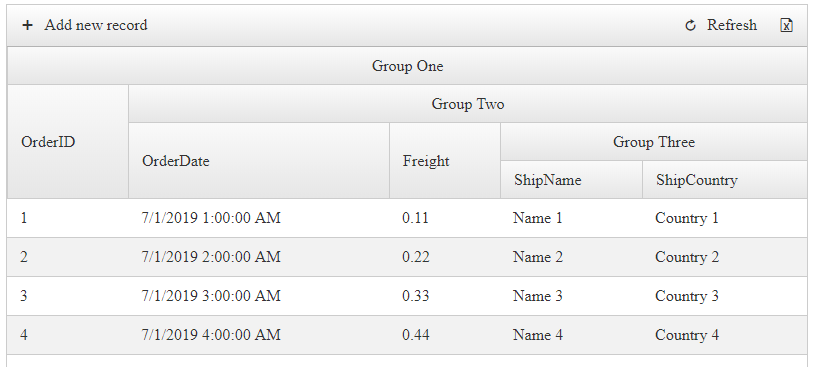
Settings:
ColGroups can be eliminated on the server using the following server-side code in the PreRender event of the Grid:
C#
VB
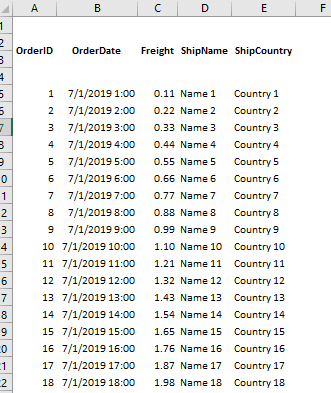
Result:
Kind regards,
Attila Antal
Progress Telerik
I assume that the code you've shared is JavaScript and is trying to remove the ColGroups on client. It is a bit complicated to do that as the Grid renders multiple rows with multiple table header cells, where the rows might have rowsSpan and cells can have colspan applied.
I suggest using the server-side approach for eliminating the ColumnGroups from the exported file.
Assuming the following structure:
Settings:
<ExportSettings OpenInNewWindow="true" IgnorePaging="true" ExportOnlyData="true"> <Excel Format="Html" /></ExportSettings><MasterTableView AutoGenerateColumns="False" DataKeyNames="OrderID" CommandItemDisplay='<%# !RadGrid1.IsExporting ? GridCommandItemDisplay.Top : GridCommandItemDisplay.None %>' CommandItemSettings-ShowExportToExcelButton="true"></MasterTableView>ColGroups can be eliminated on the server using the following server-side code in the PreRender event of the Grid:
C#
protected void RadGrid1_PreRender(object sender, EventArgs e){ if (RadGrid1.IsExporting) { foreach (GridColumn col in RadGrid1.MasterTableView.RenderColumns.Where(x=> x.Visible)) { col.ColumnGroupName = string.Empty; } RadGrid1.Rebind(); }}VB
Protected Sub RadGrid1_PreRender(ByVal sender As Object, ByVal e As EventArgs) If RadGrid1.IsExporting Then For Each col As GridColumn In RadGrid1.MasterTableView.RenderColumns.Where(Function(x) x.Visible) col.ColumnGroupName = String.Empty Next RadGrid1.Rebind() End IfEnd SubResult:
Kind regards,
Attila Antal
Progress Telerik
Get quickly onboarded and successful with your Telerik and/or Kendo UI products with the Virtual Classroom free technical training, available to all active customers. Learn More.