

Hi,
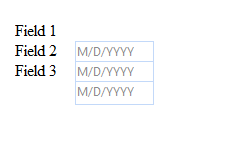
I am running into an issue with the Calendar Datepicker control in IE6 and 7 and IE8/9 in compatibility mode, when the controls are drawn dynamically with absolute positioning. The controls drop about 10px down from their intended position sometimes as soon as the screen draws and sometimes when the mouse hovers over the first datapicker control. Below is an example of a test I built to demonstrate this behavior.
Please note the DOCTYPE tag I am using for the page, and that the application is running ASP.Net 4. I am using build 2011.1.413.40 of the Telerik.Web.UI assembly.
Page3.aspx
Page3.aspx.vb
Here is an image depicting the behavior I am experiencing this this page.
Thanks
Ali M.
I am running into an issue with the Calendar Datepicker control in IE6 and 7 and IE8/9 in compatibility mode, when the controls are drawn dynamically with absolute positioning. The controls drop about 10px down from their intended position sometimes as soon as the screen draws and sometimes when the mouse hovers over the first datapicker control. Below is an example of a test I built to demonstrate this behavior.
Please note the DOCTYPE tag I am using for the page, and that the application is running ASP.Net 4. I am using build 2011.1.413.40 of the Telerik.Web.UI assembly.
Page3.aspx
<%@ Page Language="vb" AutoEventWireup="false" CodeBehind="Page3.aspx.vb" Inherits="ASPNET4Test1.Page3" %><!DOCTYPE html PUBLIC "-//W3C//DTD XHTML 1.0 Transitional//EN" "http://www.w3.org/TR/xhtml1/DTD/xhtml1-transitional.dtd"><html xmlns="http://www.w3.org/1999/xhtml"><head runat="server"> <title></title></head><body> <form id="form1" runat="server"> <asp:ScriptManager ID="ScriptManager1" runat="server"> </asp:ScriptManager> <telerik:RadAjaxManager ID="RadAjaxManager1" runat="server"> </telerik:RadAjaxManager> <div> <asp:Panel ID="Panel1" runat="server"> </asp:Panel> </div> </form></body></html>Page3.aspx.vb
Imports System.DataImports System.Collections.GenericImports Telerik.Web.UIImports System.LinqPublic Class Page3 Inherits System.Web.UI.Page Private Sub Panel1_Init(ByVal sender As Object, ByVal e As System.EventArgs) Handles Panel1.Init Try Dim _date3 As RadDatePicker = Nothing Dim oLabel As Label Dim _cal As RadCalendar = Nothing Dim _calAdded As Boolean = False Dim Pnl As System.Web.UI.WebControls.WebControl = Panel1 Dim _posLeft As Integer = 80 Dim _posLabelLeft As Integer = 20 Dim _posTop As Integer For _tabIndex As Integer = 1 To 3 _posTop = _tabIndex * 20 + 20 If IsNothing(_cal) Then _cal = New RadCalendar() _cal.ID = "sharedcalendar" Pnl.Controls.Add(_cal) End If oLabel = New Label oLabel.Style.Add("position", "absolute") oLabel.Style.Add("top", String.Format("{0}px", (_posTop).ToString())) oLabel.Style.Add("left", String.Format("{0}px", (_posLabelLeft).ToString())) oLabel.Style.Add("width", String.Format("{0}px", (50).ToString())) oLabel.Style.Add("height", String.Format("{0}px", (22).ToString())) oLabel.Text = "Field " + _tabIndex.ToString() oLabel.CssClass = "fls " oLabel.EnableViewState = True Pnl.Controls.Add(oLabel) _date3 = New RadDatePicker() _date3.ID = "dtp_" + _tabIndex.ToString() _date3.Width = Unit.Pixel(60 + 15) '+ 10 ' 87 _date3.Height = Unit.Pixel(22 - 5) ' - 13 _date3.TabIndex = _tabIndex _date3.SharedCalendar = _cal _date3.Style.Add("position", "absolute") _date3.Style.Add("top", String.Format("{0}px", (_posTop).ToString())) _date3.Style.Add("left", String.Format("{0}px", _posLeft.ToString())) ' sCLeft) _date3.Attributes.Add("fieldid", "fld" + _tabIndex.ToString()) _date3.Attributes.Add("fieldname", "fld" + _tabIndex.ToString()) _date3.Attributes.Add("fieldtype", "date") _date3.Calendar.EnableNavigationAnimation = True _date3.Culture = System.Globalization.CultureInfo.CurrentUICulture _date3.MinDate = CDate("1900-1-1") _date3.ShowPopupOnFocus = True _date3.DatePopupButton.Visible = False _date3.DateInput.EmptyMessage = System.Globalization.CultureInfo.CurrentUICulture.DateTimeFormat.ShortDatePattern.ToUpper() _date3.DateInput.DateFormat = System.Globalization.CultureInfo.CurrentUICulture.DateTimeFormat.ShortDatePattern _date3.DateInput.DisplayDateFormat = System.Globalization.CultureInfo.CurrentUICulture.DateTimeFormat.ShortDatePattern _date3.DateInput.SelectionOnFocus = SelectionOnFocus.SelectAll _date3.DateInput.ShowButton = False _date3.DateInput.Width = Unit.Pixel(60) _date3.DateInput.Height = Unit.Pixel(22 - 5) Pnl.Controls.Add(_date3) Next Catch ex As System.Exception Trace.Write(String.Format("Failed to draw fields. Exception: {0}", ex.ToString())) Throw Finally Trace.Write("End ---> Panel1_Init") End Try End SubEnd ClassHere is an image depicting the behavior I am experiencing this this page.
Thanks
Ali M.

