or
4 answers
237 views
Hello,
in many menus I use the same buttons.
Is it possible to create a kind of a base class?
In this case it would be nice to have a base class of the complete group header "actions".
eg:
Thank you,
Manuel
in many menus I use the same buttons.
Is it possible to create a kind of a base class?
In this case it would be nice to have a base class of the complete group header "actions".
eg:
<telerik:RadRibbonView ApplicationButtonVisibility="Collapsed"TitleBarVisibility="Collapsed" HelpButtonVisibility="Collapsed"> <telerik:RadRibbonTab Header="Home" HeaderVisibility="Collapsed"> <telerik:RadRibbonGroup Header="Actions"> <telerik:RadRibbonButton LargeImage="{StaticResource Back}" Text="Close" Size="Large" Command="{Binding CloseViewCommand}" /> <telerik:RadRibbonButton LargeImage="{StaticResource Edit}" Text="Edit" Size="Large" Command="{Binding EditItemCommand}" /> <telerik:RadRibbonButton LargeImage="{StaticResource Save}" Text="Save" Size="Large" Command="{Binding SaveItemCommand}" /> <telerik:RadRibbonButton SmallImage="{StaticResource Cancel}" Text="Cancel" Size="Large" Command="{Binding CancelItemCommand}" /> </telerik:RadRibbonGroup> <telerik:RadRibbonGroup Header="Print"> <telerik:RadRibbonButton SmallImage="{StaticResource Print}" Text="xxx" Size="Large" Command="{Binding PrintItemCommand}"/> </telerik:RadRibbonGroup> <telerik:RadRibbonGroup Header="Extras"> <telerik:RadRibbonButton SmallImage="{StaticResource UpdatePortrait}" Text="xxxxx" Size="Large" Command="{Binding UpdatePictureCommand}"/> </telerik:RadRibbonGroup> </telerik:RadRibbonTab> </telerik:RadRibbonView>Thank you,
Manuel

Jacob
Top achievements
 Rank 1
 Iron
Iron
Rank 1
Iron
answered
on
09 Oct 2024
0 answers
140 views
I'am using Telerik RichTextBox (trial) control in my WPF desktop application. When running the app, the control(WordControl) showing as transparent. Suppose the background image (laptop) should not be seen.
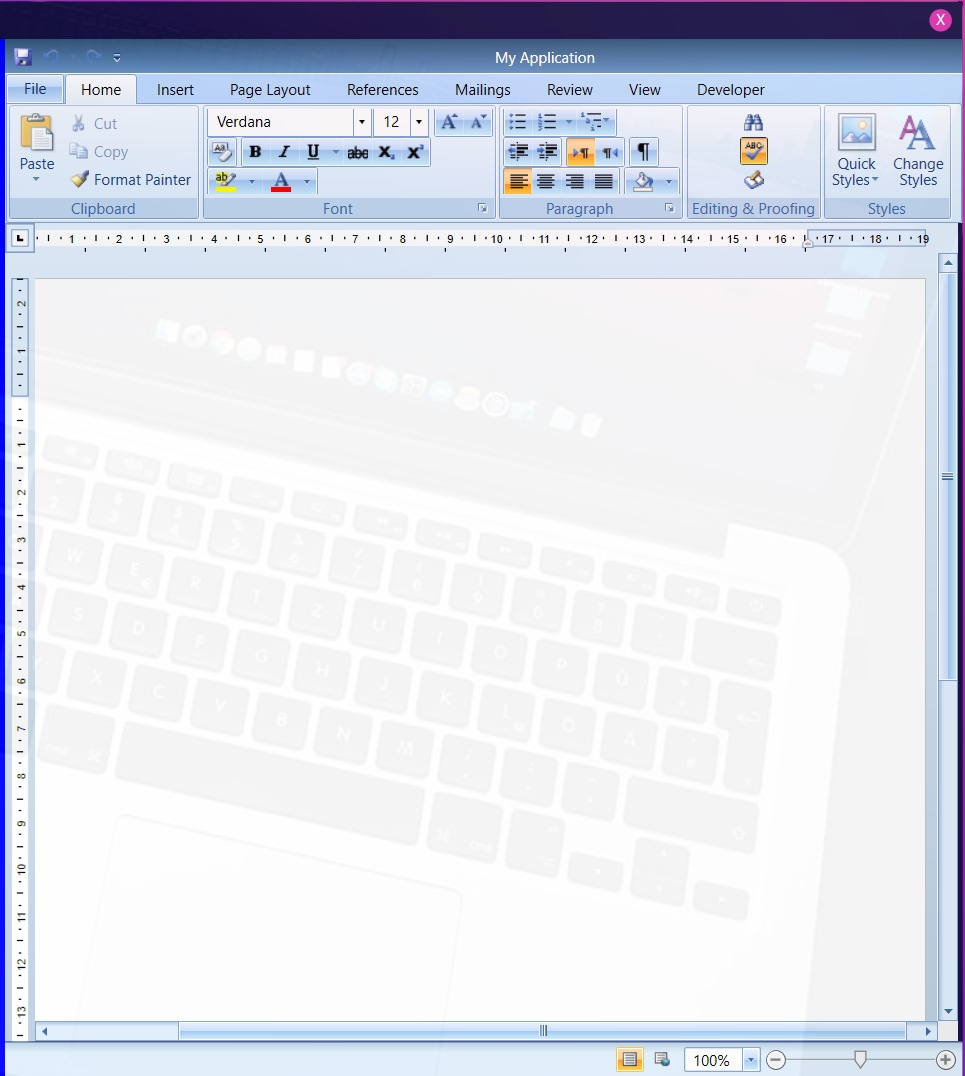
**WordControl.xaml**
```
<UserControl x:Class="MyApp.WordControl"
xmlns="http://schemas.microsoft.com/winfx/2006/xaml/presentation"
xmlns:x="http://schemas.microsoft.com/winfx/2006/xaml"
xmlns:mc="http://schemas.openxmlformats.org/markup-compatibility/2006"
xmlns:d="http://schemas.microsoft.com/expression/blend/2008"
xmlns:telerik="http://schemas.telerik.com/2008/xaml/presentation"
mc:Ignorable="d"
d:DesignHeight="450" d:DesignWidth="800">
<Grid x:Name="radRichTextBoxParent">
<Grid.Resources>
<Grid.RowDefinitions>
<RowDefinition Height="Auto"/>
<RowDefinition Height="*"/>
<RowDefinition Height="Auto"/>
</Grid.RowDefinitions>
<Grid Grid.Row="1">
<Grid.ColumnDefinitions>
<ColumnDefinition Width="*"/>
<ColumnDefinition Width="4"/>
<ColumnDefinition MaxWidth="780" Width="Auto"/>
</Grid.ColumnDefinitions>
<telerik:DocumentRuler>
<telerik:RadRichTextBox x:Name="radRichTextBox" IsSelectionMiniToolBarEnabled="True" IsSpellCheckingEnabled="True" IsContextMenuEnabled="True" LayoutMode="Paged"/>
</telerik:DocumentRuler>
<GridSplitter Background="{Binding Background, ElementName=TaskPane}" BorderThickness="1 0" Grid.Column="1" HorizontalAlignment="Stretch" Visibility="{Binding Visibility, ElementName=TaskPane}"/>
<telerik:TaskPane x:Name="TaskPane" AssociatedRichTextBox="{Binding ElementName=radRichTextBox}" Grid.Column="2" HorizontalAlignment="Stretch" MinWidth="265" VerticalAlignment="Stretch"/>
</Grid>
<telerik:RadRichTextBoxRibbonUI x:Name="ribbon"> ...</telerik:RadRichTextBoxRibbonUI>
<telerik:RadRichTextBoxStatusBar />
</Grid>
</UserControl>
```
**BrowserControl.xaml**
```
<UserControl x:Class="MyApp.BrowserControl"
xmlns="http://schemas.microsoft.com/winfx/2006/xaml/presentation"
xmlns:x="http://schemas.microsoft.com/winfx/2006/xaml"
xmlns:mc="http://schemas.openxmlformats.org/markup-compatibility/2006"
xmlns:d="http://schemas.microsoft.com/expression/blend/2008"
xmlns:local="clr-namespace:MyApp"
xmlns:wv2="clr-namespace:Microsoft.Web.WebView2.Wpf;assembly=Microsoft.Web.WebView2.Wpf"
mc:Ignorable="d"
d:DesignHeight="450" d:DesignWidth="800">
<Grid x:Name="MainGrid">
<Grid.ColumnDefinitions>
<ColumnDefinition Width="4*"/>
<ColumnDefinition Width="0*"/>
</Grid.ColumnDefinitions>
<wv2:WebView2 Name="webView" Grid.Column="0" Grid.Row="0" Margin="0,0,6,0" />
<GridSplitter x:Name="MainGridSplit" Visibility="Hidden" HorizontalAlignment="Right" Grid.RowSpan="3" MinWidth="5" MinHeight="5" Background="Blue"/>
**<local:WordControl x:Name="wordEditor" Grid.Column="1" Grid.Row="0" Margin="0,0,0,0" />**
</Grid>
</UserControl>
```
**MainWindow.xaml**
```
<Window x:Class="MyApp.MyWindow"
xmlns="http://schemas.microsoft.com/winfx/2006/xaml/presentation"
xmlns:x="http://schemas.microsoft.com/winfx/2006/xaml"
xmlns:d="http://schemas.microsoft.com/expression/blend/2008"
xmlns:mc="http://schemas.openxmlformats.org/markup-compatibility/2006"
xmlns:local="clr-namespace:MyApp"
xmlns:controls="clr-namespace:MyApp.Controls"
mc:Ignorable="d"
ResizeMode="NoResize" WindowStartupLocation="CenterScreen" Loaded="Window_Loaded"
WindowState="Maximized" WindowStyle="None" Background="#060531"
AllowsTransparency="False" Title="MyWindow" Height="450" Width="800">
<Border CornerRadius="12">
<Border.Background>
<ImageBrush ImageSource="Images/back-image.jpg"
Stretch="UniformToFill"/>
</Border.Background>
<Border CornerRadius="0" BorderThickness="2" Opacity="0.95">
<Border.BorderBrush>
<LinearGradientBrush StartPoint="0,0" EndPoint="1,1">
<GradientStop Color="#462AD8" Offset="0"/>
<GradientStop Color="#DA34AE" Offset="0.75"/>
<GradientStop Color="#8A16C1" Offset="1"/>
</LinearGradientBrush>
</Border.BorderBrush>
<Border.Background>
<LinearGradientBrush StartPoint="0,1" EndPoint="1,0">
<GradientStop Color="#060531" Offset="0"/>
<GradientStop Color="#1B1448" Offset="1"/>
</LinearGradientBrush>
</Border.Background>
<Grid>
<Grid.RowDefinitions>
<RowDefinition Height="30"/>
<RowDefinition/>
</Grid.RowDefinitions>
**<local:BrowserControl x:Name="browserControl" Grid.Row="1" ></local:BrowserControl>**
</Grid>
</Border>
</Border>
</Window>
```
I am expecting the WordControl should not be transparent.
Murad
Top achievements
Rank 1
Rank 1
updated question
on
01 Apr 2024
0 answers
136 views
Hello
I have a RadRibbonView that I would like to set some properties, and assign events, through the page code-behind.
e.g, setting the text on the various RadMenuItems in the Ribbon.
Any suggestions or help on how to do this is appreciated.
Thanks!
Curt
Top achievements
Rank 1
 Iron
Iron
Rank 1
Iron
asked
on
29 Dec 2023
0 answers
129 views
We are trying to add the translation for the QuickAccessToolBar ribbon, but altough I have added the Identifier in our Resources. The entries remains in english.
if I select Show below the Ribbon, then some translation are applied others not:
What are we missing?
We using Telerik Version: 2022.2.815.45
We have added the identifier defined in this link in our resources:
WPF RibbonView - Localization - Telerik UI for WPF
Alessandro
Top achievements
Rank 1
Rank 1
updated question
on
13 Nov 2023
0 answers
183 views
Hello,
I have RadRibbonTab that I am binding an item source to. This item source contains a GroupName as well as a list of other items that can be used to create RadRibbonButtons. My problem is that I am seeing an extra separator after each RadRibbonGroup and I'm not sure why. If I try to create my own template for the RadRibbonGroup this extra separator goes away but I'd prefer to not have to do this. I've attached an image of what I'm seeing. What suggestions are there to get rid of this separator?
Here is the xaml in question:
<telerik:RadRibbonTab Header="Dynamic Display" x:Name="DisplayMenu" ItemsSource="{Binding RelativeSource={RelativeSource AncestorType={x:Type local:RibbonViewContainer}}, Path=DisplayList}">
    <ItemsControl.ItemTemplate>
        <DataTemplate>
            <telerik:RadRibbonGroup Header="Test Header" ItemsSource="{Binding List}" >

                <ItemsControl.ItemTemplate>
                    <DataTemplate>
                        <telerik:RadRibbonButton Size="{Binding Size}"
                                                         Text="Test Text"
                                                         Command="{Binding}"
                                                         CommandParameter="{Binding Text}"
                                                         LargeImage="{Binding Image}"
                                                         ToolTip="{Binding Tooltip}"
                                                         ClickMode="Press"/>
                    </DataTemplate>
                </ItemsControl.ItemTemplate>


            </telerik:RadRibbonGroup>
        </DataTemplate>
    </ItemsControl.ItemTemplate>
</telerik:RadRibbonTab>
Giuliano
Top achievements
Rank 1
 Iron
Iron
Rank 1
Iron
updated question
on
18 Aug 2023
1 answer
155 views
Hello,
i have a problem with the radRichTextBox, when using .docx files generated with the Telerik Report Designer. (Screenshots attached)
If I create the document by myself in word, the header will be displayed correctly in the radRichTextBox (with RadRibbon).
The telerik control seems to have problems with the table structure inside of the header, as well as hyperlinks that were generated with telerik report Designer.
Does anyone know a solution?

Dimitar
Telerik team

answered
on
29 Jun 2023
1 answer
178 views
Hi
Current scenario I am trying to fix is we are wanting to make use of the minimization feature, but disable the double click toggling the minimization. Limiting the minimization toggle to only the Minimize button (or a custom context menu).
I have tried using the PreviewMouseDoubleClick event which works at a first glance, however it ends up being that a triple click will now minimize.
Other less successful attempts are disabling minimization and only enable it before the ribbon would be minimized or un minimized. This would mean more control over when the ribbon is minimized but would require more effort in getting all aspects of the minimization working.
Any assistance would be appreciated. It doesnt feel like too complicated of a problem but struggling with it none the less

Martin Ivanov
Telerik team
answered
on
18 Apr 2023
0 answers
193 views
There are images for the ribbon for open, save, etc, and I was wondering if I'm allowed to use them...
BENN
Top achievements
Rank 1
Rank 1
asked
on
01 Feb 2023
1 answer
171 views
I am trying to implement function similar to a Acount info in Visual Studio in my App build On RibbonWindow/RibbonView(WPF).
Somethink like this:
Controls do not get focus if the RibbonWindow is not Maximzed. If it is Maximzed they get focus only if mouse enters from bottom side.
Here is small reproducer .
Do I miss some setting in RibnbonWindow/RibbonView? Is it Posible with Telerik Framework?
Stenly
Telerik team
answered
on
30 Aug 2022
1 answer
1.1K+ views
Hi
I've setup a simple project using a RadRibbonWindow with a ribbon and a few controls. I'm trying to toggle between Light and Dark themes using the StyleManager which is working for the controls but not the Window (Title bar etc).
I've gone through a few articles including this one and threads on the forum including this one. Unfortunately I can't get the Window to change theme. Any help would be much appreciated.
Thanks Miles
Vicky
Telerik team
updated answer
on
27 Jun 2022








