or
0 answers
75 views
There is the a form:
| Segment | TimeIn | TimeOut | Duration |
| 1 | XX:XX:XX:XX | XX:XX:XX:XX | XX:XX:XX:XX |
| 2 | XX:XX:XX:XX | XX:XX:XX:XX | XX:XX:XX:XX |
| 3 | XX:XX:XX:XX | XX:XX:XX:XX | XX:XX:XX:XX |
| 4 | XX:XX:XX:XX | XX:XX:XX:XX | XX:XX:XX:XX |
The number of Segment depends on how many xml file is found. I want to limited the information cannot be empty in middle (without the 1st seg1 and last seg4). How can I set get these middle segment number? My way is using SegmentNo.Text <> 1 and SegmentNo.Text <> last. However it can't use ".last". How can I get the last row's Segment No?
Code
For Each r As GridDataItem In gridSegment.Items

   If FileName.Text <> "" Then

       // Red the textbox if data is missing

   Else

      If timeIn.Text = "" AND timeOut.Text = "" AND Duration.Text = "" Then

        If Segment.Text <> 1 AND Segment.Text <> ??? Then

          // Red that row all textbox

        End If

     End If

   End If

Next


2 answers
133 views
Hi:
How can I set the data Form to show required fields validation message based on annotations to appear on the right of the field like this image;
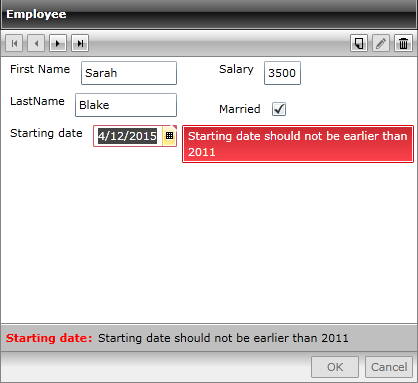
0 answers
160 views
HI:
I read the documentation about cancel option, and all that I saw says that you should implement interface IEditableObject. I have a project that doesn't implement it and cancel button works perfectly over observable collection against entity framework throw CollectionViewSource:
ICollectionView c = CollectionViewSource.GetDefaultView(db.Clientes.FromSqlRaw("Select * From CLIENTES ").ToList());
dbGrid.ItemsSource = c;
dataForm.ItemsSource = c;
in other project with other table it doesnt work unless my object implments IEditableObject, ¿Why?
Is necesary implement IEditableObject incluiding if use EnityFramework over observable collection? Is necesary implment this IedtiableObject interfase also if I use RadEntityFrameworkCoreDataSource instead ICollectionView ?
Thanks in advance for your dvise.

Sami
Top achievements
 Rank 2
 Iron
Iron
 Iron
Iron
 Iron
Iron
Rank 2
Iron
Iron
Iron
asked
on
17 Nov 2022
1 answer
212 views
Hi:
Could you advise me about the best way to create a crud with EntiyFramework 6 using radgrid and radDataForm?
The use of EntityFrameworkCoreDataSource is good idea?

Martin Ivanov
Telerik team

answered
on
02 Nov 2022
1 answer
162 views
HI I have a DataForm where itemSource is a CollectionView source created with this 3 alternatives:
c = CollectionViewSource.GetDefaultView(db.Clientes.Local.ToObservableCollection());
c = CollectionViewSource.GetDefaultView(db.Clientes.ToList<Cliente>());
c = CollectionViewSource.GetDefaultView(db.Clientes.Local.ToList<Cliente>());
db is a Context with entityFramework 6. When I edit dataForm the changes the poco doenst appear in the dataform but they are saved in to database.
dataForm.BeginEdit();
Cliente cliente =(Cliente) dataForm.CurrentItem ;
cliente.Nombre = cliente.Nombre+"-";
Could you give me an advise to solve it?
0 answers
128 views
What is an easy way to change the font or font color in the input field for DataFormDataField when using RadDataForm?
1 answer
264 views
Hey,
I am using DataForm with custom field to display one of my complex properties for editing.
I am having an issue with Null reference exceptions from within the Telerik DataForm code when my control extends from a textbox.
I have reproduced the issue in a small sample app that doesn't have any of the complexities of my actual application.
What happens is if you run the application and click Ok or Cancel on the dataform buttons it will through a null reference exception.
This only happens if the HotKeyInputBox extens from a TextBox, if it extends from a Button or other type of control it doesn't throw the exception. Based on my implementation I need to extend it from a TextBox. I can't see any reason it should be throwing an exception.
Any help with getting this working would be fantastic.
MainWindow.xaml
<Window x:Class="DataFormBugDemo.MainWindow"
                 xmlns="http://schemas.microsoft.com/winfx/2006/xaml/presentation"
                 xmlns:x="http://schemas.microsoft.com/winfx/2006/xaml"
                 xmlns:d="http://schemas.microsoft.com/expression/blend/2008"
                 xmlns:mc="http://schemas.openxmlformats.org/markup-compatibility/2006"
                 xmlns:local="clr-namespace:DataFormBugDemo"
                 xmlns:telerik="http://schemas.telerik.com/2008/xaml/presentation"
                 mc:Ignorable="d"
                 Title="MainWindow" Height="450" Width="800">
    <Grid>
        <telerik:RadDataForm CurrentItem="{Binding Source={x:Static local:Setting.Instance}}"
                             AutoEdit="True" AutoGenerateFields="True" AutoGeneratingField="RadDataForm_OnAutoGeneratingField"/>
    </Grid>
</Window>
MainWindow.xaml.cs
using System.Windows;
using System.Windows.Data;
using Telerik.Windows.Controls;
using Telerik.Windows.Controls.Data.DataForm;

namespace DataFormBugDemo
{
    /// <summary>
    /// Interaction logic for MainWindow.xaml
    /// </summary>
    public partial class MainWindow : Window
    {

        public MainWindow()
        {
            StyleManager.ApplicationTheme = new Office2019Theme();
            Office2019Palette.LoadPreset(Office2019Palette.ColorVariation.Dark);
            InitializeComponent();
        }

        private void RadDataForm_OnAutoGeneratingField(object sender, AutoGeneratingFieldEventArgs e)
        {
            e.DataField.DataMemberBinding.NotifyOnSourceUpdated = true;
            e.DataField.DataMemberBinding.NotifyOnValidationError = true;
            e.DataField.DataMemberBinding.ValidatesOnDataErrors = true;
            e.DataField.DataMemberBinding.ValidatesOnNotifyDataErrors = true;
            e.DataField.DataMemberBinding.UpdateSourceTrigger = UpdateSourceTrigger.PropertyChanged;
            if (e.PropertyType == typeof(HotKey))
            {
                var dataField = new DataFormHotKeySettingsField()
                {
                    Label = e.DataField.Label,
                    DataMemberBinding = e.DataField.DataMemberBinding,
                    Description = e.DataField.Description
                };
                e.DataField = dataField;
            }
        }
    }
}
DataFormHotKeySettingsField.cs
using System.Windows;
using System.Windows.Controls;
using System.Windows.Data;
using Telerik.Windows.Controls;

namespace DataFormBugDemo
{
    public class DataFormHotKeySettingsField : DataFormDataField
    {
        protected override DependencyProperty GetControlBindingProperty()
        {
            return HotKeyInputBox.HotKeyProperty;
        }

        protected override Control GetControl()
        {
            var dependencyProperty = GetControlBindingProperty();
            var inputBox = new HotKeyInputBox();
            if (DataMemberBinding != null)
            {
                var binding = DataMemberBinding;
                binding.Mode = BindingMode.TwoWay;
                inputBox.SetBinding(dependencyProperty, binding);
            }
            inputBox.SetBinding(IsEnabledProperty, new Binding("IsReadOnly") { Source = this, Converter = new InvertedBooleanConverter() });
            return inputBox;
        }
    }
}
HotKeyInputBox.cs
using System.Windows;
using System.Windows.Controls;

namespace DataFormBugDemo
{
    class HotKeyInputBox : TextBox
    {
        public static readonly DependencyProperty HotKeyProperty = DependencyProperty.Register(
            "HotKey", typeof(HotKey), typeof(HotKeyInputBox), new PropertyMetadata(default(HotKey)));

        public HotKey HotKey
        {
            get { return (HotKey)GetValue(HotKeyProperty); }
            set { SetValue(HotKeyProperty, value); }
        }

        public static readonly DependencyProperty DisplayTextProperty = DependencyProperty.Register(
            "DisplayText", typeof(string), typeof(HotKeyInputBox), new PropertyMetadata(default(string)));

        public string DisplayText
        {
            get { return (string)GetValue(DisplayTextProperty); }
            set { SetValue(DisplayTextProperty, value); }
        }

        public HotKeyInputBox()
        {
            DisplayText = "None";
        }
    }
}
HotKey.cs
using System.Windows.Input;

namespace DataFormBugDemo
{
    public class HotKey
    {
        public bool IsEnabled { get; set; }

        public Key Key { get; set; }
    }
}
Setting.cs
using PropertyChanged;

namespace DataFormBugDemo
{
    [AddINotifyPropertyChangedInterface]
    public class Setting
    {
        public static Setting Instance { get; }
        static Setting()
        {
            Instance = new Setting();
        }

        public string Name { get; set; } = "Test Name";

        public HotKey HotKey { get; set; } = new HotKey();
    }
}
App.xaml
<Application x:Class="DataFormBugDemo.App"
             xmlns="http://schemas.microsoft.com/winfx/2006/xaml/presentation"
             xmlns:x="http://schemas.microsoft.com/winfx/2006/xaml"
             xmlns:local="clr-namespace:DataFormBugDemo"
             xmlns:telerik="http://schemas.telerik.com/2008/xaml/presentation"
             StartupUri="MainWindow.xaml">
    <Application.Resources>
      <!-- HotKeyInputBox -->
      <ControlTemplate x:Key="HotKeyInputBoxTemplate" TargetType="local:HotKeyInputBox">
        <Grid>
          <Grid.ColumnDefinitions>
            <ColumnDefinition Width="Auto" />
            <ColumnDefinition Width="Auto" />
            <ColumnDefinition Width="Auto" />
          </Grid.ColumnDefinitions>
          <Border Grid.Column="0" BorderBrush="{Binding BorderBrush, RelativeSource={RelativeSource TemplatedParent}}" BorderThickness="{TemplateBinding BorderThickness}" Background="{TemplateBinding Background}"
                  Padding="0" Name="PART_Border" VerticalAlignment="Center">
            <StackPanel Orientation="Horizontal">
              <TextBlock Text="{TemplateBinding DisplayText}" HorizontalAlignment="{TemplateBinding HorizontalContentAlignment}" Foreground="{TemplateBinding Foreground}"
                         MinWidth="150" Margin="0" />
            </StackPanel>
          </Border>
        </Grid>
      </ControlTemplate>

      <Style TargetType="local:HotKeyInputBox">
        <Setter Property="Template" Value="{StaticResource HotKeyInputBoxTemplate}" />
        <Setter Property="HorizontalAlignment" Value="Stretch" />
        <Setter Property="HorizontalContentAlignment" Value="Left" />
        <Setter Property="BorderBrush" Value="{telerik:Office2019Resource ResourceKey=MainBorderBrush}" />
        <Setter Property="BorderThickness" Value="1" />
        <Setter Property="Background" Value="{telerik:Office2019Resource ResourceKey=SecondaryBackgroundBrush}" />
        <Setter Property="Foreground" Value="{telerik:Office2019Resource ResourceKey=MainForegroundBrush}" />
        <Setter Property="FocusVisualStyle" Value="{x:Null}" />

      </Style>
    </Application.Resources>
</Application>

Vladimir Stoyanov
Telerik team
answered
on
18 May 2021
3 answers
215 views
Hi @ all,
In the last WPF build the DataForm control got changed (single, multiple editors).
But this change broke some other functionality of the control.
I attached a screenshot of small test project when using controls from version 2020.3.1020
And also the screenshot when using controls from version 2021.1.119
This is basically the XAML code I used for the view:
<Window x:Class="TelerikDataFormTest.MainWindow" xmlns:telerik="http://schemas.telerik.com/2008/xaml/presentation" Title="MainWindow" Width="525" Height="350"> <Window.Resources> <DataTemplate x:Key="DataFormEditTemplate"> <StackPanel Margin="10"> <Grid> <Grid.ColumnDefinitions> <ColumnDefinition Width="0.5*" /> <ColumnDefinition Width="0.5*" /> </Grid.ColumnDefinitions> <StackPanel Grid.Column="0"> <telerik:DataFormDataField DataMemberBinding="{Binding DataName}" Label="Name" /> <telerik:DataFormDataField Label="Date"> <telerik:RadDatePicker SelectedValue="{Binding DataDate}" TodayButtonVisibility="Visible" /> </telerik:DataFormDataField> <telerik:DataFormDataField Label=" "> <telerik:RadButton Width="250" Margin="0,5,0,5" HorizontalAlignment="Left" Content="Test Button" /> </telerik:DataFormDataField> </StackPanel> <StackPanel Grid.Column="1"> <telerik:DataFormDataField DataMemberBinding="{Binding DataName}" Label="Name" /> <telerik:DataFormDataField Label="Date"> <telerik:RadDatePicker SelectedValue="{Binding DataDate}" TodayButtonVisibility="Visible" /> </telerik:DataFormDataField> <telerik:DataFormDataField Label=" "> <telerik:RadButton Width="250" Margin="0,5,0,5" HorizontalAlignment="Left" Content="Test Button" /> </telerik:DataFormDataField> </StackPanel> </Grid> </StackPanel> </DataTemplate> <DataTemplate x:Key="DataFormReadOnlyTemplate"> <StackPanel Margin="10"> <Grid> <Grid.ColumnDefinitions> <ColumnDefinition Width="0.5*" /> <ColumnDefinition Width="0.5*" /> </Grid.ColumnDefinitions> <StackPanel Grid.Column="0"> <telerik:DataFormDataField DataMemberBinding="{Binding DataName}" Label="Name" /> <telerik:DataFormDataField Label="Date"> <telerik:RadDatePicker SelectedValue="{Binding DataDate}" TodayButtonVisibility="Visible" /> </telerik:DataFormDataField> <telerik:DataFormDataField Label=" "> <telerik:RadButton Width="150" Margin="0,5,0,5" HorizontalAlignment="Left" Content="Test Button" /> </telerik:DataFormDataField> </StackPanel> <StackPanel Grid.Column="1"> <telerik:DataFormDataField DataMemberBinding="{Binding DataName}" Label="Name" /> <telerik:DataFormDataField Label="Date"> <telerik:RadDatePicker SelectedValue="{Binding DataDate}" TodayButtonVisibility="Visible" /> </telerik:DataFormDataField> <telerik:DataFormDataField Label=" "> <StackPanel> <telerik:RadButton Width="150" Margin="0,5,0,5" HorizontalAlignment="Left" Content="Test Button" /> </StackPanel> </telerik:DataFormDataField> </StackPanel> </Grid> </StackPanel> </DataTemplate> </Window.Resources> <Grid> <telerik:RadDataForm Width="400" Height="300" HorizontalAlignment="Left" VerticalAlignment="Top" AutoEdit="True" AutoGenerateFields="False" CurrentItem="{Binding Data}" EditTemplate="{StaticResource DataFormEditTemplate}" ReadOnlyTemplate="{StaticResource DataFormReadOnlyTemplate}" /> </Grid></Window>Until the change this worked for years now and is also used in our projects.
The question is: Is this a bug or a wanted behaviour of this control.
If there won't be a chance to use the old setting somehow we're stuck with the old version from now on.
I'm really looking forward to your suggestion on this topic.
Kind Regards,
Thomas
Martin Ivanov
Telerik team
answered
on
12 Mar 2021
4 answers
179 views
Is there an example of adding an AutocompleteBox into a custom dataform data template that has the final value binding to a property that is unrelated to the itemssource?
Martin Ivanov
Telerik team
answered
on
24 Nov 2020
5 answers
153 views
Hi,
Can't seem to find the way to set CommandButtonsVisibility from code
behind. I'm building a user control with dynamic behavior the DataForm.
In XAML it's easy and working.
Anybody that has an idea?
Thanks in advance!
Kurt
Martin Ivanov
Telerik team
answered
on
30 Sep 2020







