|
|
Overview
 Key Features
Innovative WYSIWYG Report Designer
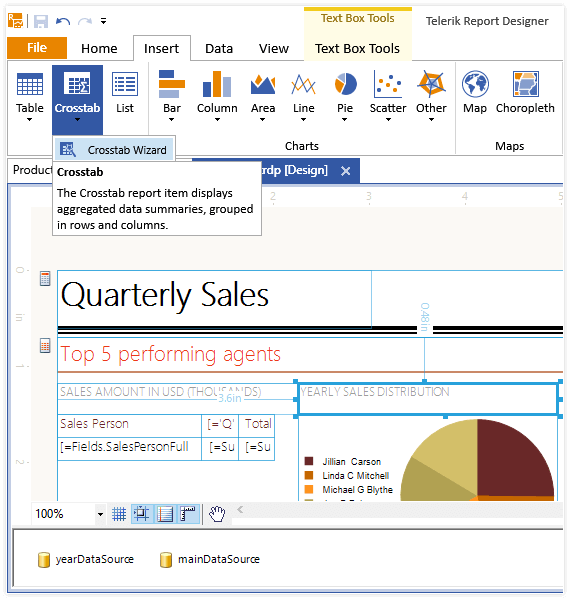
Telerik Reporting is the first reporting tool in the industry to introduce an innovative WYSIWYG design surface in Visual Studio .NET. The surface simulates graph paper and represents the actual layout of the report elements as they would appear on a printed sheet of paper. There are no bulky section dividers or other elements that clog the designer. To make the process of accurate positioning, aligning, and sizing of report elements Telerik Reporting implements some techniques used in drawing software.

Report Parameters
Advanced, easy-to-use report parameters is one of the key highlights of Telerik Reporting. With the help of expressions (which can be used throughout a report definition to control content and appearance), report parameters can be used to specify the data to be used in a report, connect related reports and subreports, modify presentation, filter data, control sorting and grouping, and even change text box properties. Watch video or see online demo.

Fine-Grained CSS-like Styling
Telerik Reporting introduces an advanced and much enriched styling mechanism through its build-in styling model, which closely follows CSS specifications. This model provides for quicker and very fine-grained visual customization of all reporting controls, all in the Visual Studio designer. This CSS-like mechanism offers full control over the item’s background, images, colors, borders, styles, paddings, etc.
You can assign styles to one or more reporting items by using the known CSS selectors: Type, Attribute, Style, and Descendant. Styles can also be applied globally and then saved to an external file for later use. If extra control over visual appearance is needed, cascading styles can be applied manually. See online demo
Extensive Data Source Support
You can databind Telerik Reporting to Business Objects, XML, Web Services and any ADO.NET datasource. The variety of data providers that ADO.NET offers means that the report can be connected to most of the common databases, such as SQL Server, MySQL, Oracle, Microsoft Access, OLE DB , etc. See online demo
Rich Set of Measurement Units
A typical challenge in report design is the precise layout and sizing of elements for the purposes of proper printing and viewing in different formats. Telerik Reporting supports a variety of measurement units, which can be used for any element, including borders, padding, and even font sizes. Examples:
Font.Size=1cm
BorderWidth.Left=2mm
You can also use combinations of different measurement units where appropriate. A default report measurement unit allows you to quickly enter dimensions and positions without specifying the unit.
True Printing Through Web Viewer
Telerik Reporting does not depend on the browser's printing capabilities anymore; instead it uses its own paging and rendering.
User Defined Functions
You can write custom code that is used in expressions throughout a report thus extending the built-in functionality of the reporting engine to infinity. User defined functions are public static methods (shared in Visual Basic.NET), defined per report, and are available in both run-time and design-time.
Dynamic Layout
Telerik Reporting offers a brilliant way to provide dynamic layouts by docking/ anchoring report items:
- Docking a report item causes its edges to adhere to the edges of its container. When a report item is docked to an edge of its container, it is always positioned to flush against that edge when the container is resized
Anchoring is used to dynamically resize report items with their container. It keeps the distance between the edge of the report item and the corresponding edge of the container in which it is anchored.
RTL Language and Globalization Support
Due to business globalization, the need of multi-lingual and culturally aware applications is a requirement. Telerik Reporting is now culturally aware and you can have your reports use more than one culture at the same time. The cultures can be applied to the whole report or to specific items.
Culture determines the way date, time, numbers and currencies are displayed, and specifies the appropriate text direction (LTR or RTL). This means that Telerik Reporting now can be used with any RTL language, such as Hebrew and Arabic. Globalization is fully supported in all export formats (HTML, TIFF, PDF, Excel).
All Telerik reports are localizable. Localization is controlled through the Localizable property of the report, much like the standard .NET controls.
 Wizards and Tools
"Report Wizard" with Themes and Templates
The "Report Wizard" provides a codeless way for creating reports. Simply start it, select your data source, design the layout, and style your report in the provided templates in true click-and-go fashion.
Label Report Wizard
The Label Report Wizard enables the creation of label reports. Developers can select from a number of standard label formats or create custom ones if needed; the generated report will be customized according to the selected label specification.
Windows and Web Report Viewers
For complete control over viewing reports, Telerik Reporting offers Windows Forms and Web Viewers, which guarantees that you will always get the same look and feel of your reports. Both viewers are also available within VS2005 with individual design-time support.
Conditional Formatting Builder
Design your reports with the help of the new Conditional Formatting feature much like you would in Microsoft Excel©.
Integrated Expression Builder
Parameters can be created and/or set through the intuitive Expression Builder, where you can also set a specific filter clause. There is no need to write code, nor event handlers. Full control over conditional formatting, grouping, filtering, and even sorting is achieved with a few mouse clicks.
Format Builder
Following established usability standards, Telerik Reporting now features an item Format Builder which will assist you in formatting report items in Microsoft Excel© fashion.
Visual Studio-identical Datasource Wizard
Telerik Reporting offers an advanced Data Source Connection Wizard, much like the one in VS2005. The wizard gives you the ability to hook your report to any existing database of your choice, in an intuitive and codeless manner.
Report Converters
Reuse your existing XtraReports, Crystal Reports and Active Reports* with the help of the intuitive Report Converter Wizard. When creating a new report Telerik Reporting automatically detects whether you have XtraReports, Crystal Reports or Active Reports installed on your machine and guides you through the conversion process.
* Crystal Reports is a trademark of Business Objects; Active Reports is a trademark of Data Dynamics; XtraReports is a trademark of Developer Express Inc
Report and Data Explorers
In addition to the regular design-time characteristics, Telerik Reporting integrates two additional tools for better report management in Visual Studio 2005 or 2008:
- Report Explorer - this tool window displays the tree representation of the report structure with all present items. Using the Explorer, you can quickly access any element in your report, which makes it much easier to work with large, complicated reports.
- The Data Explorer tool window shows the relevant data sources of the report. You can use it to drag and drop a data source field onto your report for codeless, intuitive and easy report creation.
 Functionality
Variety of Export Formats
Telerik Reporting supports the most commonly used output formats out-of-the-box:
-
Rich Text Format (RTF)
-
Excel - Microsoft Excel is the most common format for presenting numerical and accounting data. The Excel Rendering Extension, which produces Excel files without relying on Microsoft Office being installed, so no additional costs are involved. The Excel Rendering Extension also preserves the look and feel of the original report and gives you the opportunity to manipulate data further. Exported files can be opened by the user with Microsoft Excel 97 and later.
-
MHTML (Web Archive)
-
PDF
-
CSV
-
all graphic formats that are supported by GDI+ (BMP, GIF, JPEG, PNG, TIFF and metafile (EMF))
The TIFF format is one of the most versatile and diverse image formats. The extensible nature and support for numerous types of data compression allows developers to customize the TIFF output to any particular requirement.
Telerik Reporting comes with the ability to export to TIFF using a variety of compression types, including:
- LZW
- CCITT3
- CCITT4
- RLE
- NONE
The new compression types provide for an optimized file size.
Full Visual Studio 2008 Integration
Telerik Reporting was the first reporting tool on the market to fully support the new VS2008! During the installation process Telerik Reporting detects whether VS2005 and/or VS2008 are installed, and adds the needed items in the respective toolbox.
All reports created with Telerik Reporting can be fully customized through VS2005 and VS2008 design time. You can style any report to your preference, add/remove items and groups, and even preview the report through the provided HTML Preview mode for Web, and the Preview mode for Windows Forms.

Filtering with Expression Presets
Telerik Reporting comes with an intuitive filtering mechanism with helpful expression presets. Instead of building expressions to show the top N performers in a category, simply set the filter to the TOP N and you are done. See online demo
Report Items
Supported reporting items:
-
-
SubReport
-
PictureBox
-
-
Textbox
-
Panel
Toolbar Skinning
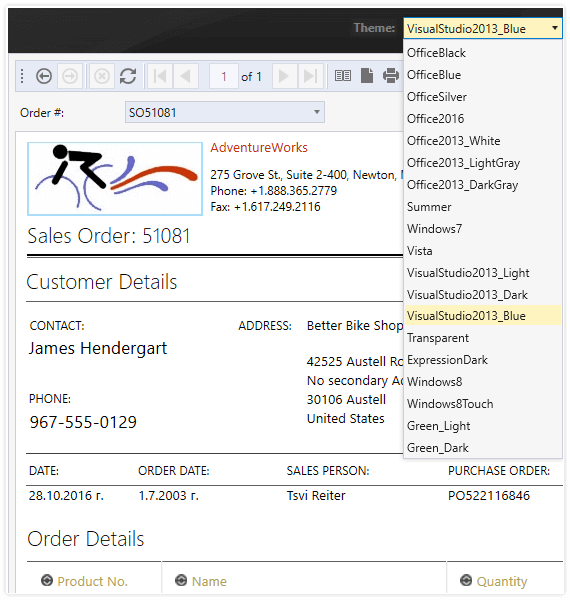
Telerik Reporting supports skinning of the Report toolbar. You can choose to use the predefined skins, or create a new one with the help of few images and simple CSS modification.

|