UI for ASP.NET AJAX
ASP.NET AJAX ComboBox
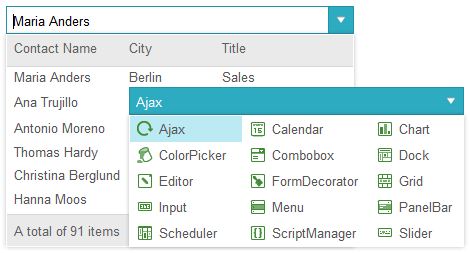
- Offer users a choice between a list of pre-set options or let them enter their own with the ASP.NET AJAX ComboBox.
- Part of the Telerik UI for ASP.NET AJAX library along with 120+ professionally designed UI components.
- Includes support, documentation, demos, virtual classrooms and more!

-
DropDownList and ComboBox Modes
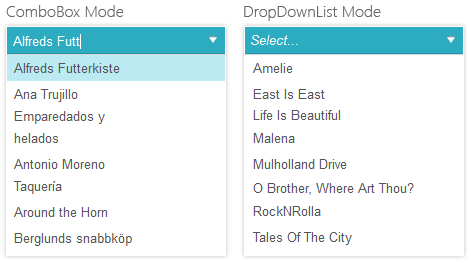
Depending on whether you want the user to be able to type text in the input or not, you can choose to use ASP.NET AJAX ComboBox either as a simple dropdown list or a full-featured combobox control. In simple scenarios where you don’t need the vast amount of features of RadComboBox, we recommend that you use our more lightweight and better performing DropDownList control.
-
ASP.NET AJAX ComboBox Data Binding
You can add items to the Telerik UI for ASP.NET AJAX ComboBox declaratively, programmatically or via the Design-Time Wizard. Alternatively, you can codelessly bind it to any ASP.NET data source component, including EntityDataSource, LinqDataSource, SqlDataSource, XmlDataSource, ObjectDataSource, SiteMapDataSource, etc. Programmatic binding to DataSet, DataView, DataTable is also easy to achieve. Populating the control with data directly from an XML file, via the .NET 4.5 Model Binding, as well as via Web Services is also supported.

-
Load Items on Demand for Optimal Performance
For enhanced user experience, leverage one of the options for loading items on demand:
- Codeless server-side load on demand
- Manual server-side load on demand
- Client-side load on demand via web services (WCF, ASMX , ADO.NET), OData feed or page method
The key gains of using load on demand are loading items on portions, allowing users to scroll to the bottom of the item list without waiting for all of the items to load (Virtual Scrolling), and items caching. All of this results in better responsiveness of your app.
-
Single and Checkbox Selection
Users can select single or multiple items. Enable the built-in checkbox support with just one property to have the ComboBox render checkboxes next to each of its items. “Select/Deselect All” functionality is available out-of-the-box as well.
-
Filtering
Help users find what they are looking for faster by enabling filtering. RadComboBox supports two types of filters: “Contains” and “StartsWith.” For optimized performance, in load on demand scenarios and you are allowed to specify upon how many characters typed by the user the combo should start displaying results. -
Searching Within a Web Site or App
RadComboBox can be used in scenarios when you want to make your web site or app searchable, but since this was a widely used feature, we created a control specifically designed for this purpose – SearchBox, which also allows you to add custom buttons to the input. -
Text With Icons
You can easily support the Combo Box text items with a corresponding image. -
Automatic Orientation and Dropdown Width Calculation
ASP.NET AJAX ComboBox automatically detects the screen boundaries and determines the best direction (up or down) in which to expand its dropdown. The control also automatically adjusts the width of its dropdown depending on the text entries it needs to display. -
ASP.NET AJAX ComboBox Overlay
Telerik ComboBox for ASP.NET AJAX fully supports overlay, which enables the control dropdown to appear above other elements on the page, including flash objects.
-
Classic, Lightweight and Native Rendering Modes
Depending on your scenario, switch between three rendering modes: Classic, Lightweight and Native. Classic rendering ensures the control looks identical in all browsers, but delivers more HTML to the browser. Lightweight rendering leverages HTML5 and CSS3 to deliver less HTML to the browser, but causes the control to lose its rounded corners and gradients in non-modern browsers. The Native rendering allows you to render RadComboBox as a standard select HTML element on mobile devices, so it has the native mobile behavior.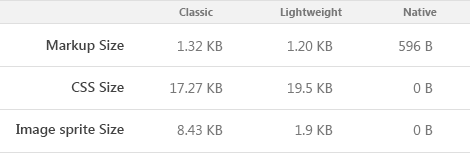
-
Hierarchy or TreeView in ComboBox
Featuring hierarchical data in a dropdown is also a commonly used scenario, which due to customer demand, led to the creation of a control specifically designed for this purpose: DropDownTree.
-
AutoComplete
Turn on AutoComplete to enable RadComboBox to autocomplete the text entered by the user to the first matching item and open a drop down with suggested results. Set a maximum result or a minimum characters typed count to enhance the search experience.
If autocomplete is the main functionality you are looking for, and especially if you’d like to have tokens in addition to the text, check out our more lightweight and better-performing AutoCompleteBox control which was specifically designed for this purpose.

-
Built-In Skins
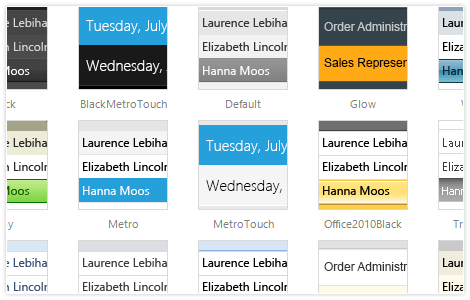
Use a single property to apply any of the 20 ready-to-use built-in themes, including an innovative mobile skin, to create a consistent look for your apps and save design and front-end development time. You can easily customize our existing skins or create your own with our Visual Style Builder.
-
Mobile Support for ASP.NET AJAX ComboBox
Why should you build a mobile version of your application when the same app can work equally well on mobile and desktop devices? Telerik ASP.NET ComboBox makes this possible by handling touch events in the same manner as those triggered by a keyboard or a mouse. In addition, the control comes with a mobile skin specially designed for a better user experience on touch devices.

-
Visual Studio Integration and Design-Time Support
Install Telerik UI for ASP.NET AJAX, the suite containing RadComboBox, to get the control available in your Visual Studio Toolbox. Drag and drop it onto the design surface and use the SmartTag, the Properties Window or the rich Design-Time wizards to codelessly configure the control and make it fully functional. -
Accessibility and Internationalization
Telerik Combo Box for ASP.NET AJAX was built for compliance with major accessibility standards including W3C Web Content Accessibility Guidelines 1.0/2.0 and Section 508 of the Rehabilitation Act. Leverage the built-in WAI-ARIA support by changing a single property to have the control render appropriate WAI-ARIA roles. Set the direction attribute to “rtl” to make your Combo work in a right-to-left mode. For international applications, use global or local resources to completely localize the control. -
Rich Server-Side and Client-Side API for Maximum Flexibility
-
Integration With the Standard ASP.NET Validators
Use Telerik’s ASP.NET Combo Box control with the standard ASP.NET validators to prevent the user from submitting wrong or incomplete data to the server. You can also set the value to the ValidationGroup property so that the control triggers validation for specific group of form elements. -
Full Control Over the ComboBox Look and Behavior
Leverage the support for custom CSS classes to create a unique appearance of the dropdown items. To create custom logic, utilize the support for custom attributes and assign their values inline or programmatically (both client-side and server-side). -
Keyboard Support for ASP.NET AJAX ComboBox
RadComboBox allows your users to use the keyboard for almost any action they can trigger with the mouse, including navigating items, selecting single and multiple items, etc. Specify which keys should be used for each action and get full control over the keyboard navigation experience.
-
Expand and Collapse Animations
Take advantage of the built-in animations upon expand and collapse of the dropdownlist and define their type and duration. -
Cross-Browser Support
When using the control in your apps, rest assured it behaves as expected and has a consistent look and feel in all major browsers.
Read the full list of supported browsers
-
Templates for Advanced Customizations
To modify the look of Telerik UI for ASP.NET AJAX ComboBox, define templates on the server or the client. You can customize each part of the drop down: the items, the header and the footer. You can use the item templates to create a multi-column ComboBox.