UI for ASP.NET AJAX
ASP.NET AJAX Upload (Async)
- Perform configurable asynchronous uploads of single or multiple files using the AsyncUpload for ASP.NET AJAX.
- Part of the Telerik UI for ASP.NET AJAX library along with 120+ professionally designed UI components.
- Includes support, documentation, demos, virtual classrooms and more!

-
Fully Asynchronous ASP.NET Upload of Single and Multiple Files
Use Telerik Async Upload to perform painless ASP.NET uploads of single and multiple files. RadAsyncUpload uses of the File API to natively upload files without using plug-ins and has a graceful downgrade to Flash/Silverlight where the latter is not available.
-
Out-of-the-Box and Advanced Progress Monitoring
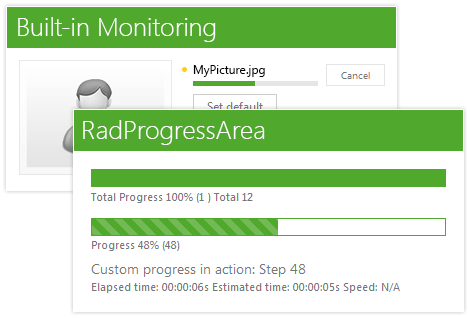
With our best-of-breed ASP.NET file upload, you can take advantage of the codeless progress monitoring, which shows a nice inline progress indicator next to each file being uploaded.
In advanced scenarios you may consider using RadProgressArea, a control that can be easily integrated with RadAsyncUpload. ProgressArea is easier to customize thanks to its 20+ built-in skins and support for templates, as well as its localization capabilities.
-
Drag and Drop Upload
Leverage the latest technology trends with Telerik Async File Upload in ASP.NET – RadAsyncUpload will enable your end users to upload files using drag and drop functionality. You can either allow them to drop the desired files over the upload or define custom drop zones over the page. All of this is achieved codelessly.
-
Visual Indicators for Common Operations
Make use of the rich UI that shows visual notifications for the common operations: successful upload, failed validation and upload in progress. Complement that with the beautiful cancel upload button.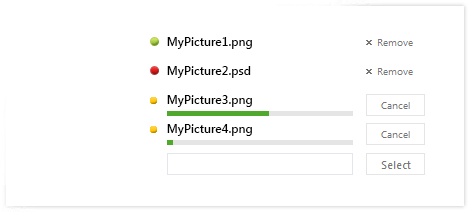
-
Out-of-the-Box File Persistence
The control allows you to persist uploaded files between postbacks and only sends them to the server when needed. -
Upload Files Larger Than 4 MB
Utilize the integrated chunk by chunk upload mechanism in order to work around the integrated ASP.NET maximum upload size of 4 MB. The control uploads files by dividing them into chunks, each 2 MB big. -
Built-In Client-Side and Server-Side Validation
Utilize the codeless client validation that validates both against file size and extension. And to make double sure that no invalid file gets through, there is a server-side counterpart that will catch any malicious attempt.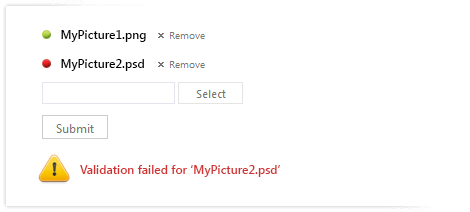
-
Rich Client-Side and Server-Side API for Maximum Flexibility
Easily customize the way you handle file uploads. Choose betweenmanual or automatic upload, add additional fields to the files that are submitted to the server, or write your own custom handler to deal with the uploaded files as you please. -
Accessibility and Internationalization
Telerik Async Upload control was built for compliance with major accessibility standards, such as W3C Web Content Accessibility Guidelines 1.0/2.0 and Section 508 of the Rehabilitation Act. Set the direction attribute to “rtl” to make your RadAsyncUpload work in a right-to-left mode. For international applications, use global or local resources to completely localize it. -
Visual Studio Integration and Design-Time Support
Install Telerik UI for ASP.NET AJAX, the suite containing RadAsyncUpload is a part of, to get the control available in your Visual Studio Toolbox. Drag and drop it onto the design surface and use the SmartTag and the Properties Window to codelessly configure the upload and make it fully functional. -
Keyboard Support
RadAsyncUpload for ASP.NET AJAX is keyboard friendly and enables you to use the keyboard for opening the file dialog and selecting files.
-
Built-In Skins
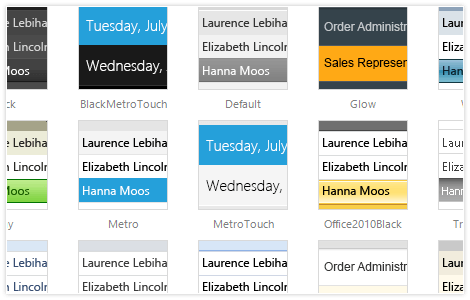
Use a single property to apply any of the 20 ready-to-use built-in themes, including an innovative mobile skin. Easily create a consistent look for your apps and save design and front-end development time. You can customize our existing skins or create your own with our Visual Style Builder.
-
Mobile Support
Why should you build a mobile version of your application when the same app can work equally well on mobile and desktop devices? Telerik Asynchronous Upload in ASP.NET makes this possible by handling touch events in the same manner as those triggered by a keyboard or a mouse. In addition, the control comes with a mobile skin specially designed for a better user experience on touch devices.
-
Cross-Browser Support
Rest assured that the control always behaves as expected and has a consistent look and feel in all browsers your users may be utilizing.
Read the full list of supported browsers