
Test Studio
What's New
What's New HistoryImproved Desktop Testing
Our latest update introduces the Capture Window and Inspection Point steps for Desktop Testing, enhancing your test automation workflow. The first one allows you to seamlessly capture a screenshot of your application while the Inspection Point helps you debug your application by pausing the test execution and letting you explore the visual tree in the current state of the application. Whether you're automating complex desktop applications or fine-tuning your testing process, these tools provide greater control and stability in your automated testing environment.
Enhanced Salesforce Support
We're excited to announce support for the latest Salesforce Lightning components' shadow DOM. This enhancement allows you to interact with and automate Salesforce Lightning components that utilize shadow DOM, ensuring accurate and reliable testing of these modern web elements. With this update, your test scripts can now effectively traverse and validate the encapsulated elements within the shadow DOM, providing you with robust and comprehensive testing capabilities for Salesforce Lightning applications.
Improved OCR Recognition
We've enhanced our Optical Character Recognition (OCR) capabilities with improved accuracy in situations where text and background colors are similar. This update ensures that your automated tests can reliably detect and interpret text even in challenging visual environments, where previous versions might have struggled. With this improvement, you can expect more precise text recognition and validation across a broader range of scenarios, leading to more reliable and effective test results.
Improved Scheduling-Related Services
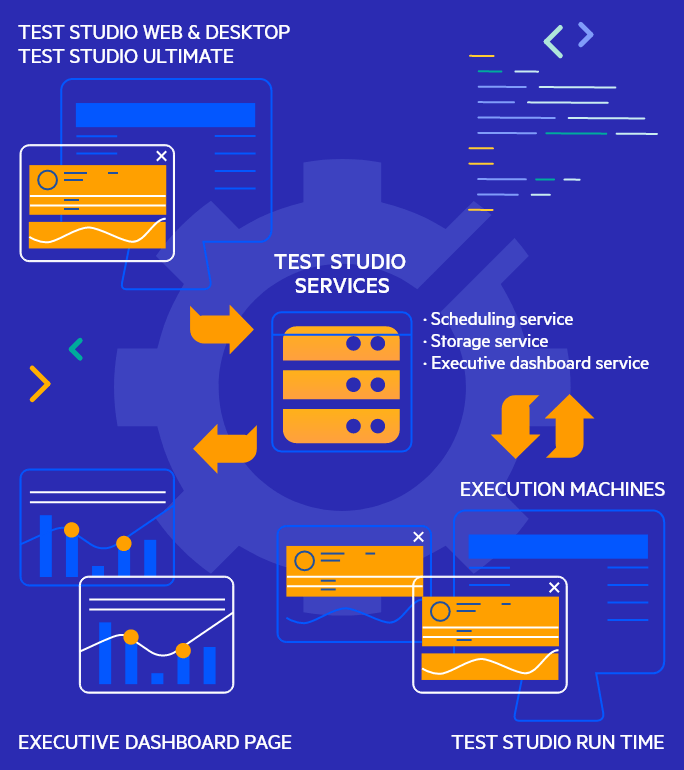
Test Studio’s Scheduling feature allows you to configure a set of machines that can execute your automated tests unattended in parallel or all together. The results generated from the scheduled test runs are stored in a centralized location allowing anyone on the team to review them inside Test Studio or in the Executive Dashboard’s web interface.
In Test Studio Q1 2024 the communication between these services is being improved. There are additional options to further harden your test environment including the ability to create and import your own custom Scheduling communication encryption. You can also use reverse proxy with client certificate authentication enabled.
A Set of New Desktop and WPF Testing Steps and Options
Based on customer feedback and needs we’ve added some new Desktop testing steps and options. These new additions provide more flexibility and productivity while testing desktop applications. The new additions are:
• “Do not launch application” option for Desktop tests.• “Scroll to element” step for Desktop tests.
• “Launch process” step for Desktop tests.
• “Connect to application” step for Desktop tests
• “Type text” step for Desktop test.
• “Scroll to element” step for WPF tests.
• “Connect to application” step for WPF tests.

Ongoing bug fixing
Test Studio is dedicated to continuously delivering a highly reliable, high performing tool which provides solutions to your testing issues. Our collaborative teams are committed to following through each and every bug report by our customers in order to ensure the ongoing stability of the product, and the resolution of all issues. It’s a daily process which involves identifying, prioritizing, and addressing issues or glitches reported by users or discovered during testing. Regular bug fixing not only enhances the user experience but also bolsters the overall quality of the software. It is an ongoing and essential process to deliver a reliable and bug-free product, reflecting a commitment to excellence and customer satisfaction.




Next Steps
Hosted by our product experts.
Check out the offers.
With dedicated technical support.