
UI for ASP.NET AJAX
ASP.NET AJAX ToolTip
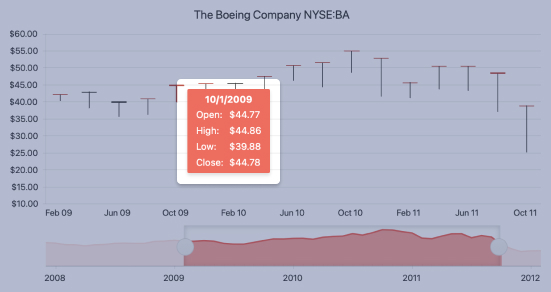
- The ASP.NET AJAX Tooltip component displays informative text upon tapping or hovering an element.
- Part of the Telerik UI for ASP.NET AJAX library along with 120+ professionally designed UI components.
- Includes support, documentation, demos, virtual classrooms and more!
-
Contextual ASP.NET AJAX Tooltips
Display additional items related to elements on your page by providing a contextual popup.
-
Automatic ASP.NET AJAX Tooltips
Automatically apply ASP.NET AJAX tooltips to all HTML or server controls on your page.

-
Load On Demand
Load the data and content of each ASP.NET AJAX tooltip only as needed, enabling increased performance across the page.
-
Web Service Support
Fetch the data for each tooltip from web services, enhancing the performance of your tooltips. -
ASP.NET AJAX Control Integration
Integrate the ASP.NET AJAX tooltip control into various other controls, including other components from Telerik.
Frequently Asked Questions
-
What is an ASP.NET AJAX ToolTip?
The ASP.NET AJAX ToolTip is a control that allows you to display a tooltip or a pop-up message when a user hovers over or clicks on an element. The tooltip can be used to provide additional information, instructions, or feedback to the user.
-
How to add ASP.NET AJAX ToolTip control?
It’s easy to get started with any of the Telerik UI for ASP.NET AJAX components. Visit the ToolTip getting started documentation to get a step-by-step guide. Take a look at the ToolTip demo and explore the source code behind the examples.
-
What would be a typical use case for the Telerik UI for ASP.NET AJAX ToolTip?
You can leverage the Telerik UI for ASP.NET AJAX ToolTip in any scenario where users would require more information, additional context or when you need to display dynamic content. Common use cases include:
- Help or information pop-ups: Provide quick tips or hints to users when they hover over a specific element, such as a button, link, or form field.
- Error messages: Display error messages or validation feedback when a user interacts with a form field or submits an invalid form.
- Confirmation messages: Use the ToolTip to confirm whether a user intends to perform a specific action, such as deleting a record or submitting a form.
- Data tips: Show additional information about a specific data item, such as a product name, description, or price.
- Hint text: Provide additional context or explanation for a specific field or control, such as a hint about the format of a date field.
- Tooltips for images: Use the ToolTip to display additional information about an image, such as the image title, description, or alt text.
- Contextual information: Display contextual information about a specific element or record, such as the current user's role or permissions.
-
Is there a way to try it before I buy it? Do you offer an ASP.NET AJAX ToolTip trial?
Yes, of course! You can try all Telerik UI for ASP.NET AJAX components without paying anything or having to provide any payment details. Simply sign up for the free 30-day trial. During your evaluation, you will have access to all ASP.NET AJAX controls, technical support, documentation, and on-demand technical training.
-
How to use the ASP.NET AJAX ToolTip in ASP.NET MVC?
We recommend using the Telerik UI for ASP.NET MVC library, built from the ground up to support the principles of MVC development, in your MVC projects. The MVC suite is pretty mature and offers a similar amount of ASP.NET MVC components (110+).
The Telerik UI for ASP.NET AJAX suite is not tested under MVC environments and the controls from the AJAX suite are not supported in an MVC setup. They are based on the web form paradigm and heavily rely on the web form server lifecycle that is not available in an MVC environment. You can only add the AJAX controls to a standard web form in a MVC project.
-
How can I purchase the Telerik UI for ASP.NET AJAX ToolTip?
Telerik UI for ASP.NET AJAX is a professional grade UI library with 120+ components for building engaging and feature-rich applications. You can purchase the suite online or contact our sales team.
You can, of course, decide to purchase a DevCraft license. It bundles all Progress Telerik .NET and JavaScript components.
All ASP.NET AJAX Components
Data Management
- Spreadsheet
- DataForm
- ClientDataSource
- TreeList
- PivotGrid
- OData DataSource
- ListView
- ListBox Updated
- Filter
- Data Pager
- Grid
Scheduling
Layout
- Badge
- Avatar
- Card
- Wizard
- Device Detection Framework
- Page Layout
- Window
- ToolTip
- Splitter
- Notification
- MultiView
- Dock
Interactivity & UX
Theming
Media
Editors
Data Visualization
- Pyramid Chart
- Vertical Area Chart
- Vertical Line Chart
- ArcGauge
- CircularGauge
- Timeline
- Map
- Diagram
- Rotator
- Org Chart Updated
- Gauge
- BinaryImage
- Barcode
- Chart (HTML5)
File Upload & Management
Spell Checking
Navigation
- SegmentedControl New
- Speech-to-Text Button
- ChipList
- Chip
- Floating Action Button
- Stepper
- SplitButton
- Switch
- Breadcrumb
- Button
- PanelBar
- RibbonBar
- SearchBox Updated
- TabStrip
- ToolBar
- SiteMap Updated
- TreeView
- Menu
Performance
Ajax
Social
SharePoint Web Parts
Mobile Widgets
Document Processing
