Contact Sales: +1-888-365-2779
Rad

ToolBar for ASP.NET AJAX

Overview

ToolBar
Simulate the versatility of desktop toolbars, using the flexible AJAX driven RadToolbar component for implementation of tool and button strips. Its powerful customization capabilities and rich collection of toolbar items allow you to craft every button on the toolbar independently to either display text, image or both. Complicated Office2007-like Ribbon toolbars should not be a mirage for you, but an achievable reality with the help of Telerik Toolbar control.

Features

  • Semantic Rendering for Minimal HTML

    Telerik ASP.NET AJAX Toolbar implements a highly efficient semantic rendering, which uses list items and CSS instead of tables. As a result the HTML output is significantly reduced, which dramatically improves performance.

    Top

  • Powerful Databinding

    The ASP.NET AJAX Toolbar component by Telerik supports binding to various sources including ASP.NET AJAX 2.0 declarative datasources (AccessDataSource, ObjectDataSource, SqlDataSource, SiteMapDataSource, XmlDataSource), datasets, arrays, as well as the new LinqDataSource. 

    Top

  • Rich Collection of ToolBar Types

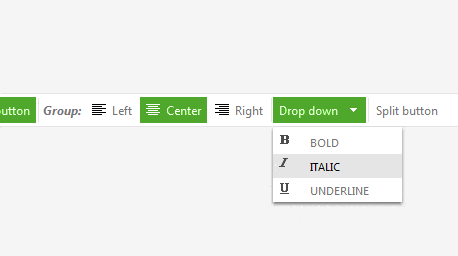
    RadToolBar items are represented as child controls in the structure of the toolbar and are very easily customized using skins and related properties. The toolbar provides three types of items - RadToolBarButton, RadToolBarDropDown and RadToolBarSplitButton

    • RadToolBarButton - You can specify groups of buttons to achieve radio-button functionality. Additionally RadToolBarButtons can be set to directly navigate to a specified URL using a single property.
    • RadToolBarDropDown – You can place  buttons in your dropdown toolbar.
    • RadToolBarSplitButton -  RadToolBarSplitButton provides support for templates. It also can navigate to a specified URL.

    See demo

    Top

  • Horizontal and Vertical Orientation

    With Telerik ASP.NET Toolbar control you can easily have both horizontal and vertical tollbars.

    See demo

    Top

  • Content Template Support

    The items of Telerik ASP.NET Toolbar control are extremely configurable. In addition to the preset skins, you can customize the appearance of menu items by adding custom images, using CSS classes, or creating custom skins. However, if you want to embed other HTML controls in a toolbar button, you must use templates. You can embed any content inside an item template, including:

    • HTML markup
    • ASP.NET server controls
    • Other third-party controls (including other Telerik controls)

    See demo

    Top

  • Extensive VS.NET Design-time Support

    Telerik ASP.NET Toolbar provides rich design-time support functionality making customizations and configurations very easy. Some of the key capabilities are: 

    • Applying skins in design time and easily switching between them - the Choose Skin command in RadToolBar Smart tag automatically detects the preset skins
    • Item Builder dialog - it lets you populate your toolbar with buttons.
    • Template Design Surface - it lets you design templates for the buttons that appear in the toolbar.

    Top

  • Rich Client-side API

    Telerik Toolbar control has a rich client-side API and comprehensive set of events guaranteeing full control over various functions performed on the client. You can easily add/delete/update items at the client side and all the changes will be persisted on the server as well. The rich client-side API provides unbeatable performance and desktop-like experience.

    See demo

    Top

  • Docking Toolbars

    You can easily integrate RadToolBar with RadDock to create floating and docking toolbars with automatic orientation adjustment.

    See demo

    Top

  • Search Engine Friendly

    RadToolBar completely follows the principles of Search Engine Optimization. The control's innovative rendering generates semantic lists and standard <a> tags, which are properly recognized and highly valued by search engines. As a result, all content accessible through this control will be automatically indexed and ranked with no extra effort required from the developer.     

    Top

  • XHTML and Accessibility Standards Compliancy

    RadToolBar is compliant with the XHTML 1.1 requirement. RadToolBar also has full support for keyboard navigation with Shortcuts, Access Keys and Arrow-key navigation.

    Top

  • Right-to-left Support

    Telerik ASP.NET AJAX Toolbar provides full support for Right-to-Left languages.

    See demo

    Top

  • Validation

    The Toolbar control by Telerik provides a built in ASP.NET validation.  The menu can trigger validation of other controls on the form when it performs a post-back to the server.
    By default, all validators on the Web page must be successful before the postback can occur. You can limit the controls that must be validated when the menu performs a post-back, while still allowing other controls on the Web page to be validated, by using Validation Groups.

    Top

  • Office2007-like Ribbon

    RadToolBar can easily integrate with RadMenu, RadTabStrip and RadComboBox to achieve Office2007-like Ribbon look and feel. 

    See demo

    Top

  • Animations

    Telerik ASP.NET Toolbar supports a variety of expand and collapse animation styles for a great user experience. You can easily customize the way the dropdown items are expanded and collapsed, as well as specify their type and duration.

    See demo

    Top

  • Appearance

    Telerik ASP.NET AJAX Toolbar allows you to easily style and customize the looks of your toolbars. There are three different ways your toolbar items may look. Every item can be customized independently to either display text, image or both.
    Additionally, RadToolBar is shipped with a rich set of skins that allow you to easily build slick interfaces with the look-and-feel of Windows Vista, Office 2007, Outlook, etc. The skins can be easily switched using a single property.


    Top

  • VS Plug-in for Testing RadControls

    Telerik's automated software testing tool Test Studio employs a rich set of features to help you automate AJAX-intense web content. You can test complex UI actions like drag-and-drop, invoke JavaScript functions from your test code, and perform logging actions. Additionally, the test recorder makes it easy to wait on AJAX operations before executing a specific verification. What’s more, Test Studio is the best way to test RadControls for ASP.NET AJAX. The powerful test recorder automatically detects the controls and exposes commonly used verifications. Learn more

    Top

$999

This and 70+ other controls are part of RadControls for ASP.NET AJAX


Buy NoworDownload
Free Trial

$1299

Get this product + 8 more as part of Premium Collection Bundle

  • All Telerik UI for web / desktop / mobile
  • Code Analysis and Refactoring tools
  • Data Access Tools & Reporting Engine

Buy Nowor Download
Free Trial

Full List of Controls
Integration capabilities

Product Resources