Rad

ListView for ASP.NET AJAX

Overview

ListView
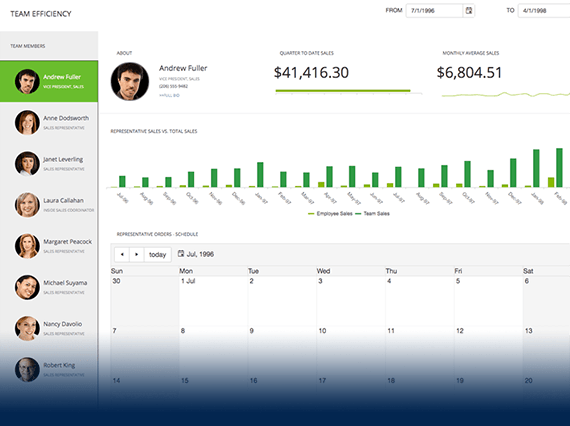
Present and manage your data entries in a list with Telerik RadListView for ASP.NET AJAX. Take advantage of the predefined or customized layout options and capabilities like sorting, paging, grouping, filtering, and selecting for optimal data presentation. You can also embed various controls of your choice in RadListView's templates and model their appearance. Thanks to its innovative architecture Telerik RadListView is extremely fast and generates very little output. 

Features

  • Powerful Databinding

    RadListView for ASP.NET AJAX comes with a flexible databinding mechanism including support for all ASP.NET 2.0 declarative datasources (SqlDataSource, ObjectDataSource, XmlDataSource, AccessDataSource) as well as well as .NET 3.5 (LinqDataSource, EntityDataSource). In addition, the control can also be bound to various data sources which implement the IEnumerable, IList or ICustomTypeDescriptor interfaces.

    Top

  • Sorting

    RadListView features integrated sorting similar to RadGrid. You can have the Telerik ASP.NET ListView automatically sort its data entries by setting your preferred sorting conditions. The control also supports custom sorting. You can select from several sorting modes and manage your data in an ascending, descending or random fashion.


    Top

  • Paging

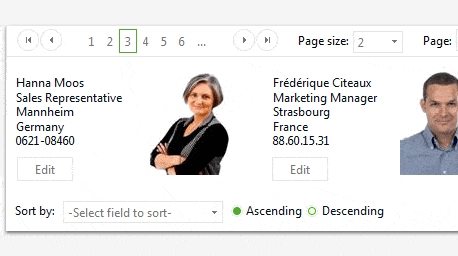
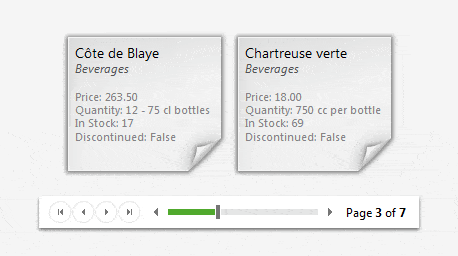
    ASP.NET RadListView supports integrated, custom paging and RadDataPager as external control to provide rich paging functionality. It lets users view large sets of data in small chunks for faster loading and easier navigation.

    Integrated Paging with RadListView


    Custom Paging with RadListView


    Top

  • Selecting

    RadListView for ASP.NET AJAX provides integrated server-side selection. You can apply single or multiple selection from a list or deselect previously marked items.


    Top

  • Grouping

    RadListView allows item grouping to best match numerous custom view scenarios. You can place categorized sets of items in groups and facilitate the navigation through your listed data. 

    Top

  • Filtering

    RadListView supports generation and applying of filter expressions. This feature of RadListView allows for data filtering according to specified criteria and easier navigation within it. You apply filter expressions to your data so that only information that relates to your needs is displayed. In addition, you can attach RadFilter (a separate AJAX control) to RadListView and have another option to apply filter expressions for more complex scenarios.


    Top

  • Rich Data Editing

    Telerik RadListView allows you to codelessly manage various data entries based on the controls you embed within its edit/insert templates. It supports automatic data editing operations (through ASP.NET 2.x/3.x data source controls) as well as manual editing. 


    Top

  • Items drag-and-drop

    RadListView for ASP.NET AJAX exposes a flexible combined client/server capability which allows you to easily modify the arrangement of the control’s elements (by means of drag handles). This feature also allows you to drag ListView items and place them directly on other html elements on the page.

    See demo

    Top

  • Flexible layouts

    RadListView can be configured through predefined or custom layouts. The component gives unlimited possibilities for customizable data display. Besides, for greater convenience to the developer, the control ships with 6 ready-to-use layout options: Grid, Ordered/Unordered List, Flow,Single Row and FloatedTiles.


    Top

  • Templates

    The template mechanism of Telerik RadListView allows you to model the look and feel of each of its elements in a completely custom manner. Telerik RadListView exposes a variety of templates which can be used to define the structure of the control with extra information such as images, links to additional sources, etc. There are two types of templates - Data/Layout and Edit/Insert templates. Data and layout templates allows you to define the look and feel of the common layout template of the control, the items in it and the content that will be shown when there is no data available. Edit and insert templates in RadListView for ASP.NET AJAX allow you to define the appearance of the edited and inserted ListView items.

    Top

  • Appearance

    RadListView is shipped with a rich set of skins that allow you to easily build slick interfaces with the look-and-feel of Windows Vista, Office 2007, Outlook, etc. The skins can be easily switched using a single property. This significantly simplifies styling even for complex configurations.

    Top

  • Industry-Best Cross-Browser Support

    Following our long tradition of industry best cross-browser support, Telerik ASP.NET ListView doesn’t make an exception. The component supports all major browsers, including Internet Explorer, Firefox, Safari, Opera and Google Chrome and produces identical results.

    Top

  • VS Plug-in for Testing RadControls

    Telerik's automated software testing tool Test Studio employs a rich set of features to help you automate AJAX-intense web content. You can test complex UI actions like drag-and-drop, invoke JavaScript functions from your test code, and perform logging actions. Additionally, the test recorder makes it easy to wait on AJAX operations before executing a specific verification. What’s more, Test Studio is the best way to test RadControls for ASP.NET AJAX. The powerful test recorder automatically detects the controls and exposes commonly used verifications. Learn more

    Top

$999

This and 70+ other controls are part of RadControls for ASP.NET AJAX


Buy NoworDownload
Free Trial

$1299

Get this product + 8 more as part of Premium Collection Bundle

  • All Telerik UI for web / desktop / mobile
  • Code Analysis and Refactoring tools
  • Data Access Tools & Reporting Engine

Buy Nowor Download
Free Trial

Full List of Controls
Integration capabilities

Product Resources