Telerik
Rad

Dock for ASP.NET AJAX

Skip Navigation LinksHome / Products / ASP.NET AJAX Controls / Dock

Overview

Dock
Make your web page comfy by personalizing it with the help of the Telerik Dock control for ASP.NET AJAX. It represents a content placeholder, which can be moved, dragged, docked or pinned into docking zones, collapsed into a minimized state and expanded to display content - all the familiar  features found in Visual Studio .NET. The customized page layout can be saved to a file or database and reloaded.

Features

  • Docking Controls

    The Telerik  Docking controls consist of RadDock, RadDockZone, and RadDockLayout. Together, they can be used to create ASP.NET applications that contain movable content regions that can be dragged around the Web page, docked into docking zones, collapsed into a minimized state and expanded to display their content, pinned in place, and so on. 

    Top

  • Customizing the Docking Object

    The Telerik ASP.NET AJAX Dock control allows for various customization capabilities. You can specify whether the dockable object can be resized, expanded/collapsed, closed, or pinned to the current position on the page. In accordance with the specified behaviors, the buttons of the corresponding predefined commands will be shown. The dynamic page layout can be also enabled for customization (users can reorder, close, expand, collapse, pin, unpin, resize dockable objects) or be set in view-only mode.

    RadDock offers 5 areas within a dockable objects, which are used for dragging (Grip Areas). Different sets of Grip Areas can be enabled when the dockable object is floating and when it is docked.

    See demo

    Top

  • Customizing the Docking Zones

    Dockable objects can be configured in such a way that allows them to be docked only to a specific docking zones, or only to specific types of docking zones (horizontal/vertical). When a dockable object is about to be docked to a docking zone, the zone is highlighted to show where the object will be placed. The way a zone is highlighted can be customized.

    See demo

    The Telerik ASP.NET Dock control offers several types of docking zones: horizontal, vertical, top, bottom, right or left. To achieve a fine-tuned control, developers can restrain the docking of certain objects only to a certain type of docking zones. The docking zones can be set to have fixed width and/or height or to be resizable, which is their default state.

    See demo


    Top

  • Various Docking Modes

    RadDockableObjects can have different docking modes that define whether they can be floating (outside a docking zone) or docked as follows:
    • Disabled - disabled object act as a simple control placeholder (like System.Web.UI.WebControls.Panel control);
    • AlwaysDock - requires the object always to be inside a docking zone;
    • NeverDock - object cannot be docked to a docking zone i.e always floating;
    • Dockable - (Default) combination of the above two flags (AlwaysDock + Never Dock) and means that object can be docked and floating too.

    Top

  • Client-side API and Events

    The Telerik ASP.NET Dock control provides a rich client-side API that lets you interact with the controls and docking zones in client-side code. In addition to a full set of client-side events, the client-side object model lets you manipulate the dock controls and docking zones while avoiding unnecessary post-backs.
    Some of the key client- side API functions include: 
    • Expand/Collapse All Objects in a Zone
    • Reorder Objects in a Zone
    • Accessing Child Controls

    Top

  • Extensive VS.NET Design-time Support

    Telerik ASP.NET Dock fully supports the Design mode of visual Studio .Net, which allows you to visually modify the content of the dockable objects through templates. Some of the key capabilities are:

    • Smart Tag - lets you easily change the skin for your control or quickly get help.

    • RadDock Collection Editor – very useful for locating RadDock controls and setting their properties when the RadDockZone control has many child RadDock controls.
    • DockCommand Collection Editor-  lets you add commands to a RadDock control. The commands you add here appear on the title bar of the control.

    Top

  • Action Commands

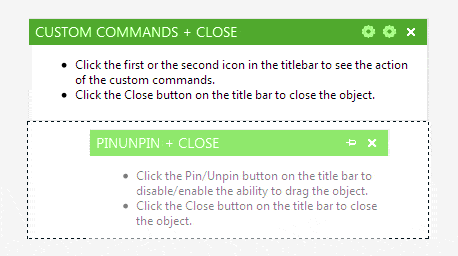
    The ASP.NET AJAX Dock control by Telerik offers standard action commands (Expand/Collapse/Pin/Unpin/Close) that are enabled by setting the corresponding behavior. The built-in commands perform their function without any programming on your part. Besides these commands developers can create custom commands and handle them either on the client or on server.

    See demo

    Top

  • Content

    RadDock supports different types of content– text, images, html, other controls. There are three ways to customize the content of the Telerik ASP.NET Dock controls
    • Create ContentTemplate - in design mode you can add controls to the ContentTemplate property and RadDock will automatically display them in run time.
    • Add controls to the ContentContainer - this is the container control for the ContentTemplate. This is slightly easier to implement, but you cannot easily reuse the template in other controls.
    • Set the Text property - if the RadDock control should display only plain text, you could set this property, instead of adding controls to the ContentTemplate or the ContentContainer.

    See demo


    Top

  • Save/Load Layout State

    All changes made to the dynamic page layouts can be stored on the server and be reloaded when needed. This is an excellent way for portal customization and preservation of user layout settings.

    Top

  • XHTML and Accessibility Standards Compliancy

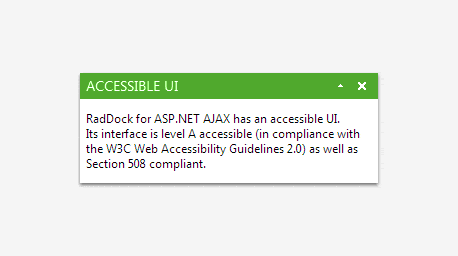
    The Telerik ASP.NET AJAX Dock is compliant with the XHTML 1.1 requirement.

    Top

  • Animation Effects

    To enrich the UI with smooth objects movement, resizing, docking and undocking you can add animation effects. Developers can control the various settings like duration and frames per second, which affect the quality of the animation and client CPU load.

    Top

  • Appearance

    Telerik ASP.NET AJAX Dock is shipped with a rich set of skins that allow you to easily build slick interfaces with the look-and-feel of Windows Vista, Office 2007, Outlook, etc. You can also override certain characteristics of the skin by setting individual styles:

    • for the whole object, title bar, and grips (of dockable objects)
    • for highlighting, border, and background (of docking zones)

    Top

$999

Part of RadControls for ASP.NET AJAX

License:
Developer License with Subscription and Priority SupportAdd to Cart
Add-ons for RadControls
Full List of Controls

Product Resources

Powered by Sitefinity ASP.NET CMS

Contact Us | Site Feedback | Terms of Use | Privacy Policy
Copyright © 2002-2010 Telerik. All rights reserved.