Telerik
Rad

Calendar for ASP.NET AJAX

Skip Navigation LinksHome / Products / ASP.NET AJAX Controls / Calendar

Overview

Calendar
Go to any travel or event booking website and you'll notice one key component: the Calendar. Providing such an interface is no brainer, with Telerik ASP.NET AJAX Calendar control, as it plugs itself seamlessly in any system. Combining Date picker, Time picker and Date input, the product offers a myriad of features like adjacent months preview, multi-month view, context menus, etc. Finally, its revolutionary rendering using CSS sprites skyrockets its loading time.

Features

  • Integrated DatePicker and Timepicker Controls

    RadCalendar is shipped with several highly configurable components for selecting date and time values.

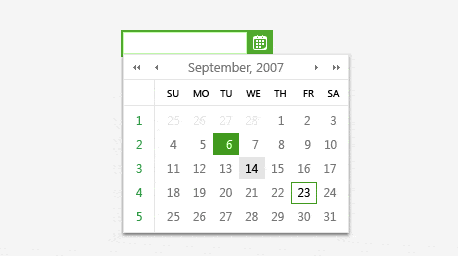
    DatePicker control: Integrates with the Calendar, the DateInput, and PopupButton controls. This enables developers to quickly implement the most widely used date selection interface for web applications.

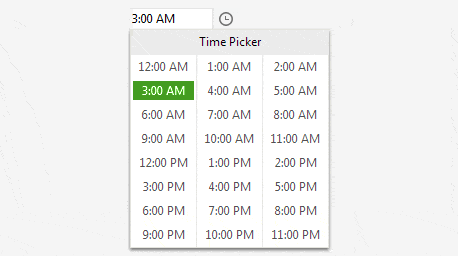
    RadTimePicker:  Integrates with RadTimeView control to let users enter a time directly in the input area or select it from the popup time view control. The values of the two controls are synchronized to allow further change of the chosen time.

    RadDateTimePicker: A RadDateInput control with an integrated RadCalendar control and an integrated RadTimeView control. This combines the features of RadDatePicker and RadTimePicker in a single control for selecting both a date and a time value.

    Top

  • Semantic Rendering for Minimal HTML

    The Telerik ASP.NET Calendar implements a highly efficient semantic rendering, which results in minimum HTML output and dramatically improved performance. Additionally, RadDatePicker’s rendering mechanism allows for proper support of different width/height units (e.g. percentage).

    Top

  • Rich Client-side API

    The RadCalendar controls provide a flexible client-side API. You can easily interact with the controls in the browser using their client-side objects. In addition to a variety of client-side events, the client-side object model lets you achieve complicated tasks while avoiding unnecessary post-backs.

    See demo

    Top

  • XHTML and Accessibility standards compliancy

    The Telerik ASP.NET AJAX Calendar is completely compliant with the XHTML 1.1 requirements.

    Top

  • Extensive VS.NET Design-time Support

    Telerik ASP.NET Calendar provides rich design-time support functionality making customizations and configurations very easy. Some of the key capabilities are:

    • Smart tag – allows easy access to frequently needed tasks.
    • The Edit Templates link brings up the Template Design Surface, where you can design templates for the calendar header and footer sections.
    • Applying skins - The Skin drop-down lets you select from a list of available skins to customize the look of your RadCalendar control.

    Top

  • Customization Capabilities

    The ASP.NET Calendar by Telerik provides a number of properties to let you customize the appearance of its elements.

    • Title Settings - You can customize the RadCalendar Title to define how and what information should be shown.
    • Navigation Buttons - You can enable or disable the navigation buttons in the title bar and control its appearance through three properties: an image property, a text property, and a tooltip property
    • Column and Row headers - The column and row headers label the rows and columns of the main calendar area. In between the column and row headers, a view selector can optionally appear as well. You can control the appearance and behavior of each of these header sections separately.
    •  Day Matrix  - By default, RadCalendar lays out its day matrix like an ordinary calendar, with 7 columns (one for each day of the week) and 6 rows (the maximum number of weeks needed in a month).You have complete control over the appearance of the day matrix, by using two properties: By setting the FirstDayOfWeek and the days x rows matrix you can format the number of rows/columns in a MonthView.

    Top

  • Multiview Presentation

    RadCalendar can be easily configured to show more than one month in the calendar area. To enable this functionality you need to set the MultiViewColumns  and MultiViewRows property to specify the number of month columns/rows in the Multiview.

    Top

  • Multiple Selection Options

    Telerik ASP.NET Calendar supports both single and multi-date selection. To enable multi-date selection you should set EnableMultiSelect property to "true", so that each day you click will be selected/unselected respectively. You can also use the column and row buttons (days and weeks) to select blocks of dates. These features are controlled by the UseColumnHeadersAsSelectors and UseRowHeadersAsSelectors properties. 

    see demo

    Top

  • Template Support

    The ASP.NET Calendar by Telerik allows you to define a collection of dynamic templates that customize the presentation of calendar days on a "per day" basis. The templates can contain regular HTML and are particularly useful if you want to implement a scheduler-like interface with extra information, such as images illustrating events, links to additional sources, etc.The header and the footer areas of RadCalendar can also be customized completely using templates.

    Top

  • Horizontal and Vertical Orientation

    By default the Telerik ASP.NET AJAX Calendar view renders the days horizontally row by row. However it can be configured to render the content vertically (i.e. column by column). Simply specify the orientation of the calendar by setting the Orientation property to either RenderInColumns or RenderInRows.

    Top

  • Scrolling and Navigation

    The ASP.NET Calendar control by Telerik provides three types of navigation, which allow you to switch and jump to new views (months):

    • Previous/next month - allows you to go to the pervious/next view (month) by clicking the "<" or ">" buttons (customizable)
    • Jump X months forward/backward - allows you to jump X views (months) forward or backward when you click the "<<" or ">>" buttons. The jump step is specified in the FastNavigationStep property.
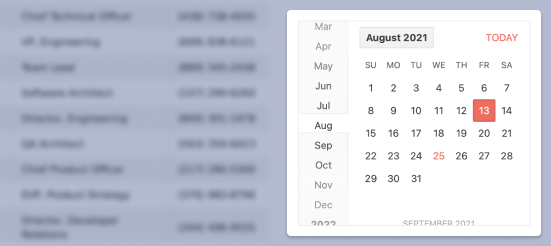
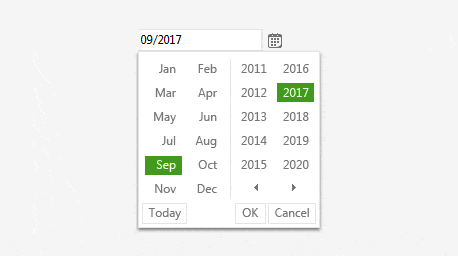
    • Month and Year selector - allows you to specify the month and year directly from a popup window, which can be opened when you click on the calendar header.

    See demo


    Top

  • Keyboard Support

    RadCalendar supports the standard browser navigation paradigm. Users can tab across the page elements till they reach the calendar element. Then they can go forward/backward over the individual days by pressing the [Tab]/[Shift+Tab] keys. A day can be selected by clicking the [Enter] button.

    Top

  • Localization

    Telerik ASP.NET AJAX Calendar has full support for localized cultures. Through the System.Globalization namespace you can control culture-related information, such as language, country/region, calendars in use, and format patterns for dates, currency, and numbers, and sort order for strings. They are useful classes for writing internationalized applications.

    See demo

    Top

  • Appearance

    Telerik ASP.NET Calendar is shipped with a rich set of skins that allow you to easily build slick interfaces with the look-and-feel of Windows Vista, Office 2007, Outlook, etc. The skins can be easily switched using a single property. This significantly simplifies styling even for complex configurations.

    Top

Part of RadControls for ASP.NET AJAX 

License:
Developer License with Subscription and Priority Support
Full List of Controls

Product Resources

Powered by Sitefinity ASP.NET CMS

Contact Us | Site Feedback | Terms of Use | Privacy Policy
Copyright © 2002-2009 Telerik. All rights reserved.