# .NET MAUI TemplatedButton Overview
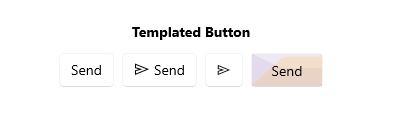
The Telerik UI for .NET MAUI TemplatedButton represents a button with customizable content. You can set the content to a `string`, `View`, use the `ContentTemplate` or re-template the control.
Additionally, it enables you to align its content and define custom content by using a template, applying visual states and more.
## Key Features of the .NET MAUI TemplatedButton
* [Content and ContentTemplate](https://www.telerik.com/maui-ui/documentation/controls/templatedbutton/configuration#setting-content)—The TemplatedButton allows you to define a `Content`. In addition, there is an option for setting `ContentTemplate`. For example, you can implement a [Loading Button](https://www.telerik.com/maui-ui/documentation/controls/templatedbutton/loading-button) using the `ContentTemplate`.
* [Text alignment](https://www.telerik.com/maui-ui/documentation/controls/templatedbutton/configuration#text-alignment)—The TemplatedButton enables you to control the horizontal and vertical positioning of the text inside the content.
* [Visual states](https://www.telerik.com/maui-ui/documentation/controls/templatedbutton/visual-states)—You can change the TemplatedButton appearance for different visual states like, `Normal`, `Pressed`, `MouseOver` (desktop-only), and `Disabled`.
* [Exhaustive number of events](https://www.telerik.com/maui-ui/documentation/controls/templatedbutton/events)—You can use the events exposed by the TemplatedButton to execute various operations on user interactions such as click, press, and release.
* [Command](https://www.telerik.com/maui-ui/documentation/controls/templatedbutton/command)—The TemplatedButton provides a command, that executes when the button is clicked.
* [Styling](https://www.telerik.com/maui-ui/documentation/controls/templatedbutton/styling)—You can apply different styling options to the button such as changing its background color, border color, border thickness, and more.
* [Ripple effect](https://www.telerik.com/maui-ui/documentation/controls/templatedbutton/ripple)—You can apply a ripple effect on Android when pressing the TemplatedButton.
## Next Steps
* [Getting Started with Telerik UI for .NET MAUI TemplatedButton](https://www.telerik.com/maui-ui/documentation/controls/templatedbutton/getting-started)
## See Also
* .NET MAUI TemplatedButton Product Page
* .NET MAUI TemplatedButton Forum Page
* Telerik .NET MAUI Blogs
* Telerik .NET MAUI Roadmap