# .NET MAUI Calendar Blackout Dates
The .NET MAUI Calendar component provides a simple way to disable specific dates. To take advantage of this feature, specify the `BlackoutDates`(`IEnumerable`) collection and the user cannot select the defined dates.
## Disabled (Blackout) Dates Example
The following snippets show how to disable dates in the Calendar control.
**1.** Define the `RadCalendar` control in XAML.
```XAML
```
**2.** Add a ViewModel with defined blackout dates.
```C#
public class ViewModel : NotifyPropertyChangedBase
{
private ObservableCollection blackoutDates;
public ViewModel()
{
this.BlackoutDates = new ObservableCollection();
this.BlackoutDates.Add(DateTime.Today.AddDays(3));
this.BlackoutDates.Add(DateTime.Today.AddDays(8));
this.BlackoutDates.Add(DateTime.Today.AddDays(6));
this.BlackoutDates.Add(DateTime.Today.AddDays(15));
}
public ObservableCollection BlackoutDates
{
get => this.blackoutDates;
set => this.UpdateValue(ref this.blackoutDates, value);
}
}
```
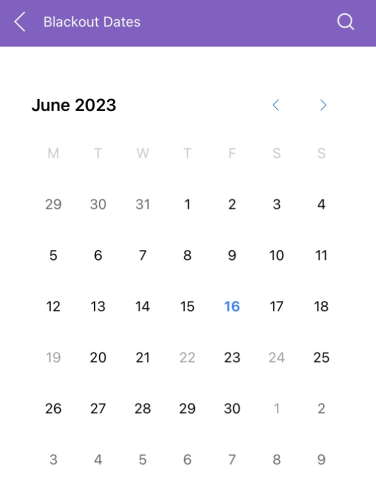
> For the complete example with the Calendar Blackout dates, see the [SDKBrowser Demo Application](https://www.telerik.com/maui-ui/documentation/demos-and-sample-apps/sdkbrowser-app) and go to the **Calendar > Features** category.
## See Also
* [Navigation Between the Different Views](https://www.telerik.com/maui-ui/documentation/controls/calendar/navigation)
* [Specify the Formatting](https://www.telerik.com/maui-ui/documentation/controls/calendar/formatting)
* [Selection modes](https://www.telerik.com/maui-ui/documentation/controls/calendar/selection)
* [Use exposed Events](https://www.telerik.com/maui-ui/documentation/controls/calendar/events)
* [Use the exposed Commands](https://www.telerik.com/maui-ui/documentation/controls/calendar/commands)
* [Define Templates](https://www.telerik.com/maui-ui/documentation/controls/calendar/templates)
* [Calendar Header Styling](https://www.telerik.com/maui-ui/documentation/controls/calendar/styling/header-styling)