# Custom Interval Types
`RadTimeBar` provides built-in support for a couple of predefined interval types ranging from milliseconds to centuries. For a full list of the predefined intervals, please refer to the [Interval Formatters](https://www.telerik.com/winui/documentation/controls/radtimebar/intervals-formatter) article. For all custom scenarios that the predefined intervals do not cover, the control supports custom interval type implementations.
## Using Custom Interval Types
The `Intervals` collection contains items of type `IntervalBase`. That is why, in order to configure a RadTimeBar control to use a custom interval type, simply add an instance of that custom interval to the Intervals collection of the control.
The example below shows how you can add a custom interval type to the Intervals collection of a RadTimeBar control:
#### **Adding a custom Interval to the Intervals collection of RadTimeBar**
```XAML
```
## The IntervalBase class
A custom interval is a class that inherits the `IntervalBase` class and implements its abstract properties and methods:
* `Formatters`—Gets a collection of formatter that the interval can use to convert **DateTime** objects to strings.
* `MinimumPeriodLength`—Gets the smallest interval period.
* `ExtractIntervalStart`—Given a **DateTime** object, this method returns the start of the interval that contains the given DateTime object.
* `IncrementByInterval`—Given a **DateTime** object and span, this method increments the specified DateTime object by the specified number of `MinimumPeriodLengths` property.
Below you can find a sample custom interval implementation:
#### **Creating a custom Interval**
```C#
public class CustomInterval : IntervalBase
{
private static readonly Func[] formatters;
static CustomInterval()
{
formatters = new Func[]
{
date => string.Format("My custom interval {0}, {1}", GetNumberOfInterval(date), date.ToString("yyyy")),
date => string.Format("Custom interval {0}", GetNumberOfInterval(date)),
date => string.Format("C{0} {1}", GetNumberOfInterval(date), date.ToString("yyyy")),
};
}
public override DateTime ExtractIntervalStart(DateTime date)
{
int firstMonthOfInterval = GetFirstMonthOfInterval(date);
return new DateTime(date.Year, firstMonthOfInterval, 1);
}
public override DateTime IncrementByInterval(DateTime date, int intervalSpan)
{
return date.AddMonths(intervalSpan * 6);
}
public override Func[] Formatters
{
get
{
return formatters;
}
}
public override TimeSpan MinimumPeriodLength
{
get
{
return TimeSpan.FromDays(180);
}
}
private static int GetNumberOfInterval(DateTime date)
{
int number = ((date.Month - 1) / 6) + 1;
return number;
}
private int GetFirstMonthOfInterval(DateTime date)
{
int quarter = GetNumberOfInterval(date);
int firstMonthOfInterval = ((quarter - 1) * 6) + 1;
return firstMonthOfInterval;
}
}
```
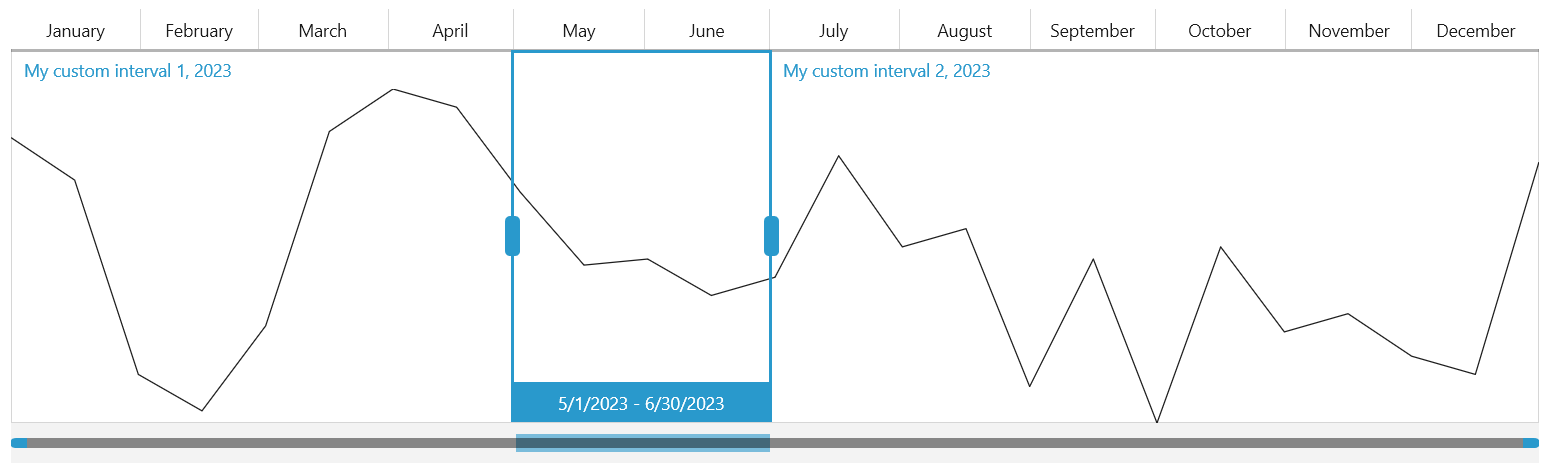
**RadTimeBar with custom Interval**
## See Also
* [Intervals Formatters](https://www.telerik.com/winui/documentation/controls/radtimebar/intervals-formatter)
* [Formatter Provider](https://www.telerik.com/winui/documentation/controls/radtimebar/formatter-provider)